


MCP + WorkIQ in the Wild: Lessons from building a Copilot on Azure
Over the last few weeks, I built a copilot using Model Context Protocol and Copilot Studio — designed to do more than answer questions.
This copilot can:
1). Retrieve structured dada
2). Compute a risk score
3). Generate formal Word/PDF reports
4). Escalate high-risk cases directly to Teams
Code Repo Link: https://github.com/RichaPandit/banking_copilot_ai
The Core Use Case
In credit risk teams, analysts don’t need long explanations. They need:
A quick risk snapshot
A detailed review on demand
A clear escalation path when risk crosses thresholds
Architecture Overview
MCP Server (FastMCP)
The MCP server exposes both:
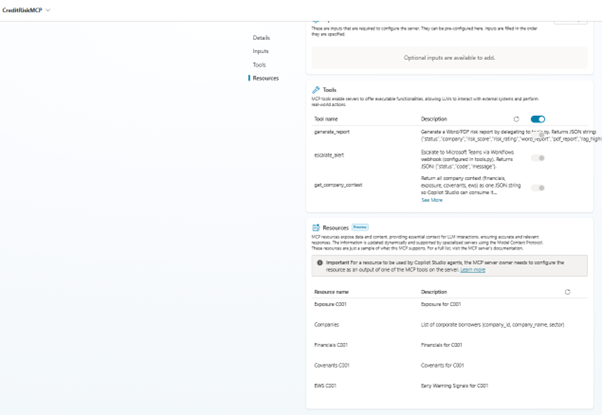
- Resources — are read only context and are accessed by Copilot via MCP Resource URIs. This ensures the LLM reasons over grounded, auditable data.
- Tools — are where the copilot becomes agentic. This enforces decision-based action and not just a conversational drift.
Risk Scoring + RAG
A key design choice was separating reasoning from narration. Risk score is computed using internal rules over the key metrics (or resource data). RAG highlights are generated from the same data and embedded into the copilot response and the word/PDF report. This avoids hallucinations and keeps narrative aligned with numbers.
Security & Enterprise Readiness
Even as an MVP, the MCP Server enforces:
- Header-based authentication
- Agent identity validation
- Stateless Streamable HTTP (proxy-friendly)
- Environment variables defined in Azure app to avoid hardcoding
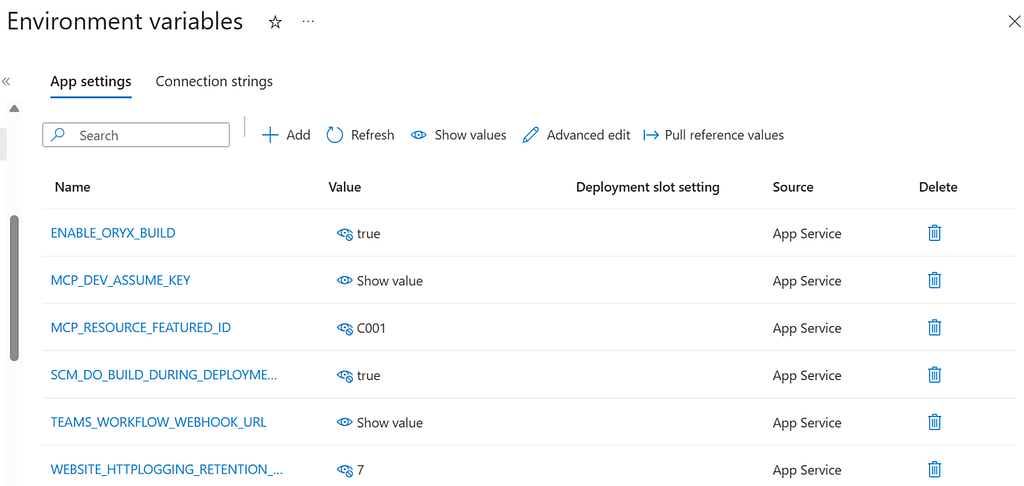
Copilot communicates using a bearer token, validated through middleware- no anonymous tool calls.
Lessons Learnt:
Why Streamable HTTP (Not SSE)
Instead of SSE, I deployed MCP over Streamable HTTP because of the following reasons:
- Works cleanly behind Azure App Service & proxies
- Easier to debug
- More production-aligned
This choice alone avoided several deployment pitfalls.
Copilot Orchestration via Prompts
Copilot Studio is guided by explicit instructions, for example:
- Retrieve context via MCP resources
- Compute risk
- Decide whether to:
a. Generate Report
b. Escalate an alert
4. When risk is High, the copilot is instructed to:
a. Call generate_report
b. Then call escalate_alert
This makes the copilot decision-aware, not reactive.
The recipe!
- Create an Azure Web App in Azure Portal
- Create a GitHub Repository & push code
- Connect GitHub to Azure Web App (CI/CD)
- Configure Startup Command in Azure Web App Settings
- Define Environment Variable in the Web App Configuration
- Monitor with Log Stream while you connect to the MCP via Copilot Studio to understand any import or validation errors
- Validate MCP endpoints using Curl
- Create w GitHub Action Workflow for easy, repeatable deployments while troubleshooting
- Add your Azure Publish Profile to GitHub
- Go to Copilot Studio and navigate to Tools. Add a tool by selecting a new tool of type MCP (make sure your environment is in US). Enter the MCP server details as per your definitions in the code. If all goes well, you should be able to see your tools and resources loaded.
- Define your instructions for the agent in the Overview tab and save.
Voila, you tools and resources hosted over MCP are ready for use!