

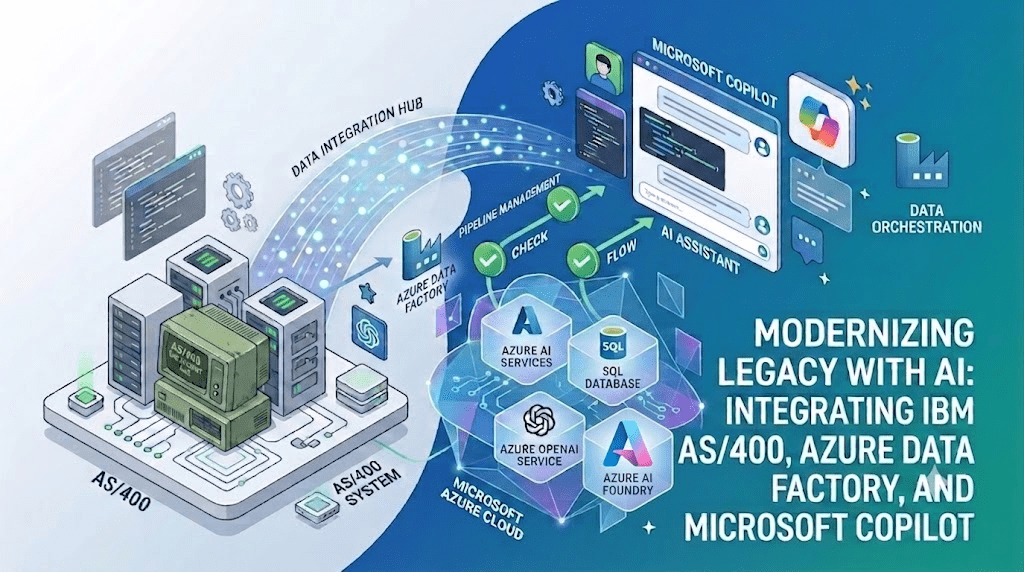
If you’ve been following my blog for a while, you know I love exploring how modern Microsoft technologies can connect with enterprise systems. Today, I want to share something I found really exciting , and I think you will too  . In many companies, an AS400 system has been running quietly in the background for 10, 15 sometimes even 20 years. It holds customer records, inventory data, financial transactions, all of it trusted. But asking it a question? That still takes a developer, a custom report, and sometimes days of waiting. In this article, I’m going to show you how I changed that : using Azure Data Factory, Azure AI Search, Azure AI Foundry and Microsoft Copilot.
What We’re Building Today
Welcome back again, Today’s article is one I’ve been really excited to write. If you work with enterprise legacy systems, there’s a good chance you’ve come across an AS400 at some point. It’s one of those systems that just keeps running , year after year, holding critical business data, running core processes, and never missing a beat. The problem is not the system itself. The problem is getting a quick answer out of it.
So I decided to test something: can I connect a real AS400 to Microsoft Azure AI, and let a business user simply ask it a question in natural language? The answer is yes , and in this article, I’ll show you exactly how I did it.
I used Azure Data Factory to pull the data, Azure AI Search with Azure AI Foundry to make it searchable by AI, and Copilot to publish the bot and deliver the answers directly in Microsoft Teams. The AS400 was never modified. Nothing was migrated.
Grab a coffee and let’s get into it
The Challenge : Valuable Data, Slow Access
In many organizations that still run an AS400, accessing business data quickly can be a challenge. Some clients have already built reporting layers or dashboards on top of their IBM i system , and that’s great. But in a lot of cases, especially for ad-hoc questions that weren’t planned in advance, the process still looks something like this: a business user needs a specific answer, they ask IT, IT runs a query or generates a report, and the user gets their answer ; hours or sometimes days later. If that sounds familiar in your context, this article is for you. If you’ve already solved that problem, the AI layer I’m about to show you can still add value ; by making that access even faster and available to everyone.
From raw AS400 data to a Copilot chat : the modernization in one image
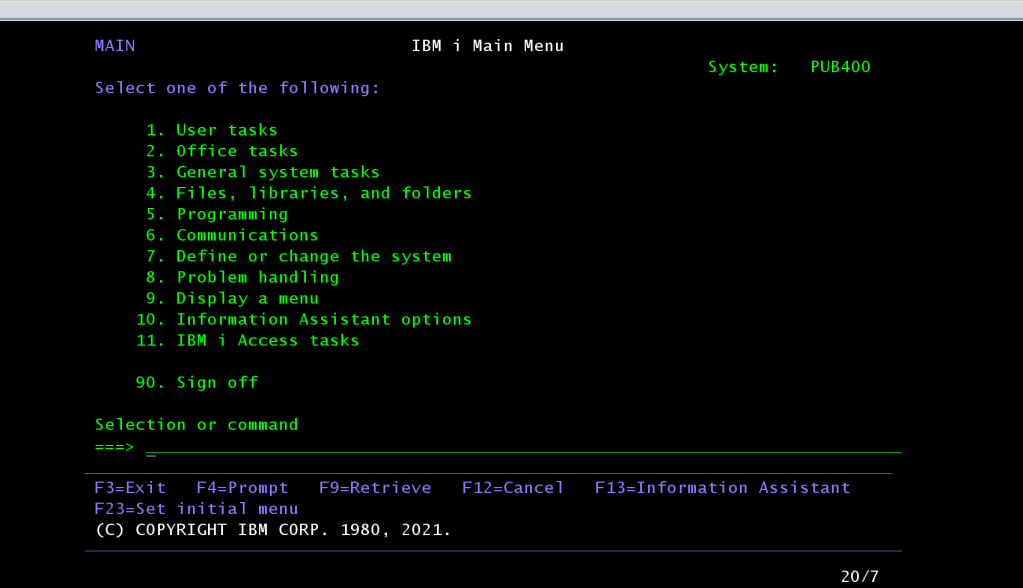
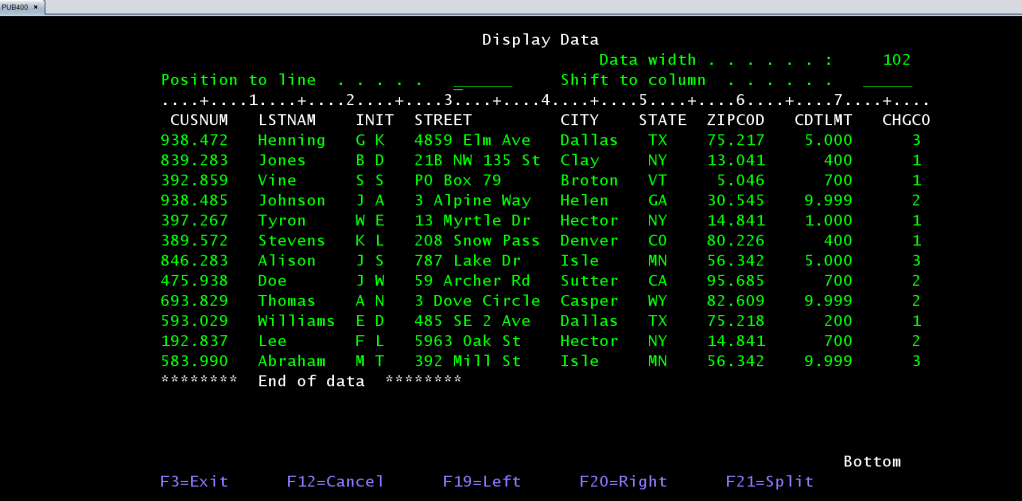
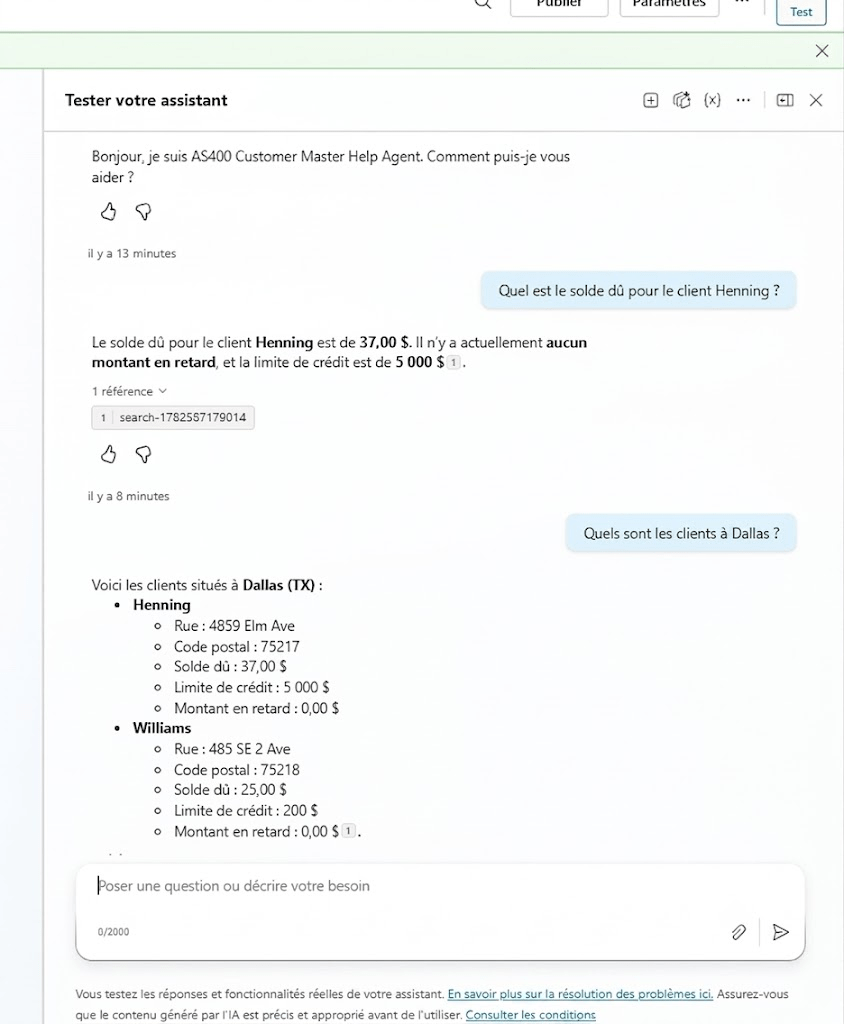
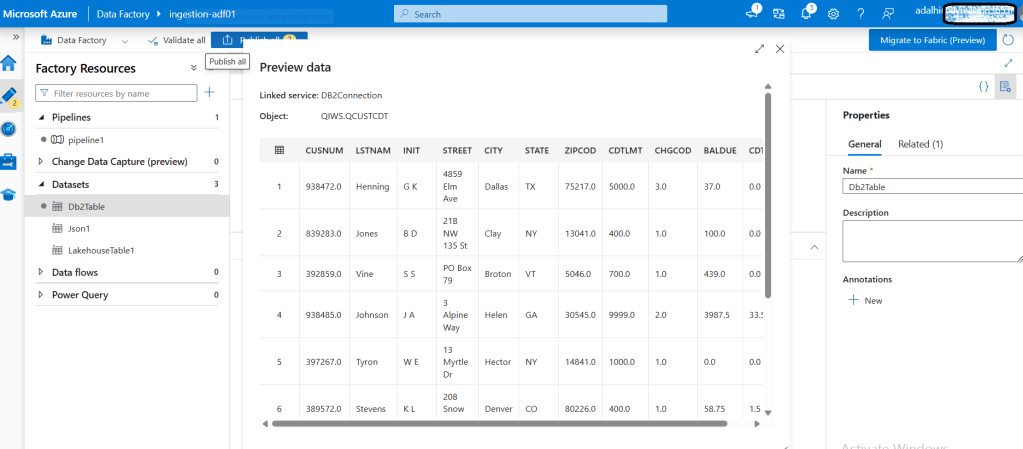
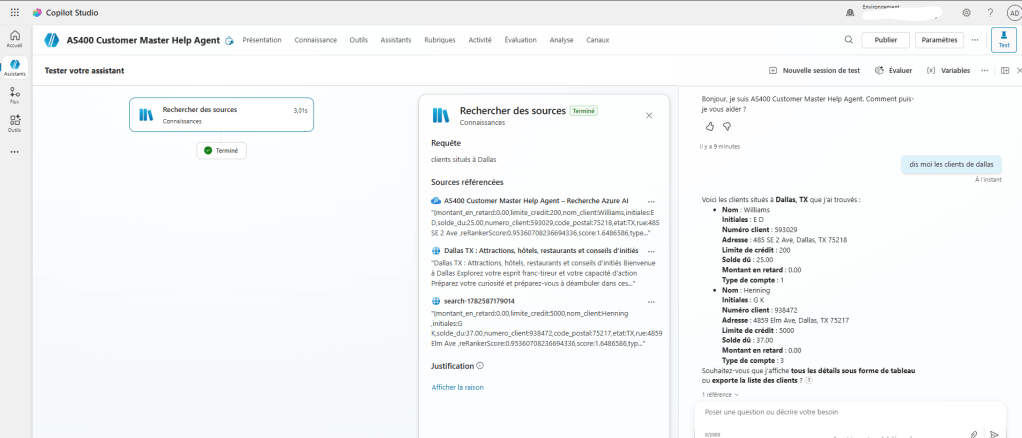
Before I explain how the architecture works, I want to show you exactly what changes for the user. in the « Figure1 » screenshot this is what AS400 data actually looks like , real customer records, with field names like CUSNUM, LSTNAM, CDTLMT, CHGCO. The data is accurate and has been trusted for decades. But reading it requires knowing what every code means. On the « Figure2 » screenshot, this is what the same data looks like after adding the Azure AI layer and Copilot integration , a natural-language question in Copilot , a clear answer in seconds, with the exact source cited.
Same data. Same AS400. Completely different experience for the user.
BEFORE : RAWS AS400 DATA (IBM i)
Technical field names like CUSNUM, LSTNAM, CDTLMT, CHGCO. This is what the raw AS400 data looks like ; accurate and valuable, but impossible to read without knowing the system.
AFTER : COPILOT IN TEAMS : Natual-language question. Instant answer. Source cited. Any business user.
The real question isn’t « is the data good? » – it’s « how do you get to it? »
Let me be clear about something: the AS400 data is not the problem. In many companies, it’s actually the most reliable data they have. The challenge is simply how you access it. Today, getting a specific answer out of DB2 for i usually means one of three things :
- You know the system well enough to query it yourself,
- You ask someone who does,
- Or you wait for a report that was already built.
None of these are self-service. And that’s the gap this article addresses.
What I’m showing in this article is a different approach: instead of trying to make the AS400 expose itself as an API, you connect to it from Azure, bring the data out on a schedule, make it searchable, and let people ask questions through Copilot. The AS400 keeps doing exactly what it already does. You just add a smarter front door on top of it.

Why « just migrate it » is the wrong default answer
Migration is often suggested as the only path to modernization. But a migration project is multi-year, expensive, and risky – and it frequently fails to capture business rules that were never documented, only encoded inside old programs. Migration solves a different problem than the one usually being asked. Most of the time, the real request is simpler: let people get answers.
I’ve written about this topic before : if you’re interested in how IBM i / AS400 data can be connected using Microsoft Fabric and D365 Finance & Operations, I covered that in a previous article:
Business Value & ROI
Before I get into the technical setup, let me answer the question I always get asked first: « OK, but what do we actually gain from this? » Fair question. Here’s my honest answer.
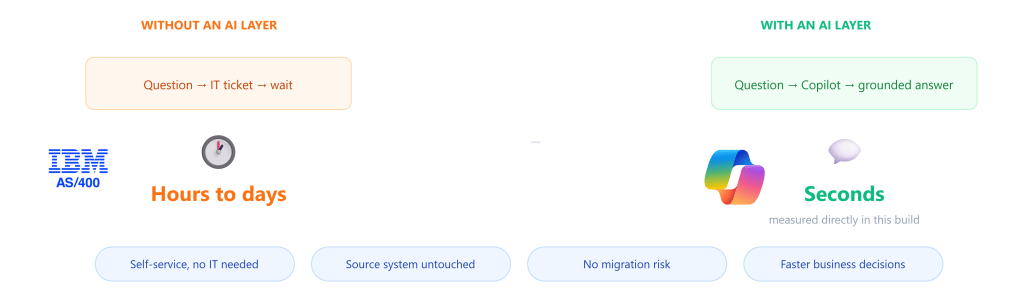
What the organization actually gains
| Dimension | Before | After |
| Time to an answer | Hours to days ; depends on IT availability | Seconds – self-service, any time |
| Who can get the answer | Only people with specialized system access, or who can wait for a developer | Any business user, in natural language, in Teams or Microsoft Copilot |
| IT involvement per question | Required for nearly every ad-hoc request | None – IT is only needed to maintain the pipeline, not answer questions |
| Risk to the source system | — | None. The AS400 is never modified |
| Investment required | — | Weeks of integration work, not a multi-year migration program |
The concrete advantages of adding an AI layer
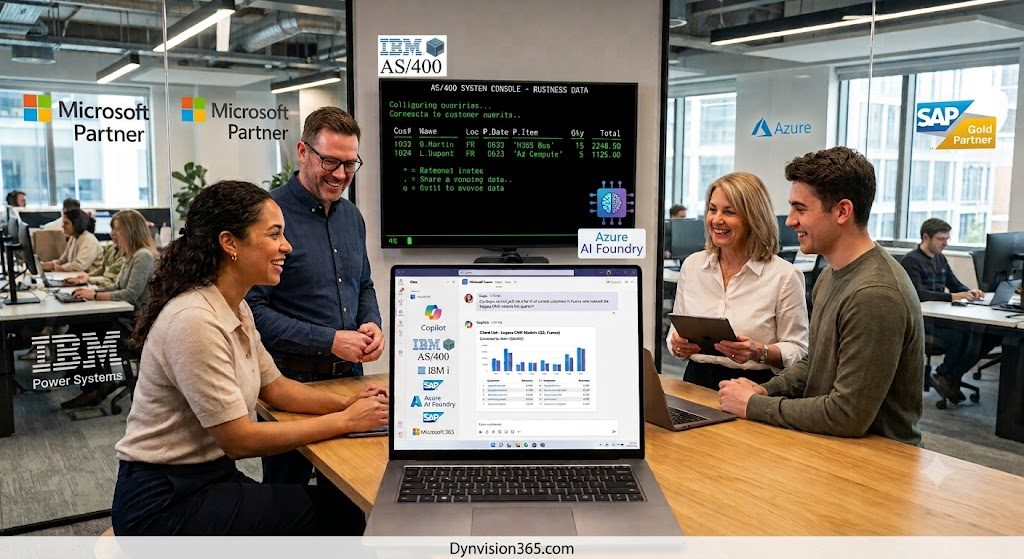
Based on my experience on this kind of integration Legacy systems projects, here are some specific advantages, in practice i can mention :
- A natural fit for clients already using Microsoft: For many multicloud clients already runs Microsoft 365, Dynamics 365, Azure, or any combination of these, this architecture plugs straight in. Azure Data Factory, Azure AI Foundry, and Copilot are all part of the same Microsoft ecosystem – the same identity model, the same admin center, the same licensing conversations already having. For client running a multi-cloud or mixed architecture with both IBM i and Microsoft systems or SAP, this is the bridge that connects two worlds that were never designed to talk to each other without introducing a third vendor or a parallel infrastructure to manage.
- Business users can get answers on their own: Every « can you quickly pull me a list of X » request used to land on a developer’s desk. With an AI layer, users can ask the question themselves and get the answer immediately : no waiting, no ticket.
- Knowledge stops living in one person’s head: Today, getting an answer often depends on knowing which report to run, or which one person on the team knows how to write that specific query. A conversational layer makes the data reachable by anyone, removing that single point of failure.
- Front-line staff can answer questions on the spot: A customer service or warehouse employee can get a real answer immediately, instead of saying « let me check and get back to you. »
- It’s a foundation: Once the data is connected and indexed, the same pipeline can support more later : additional tables, or further automation , or many AI Agents can be connected to the same one, without redoing the underlying connection work.
- People use it where they already work: Microsoft Teams, not a new tool to install or learn
Why this is a strong return on investment
Here’s my honest answer:
- The Azure services in this architecture : Data Factory, Azure SQL, Azure AI Foundry, Azure AI Search, and Copilot ; are all managed services, pay-as-you-go costs. For a project at this scale, you’re not talking about a massive infrastructure investment. You’re talking about a few managed cloud services that you can start small with and scale only if you need to
- You’re not replacing a system, not running a migration project. You’re adding a smarter way to access data that’s already there and already trusted. Every question a business user can now answer in seconds without raising a ticket, without waiting for IT, without opening a specialized interface; is time saved and a decision made faster. Over weeks and months, that adds up. And the AS400 keeps running exactly as it always has. You’re just giving it a smarter front door.
Why not just use IBM’s own AI tools?
I asked this exact question before building anything. IBM has invested in AI – Watsonx is the main AI platform. So why not just use that? Here’s what I found when I looked into it.

- Watsonx – IBM’s general AI platform for building models and agents. It can connect to Db2, but you would still need to build the same kind of connect-translate-index pipeline shown in this article – there’s no IBM i-specific shortcut.
- Watson Code Assistant for i – helps developers read and modernize RPG and COBOL code. Built for developers, not for business users asking questions.
- Db2 Intelligence Center / Database Assistant – helps database administrators tune performance and spot issues. Built for DBAs managing the database, not for business teams reading the data inside it.
The Solution – Approach Overview
Now let me show you the big picture before we go into detail. I like to explain the approach in four simple layers first without any product names – so the logic makes sense on its own. Then in the next section I’ll map each layer to the actual Azure service I used.

Technical Architecture
Alright, this is the part where things get interesting. Let me walk you through each tool, what it does in this architecture, and how configured it.
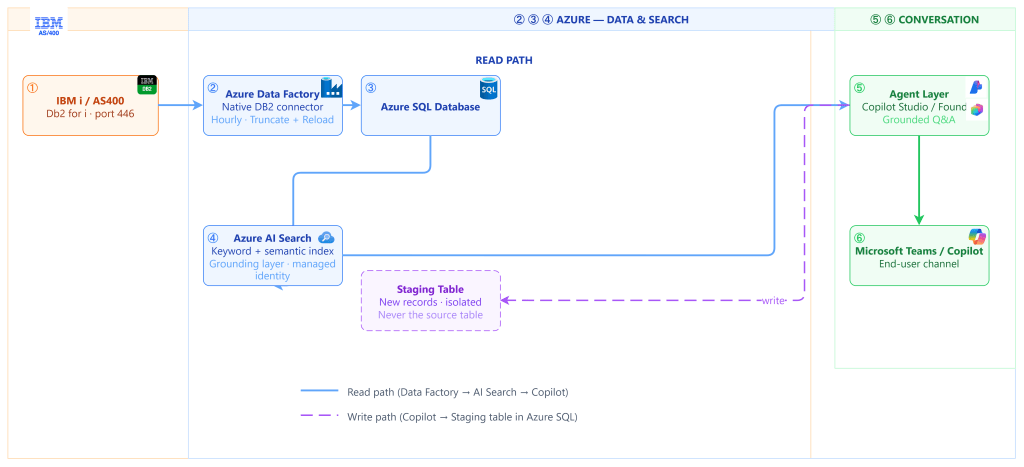
Meet the tools
Five Microsoft and Azure services work together here.
Azure Data Factory – the connector
Azure Data Factory is Microsoft’s cloud data integration service. Here, its job specific: reach into Db2 for i using its native DB2 connector, and copy data out on a schedule. ADF doesn’t transform or interpret anything; it moves data reliably, on schedule, and that’s the whole job.
Azure SQL Database – the landing zone and translator
SQL Database is where the copied data actually lives once it leaves the AS400 side. It plays two roles: a Bronze table holding a faithful, untouched copy of the source data, and a Silver view that renames cryptic legacy fields into plain business language. It’s also where new records created through the conversational layer get written safely, into their own staging table,
Azure AI Search – the layer that makes the data understandable to AI
This is the most important element in the whole stack, Azure AI Search is not a database, and it isn’t the AI model either – it’s the layer that turns structured business data into something a language model can reason over accurately, instead of guessing.
What Azure AI Search actually does is build a searchable, structured index over the Silver layer. It supports:
- Keyword search : fast, exact and fuzzy text matching against field values.
- Semantic ranking : matching the meaning of a natural-language question to the right rows, even when the user’s wording doesn’t match the field names at all.
- Vector search (optional) : similarity matching based on meaning rather than exact words, useful for less structured content.
Copilot & Copilot Studio – the business facing conversation layer
Copilot Studio is Microsoft’s low-code platform for building and publishing AI assistants. Here, it connects directly to the Azure AI Search index as a knowledge source for answering questions, and to a Power Automate flow as a callable tool for creating new records. It’s also what puts the assistant directly into Microsoft Teams,
Microsoft Foundry – the developer grade alternative
Microsoft Foundry can play the same conceptual role as Copilot Studio – connecting to the same Azure AI Search index and answering the same kinds of questions – but it’s aimed at teams who need full programmatic control: custom orchestration logic, a wider model LLM catalog, and deployment into a custom application rather than Teams or a web widget.
Connectivity: Azure Data Factory to Db2 for i
The connection uses Azure Data Factory’s native DB2 connector,
How the pipeline actually works
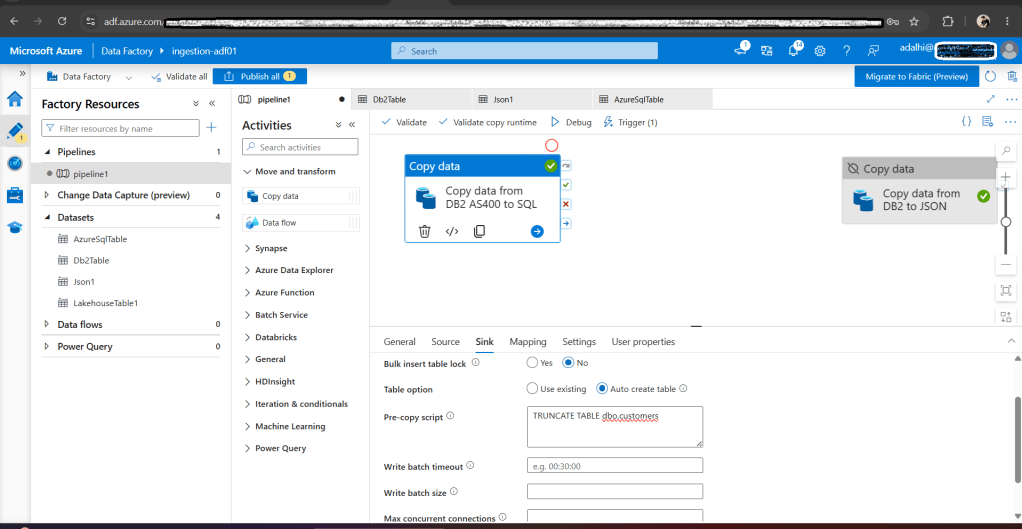
At its core, the pipeline contains the following activity: a Copy Data activity, with two sides:
- Source : a dataset pointing at the Db2 for i table, through the DB2 linked service.
- Sink : a dataset pointing at the destination table in Azure SQL.
When the pipeline runs, Data Factory opens a connection to Db2 for i, reads the rows, and writes them into Azure SQL , on a schedule. column names and values are copied. (Renaming into business language happens later, in the Silver layer – see the next section.)
Connecting to DB2 for i steps
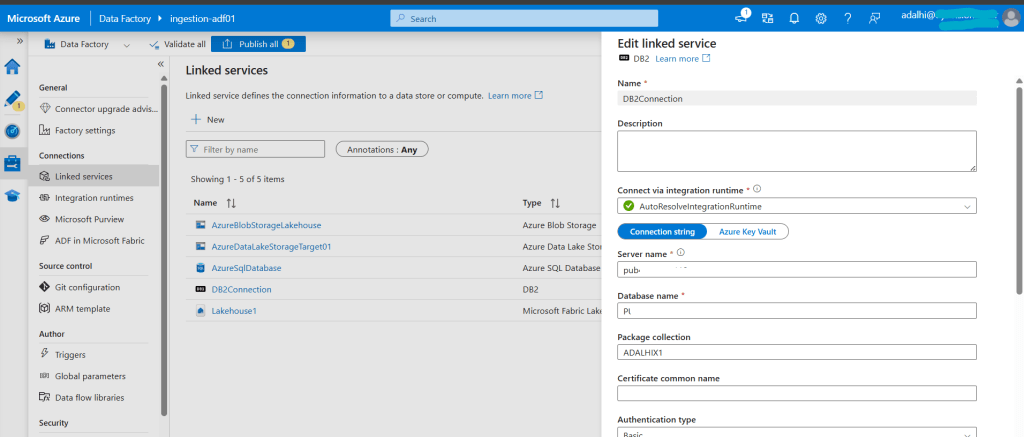
- In Azure Data Factory, go and search for DB2.
- Fill in the connection fields:
- Server name : the Db2 for i host and port, e.g.
your-host.com:446 - Database name : the system’s local database name
- Package collection : a library the connecting user owns
- Authentication type : Basic, with the IBM i user name and password
- Server name : the Db2 for i host and port, e.g.
- Click Test connection to confirm it can reach the host before saving.
Building the copy pipeline steps
- Dataset for the source type DB2, using the linked service above and a dataset for the destination (type Azure SQL Database).
- A new pipeline, with Copy data activity
- On the Source tab, select the DB2 dataset and the table to copy.
- On the Sink tab, we will use the Azure SQL dataset.
- On the Mapping tab, confirm the source and destination columns line up.
Landing: Azure SQL Database, a Bronze and Silver pattern
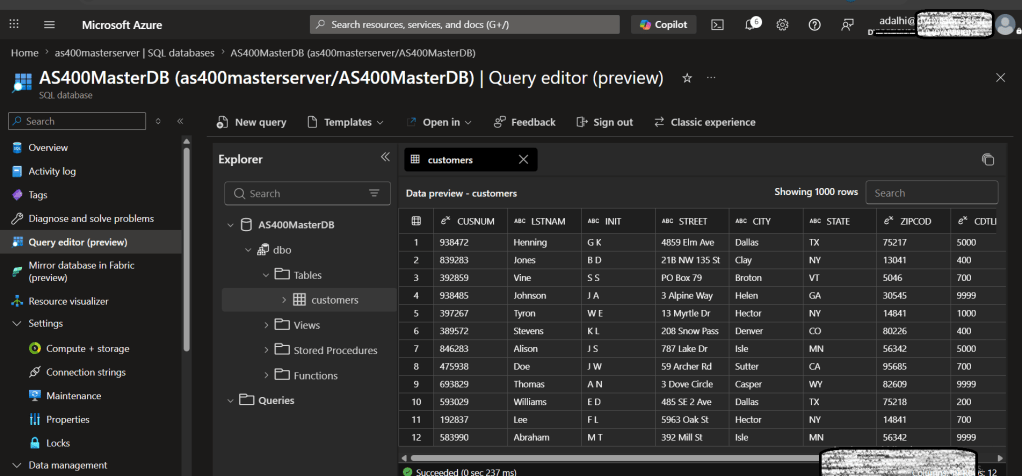
Data lands first in a Bronze table, unmodified copy, with the original field names. A Silver layer, built as a SQL view, renames those fields and resolves coded values into plain business language. This translation step is what makes the data usable for grounding an AI answer.
Indexing: Azure AI Search
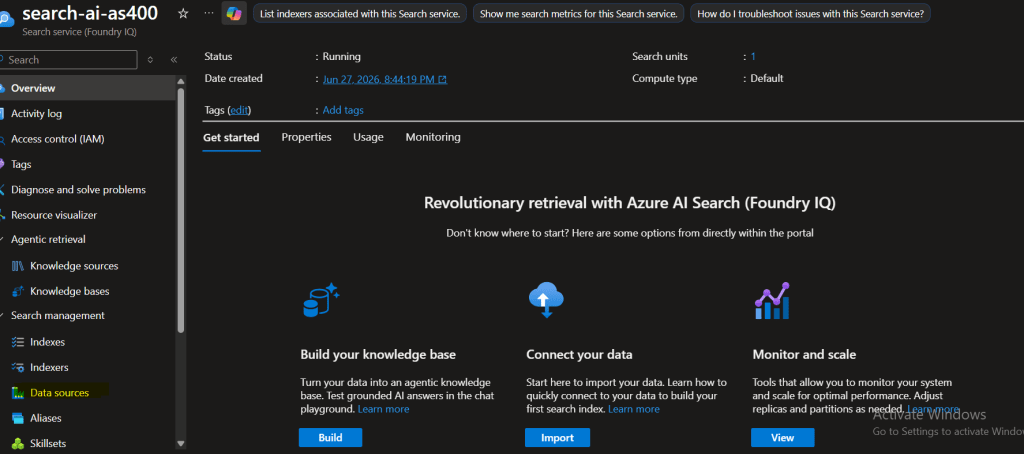
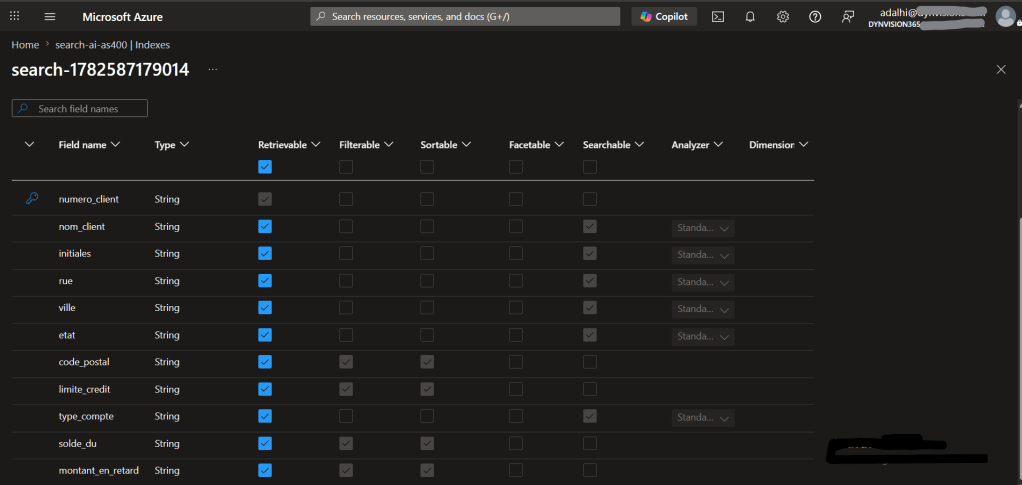
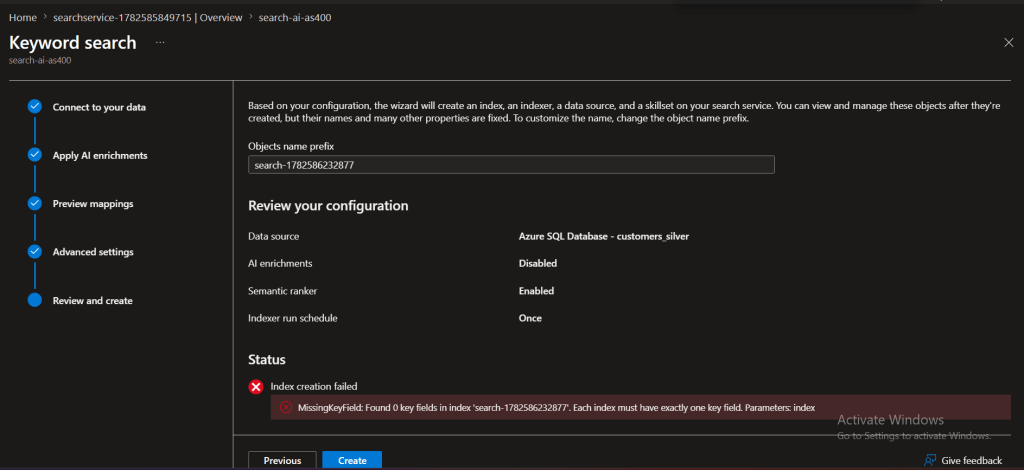
Here are the concrete configuration that turn that role into a working index. The Silver layer gets indexed for hybrid (keyword + semantic) search. Two design constraints matter here, and they must be decided&n bsp;before the index is created:
- The key field must be defined
- Searchable, Filterable, Sortable, and Facetable attributes must be defined at creation
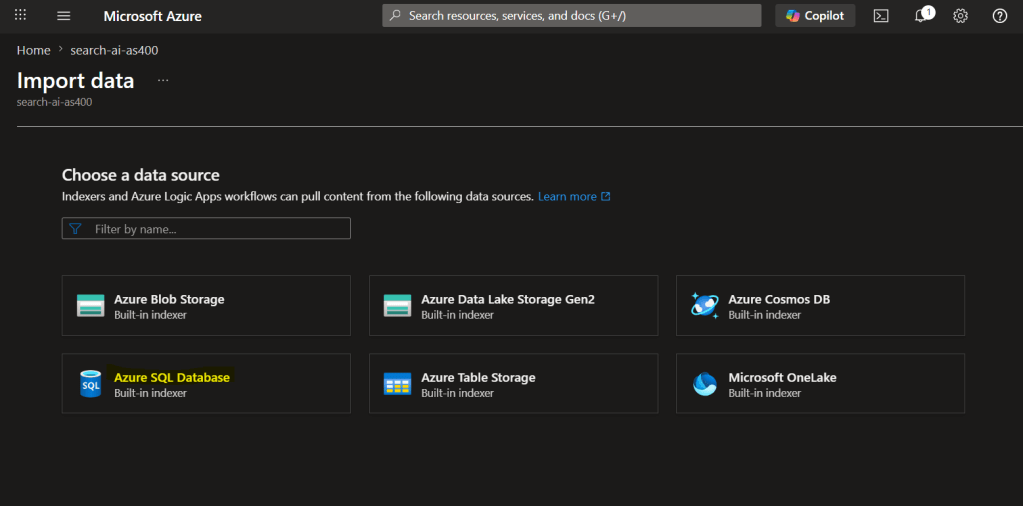
The conversational layer: Microsoft Copilot Studio / Azure AI Foundry
Copilot Studio / Azure AI Foundry connects to the Azure AI Search index as a knowledge source, You point it at your index, From there, you publish it to Microsoft Teams or Microsoft Copilot.

Write-back: a separate path
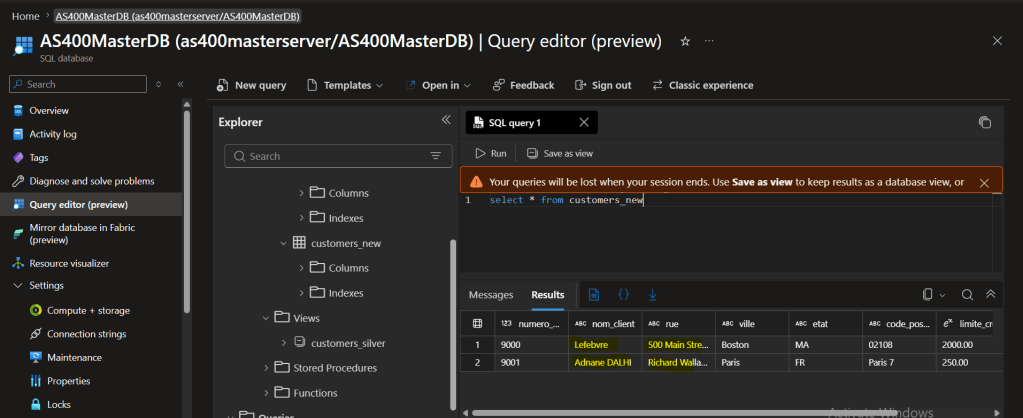
Never write directly into the source-mirrored table, and never into the AS400 system itself, In practice, this means new records created through the chat interface land in a separate staging table in Azure SQL – never in the table that mirrors AS400.
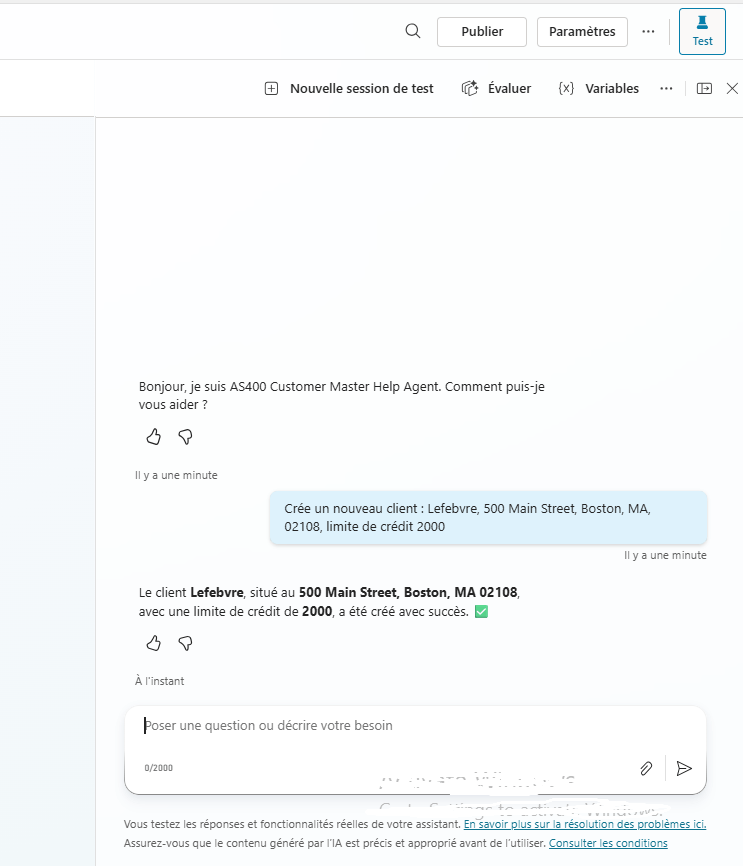
On the write-back side, Copilot Studio calls another agent as a tool to let users create new records through a natural-language.
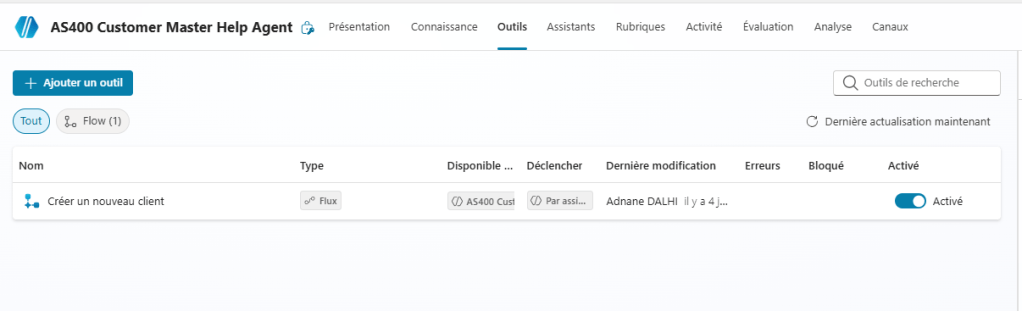
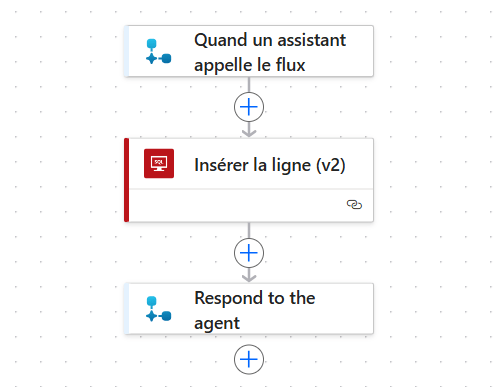
A record created through a natural-language request in chat, confirmed directly in the staging table: every field landed correctly
ADF gets the data out. Logic Apps puts it back in.
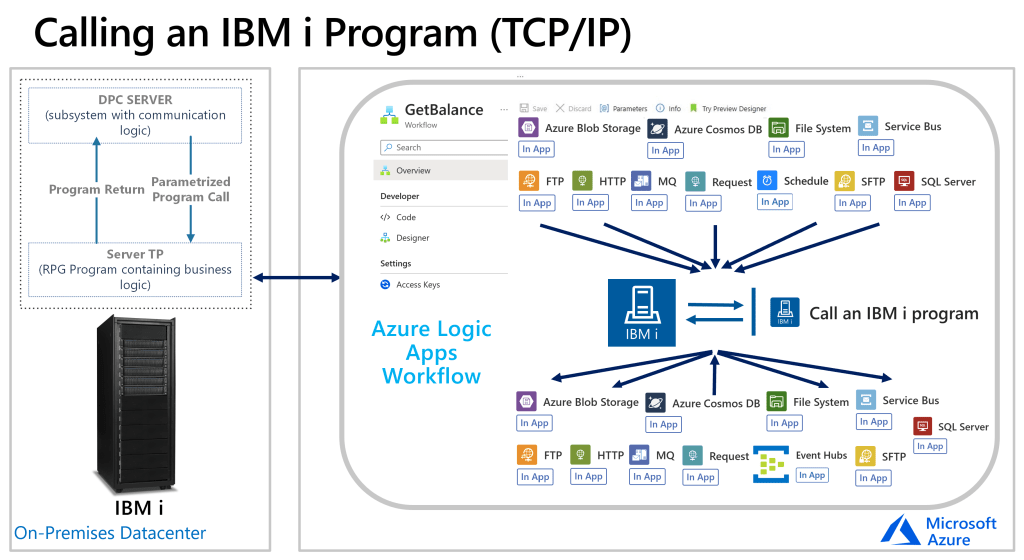
For write-back, the right tool in the Microsoft ecosystem is Azure Logic Apps Standard. It ships a dedicated IBM i Program Call connector , built-in connector that calls RPG or COBOL programs directly on the IBM i system over TCP/IP. Instead of writing raw SQL into a Db2 table, Logic Apps calls the program that already exists on the AS400.
Keeping data current: hourly synchronization
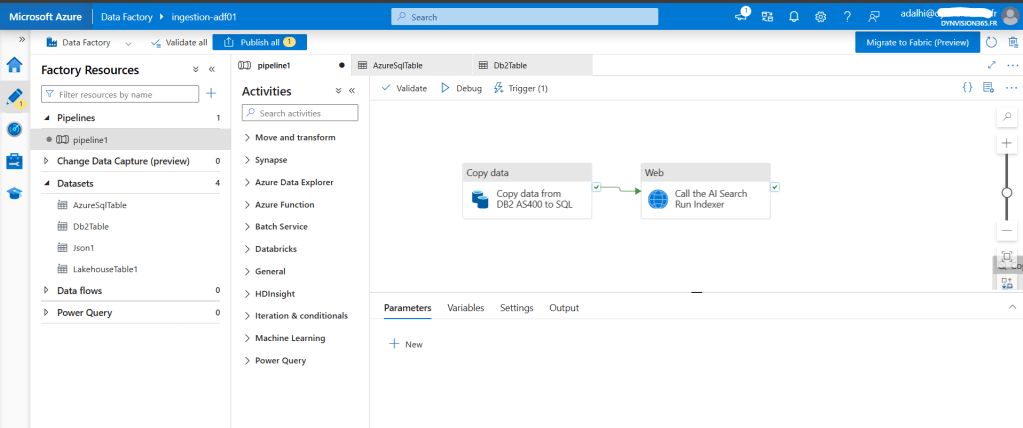
A real deployment needs a recurring schedule. This is done with a&nb sp;schedule trigger attached to the pipeline ; in this implementation, set to run every hour, which is a reasonable cadence for reference-style data such as a customer master.
Two strategies exist for refreshing the Bronze table on each run:
- Truncate and reload : clear the table and reinsert everything fresh
- Upsert : match incoming rows against a key and update or insert
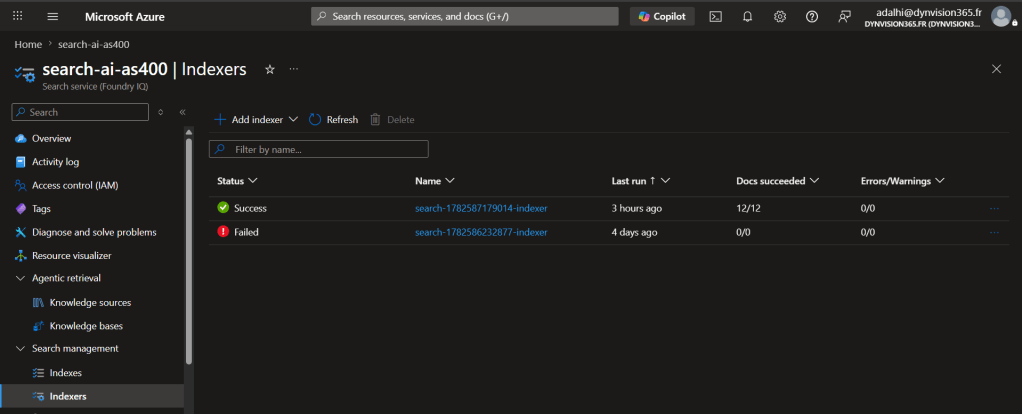
The search index refresh must be chained into the same pipeline run as the data copy,, calls the search index’s Run Indexer endpoint directly. This keeps data updated and search index updated also .
Closing – Where This Goes Next
And that’s a wrap I hope this article gave you a clear picture of what it actually takes to connect an AS400 system to an Azure AI layer the setup steps, and the results you can expect at the end of it.
If I had to pick the one thing I want you to take away from this: you don’t need to migrate your AS400 to start getting value from its data. You can add an AI layer on top, and give your business users instant, self-service answers in Microsoft Copilot today.
If you have any questions, or if you’ve tried building something similar and ran into different issues, drop a comment or reach me directly through dynvision365.com. I’d love to hear about your experience.
See you in the next article
Thanks