

Every week Microsoft tells us what’s changing in Power Platform and Copilot. What they can’t tell us is whether any of it touches the things that we’ve built… So I drew a picture, got a bit carried away, and ended up building something that can.
Let’s start by talking about the weather. (Bear with me… I’m British, and it does go somewhere!)
Imagine you’ve got a barbecue planned for Saturday and the forecast says “rain is expected across the UK”. Is that a problem? Well… it depends. Where’s the rain? What time? Is it a bit of drizzle or is somebody’s gazebo going to end up in next door’s garden? The forecast might be completely accurate and it still hasn’t told you the one thing you wanted to know, which is whether it’s going to rain on your barbecue.
Keeping up with Microsoft feels a lot like that to me.
A notice arrives to say that a model is being retired at the end of the month. OK… so is that a problem? If nothing we run uses that model then it’s background noise and we can all get back to our coffee. But if one of our agents uses it, and it’s in production, and nobody has told the person who owns it, then we’ve got a problem with a date on it. It’s exactly the same announcement in both cases. The only thing that’s different is us, and the announcement doesn’t know anything about us.
I’ve written loads over the last few years about the things that we get to decide when we’re governing a platform – our environments, our DLP policies, how we size the risk of a use case and choose the right controls for it. What I’ve not really talked about is the other half… We can govern our platform beautifully and still have it change underneath us. A connector changes, a preview feature goes GA, a model gets swapped for a newer one, and something that we tested really carefully six months ago is now behaving a little bit differently even though nobody in our organisation did anything at all.
To be fair to Microsoft they do tell us. We’ve got Message Center, service health, the roadmap, Learn, release notes, the product blogs, the licensing guides… There’s LOADS of information, and if you’ve got the time to read it all every week and work out what it means for every solution you’ve got, I’d love to know how you do it!
So… I drew a picture
Those of you who’ve read any of my posts before will know what happens when something gets stuck in my head. Out come the pens!
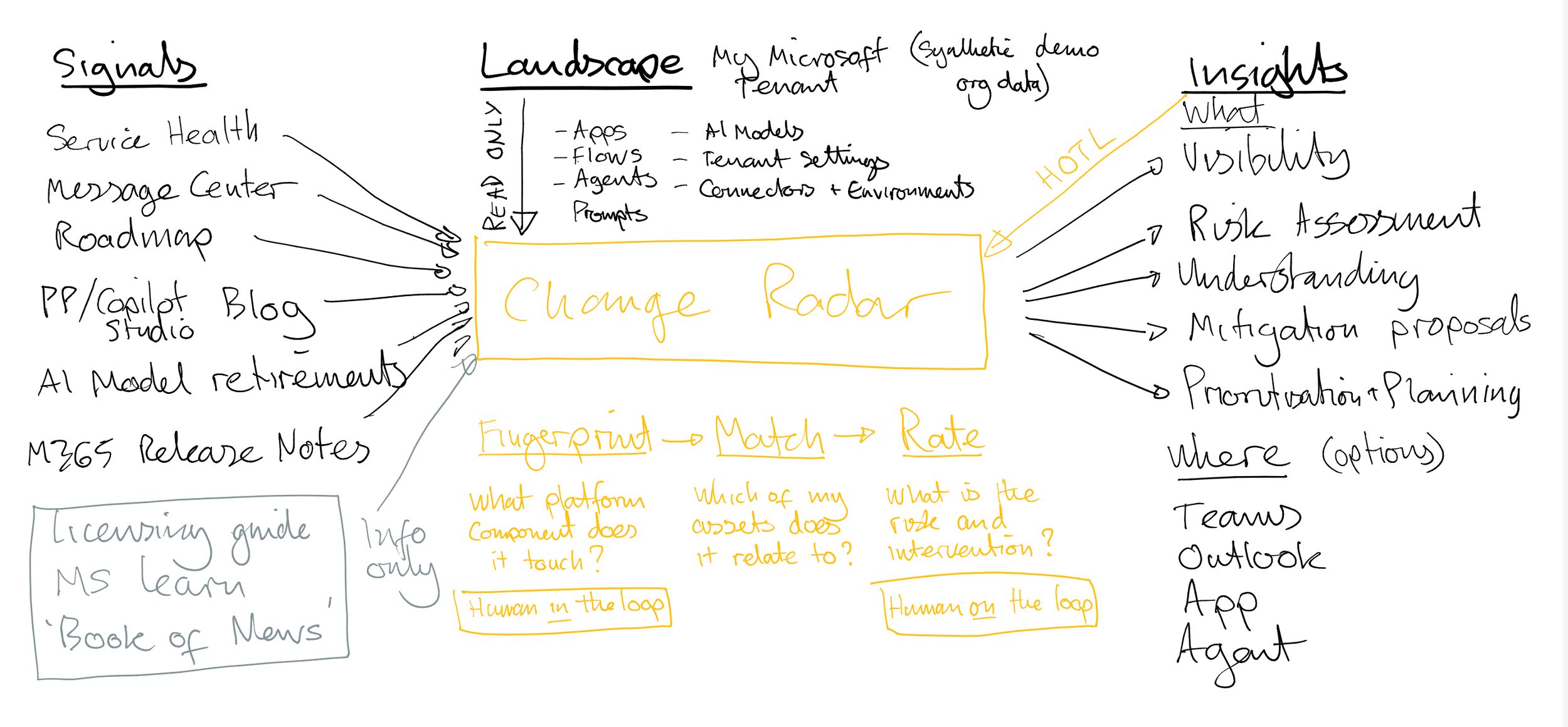
My first go at the problem: what’s changing on the left, what we’ve got at the top, and what I wanted to get out of it on the right.
On the left are the signals, which is all of the stuff that Microsoft is telling us. At the top is our landscape – the apps, flows, agents, prompts, models, connectors, and settings that we’ve actually got. Most of us have some sort of handle on both of those things. The trouble is that they live in different places and, quite often, what’s joining them together is one person with a really good memory. (What happens when that person goes on holiday?)
Then there’s the right hand side, which is the bit I spent longest on. What did I actually want? I definitely didn’t want yet another news feed. I wanted to be able to see what’s coming, to understand how risky it is and why, to get some ideas on what we could do about it, and to get all of that early enough that we could plan for it rather than run around with our hair on fire. I also wanted it to turn up wherever people already are, so that could be in Teams, or Outlook, or an app, or by asking an agent.
That left me with a box in the middle to fill in. So… how do we get from one side to the other?
Fingerprint, match, rate
I broke it down into three questions that we’d ask ourselves if we were doing this by hand:
-
What does this change touch? Not just the product in the headline, but the connector, capability, or model underneath it. I think of that as the change’s fingerprint.
-
Which of our things have got that same fingerprint on them? That’s the match.
-
So what? How much does it matter to us, and what might we do about it? That’s the rating.
Simple, right? Well, the questions are. The part that I found really interesting was working out who, or what, should be answering each of them.
Where does the AI come in?
It would have been really easy to hand the whole lot over to AI – “Here’s all the announcements, here’s everything that we run, tell me what I should worry about!” – and I’m sure it would have given me a very confident answer. But what happens when somebody asks why their flow is on the list? I’d want to be able to show them, and “the AI said so” isn’t a conversation that I’d enjoy very much.
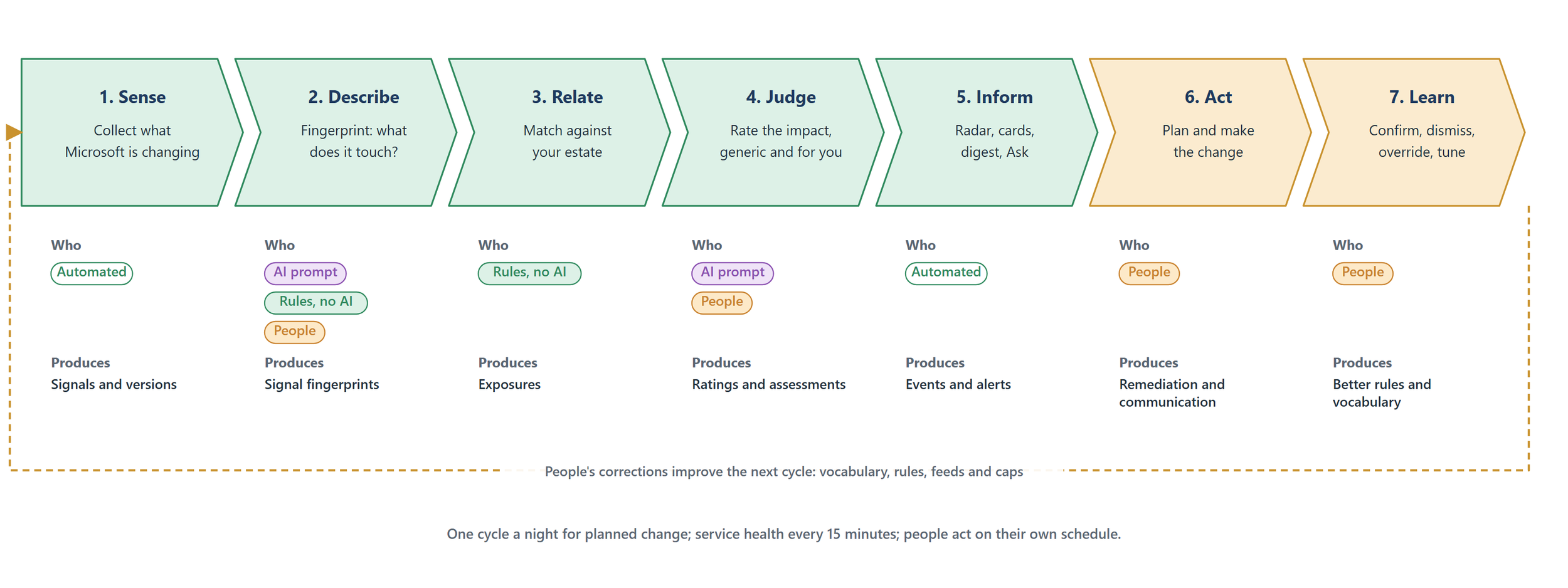
Who does what? Purple is AI, green is automation or rules, and amber is people.
Reading lots of wordy announcements and describing them in a consistent way is something that AI is really good at, so that’s the job I gave it. It takes each announcement and creates the fingerprint using a fixed list of products, connectors, capabilities, and models that it has to choose from. If Microsoft has already published something in a nice structured way, like a table of model retirement dates, then we don’t need AI to read it at all and some simple rules can do it instead.
The matching is ALL rules. You can look at them, test them, change them if you don’t agree with them, and every match keeps the evidence for why it’s there. Then the AI comes back in to suggest how much the change matters, with some rules that bump it up if it affects something in production or the deadline is getting close. It’s always labelled as AI’s opinion and a person can override it.
So AI reads, rules match, and people decide. You might have spotted in my sketch that I’d put “human in the loop” next to the fingerprint and “human on the loop” next to the rating, and (as I found when I was stood in the queue at border control) it turns out to be a bit messier than that once you start building it for real. Where the AI is confident in its fingerprint it goes straight through, like one of the e-gates. Where it isn’t so sure it gets sent over to the desk, and a person has to accept it or reject it before it’s allowed to match with anything.
When it told me I was wrong
Before we built each of the rules we wrote down what we expected it to find, so that we’d know if it was working. That’s a pretty sensible thing to do, and it means that you get told very clearly when you’re wrong.
One of the models used by Copilot Studio had a retirement date coming up and I knew that I had an agent using that very same model, so down it went on the list – the radar should flag my agent. We ran it and… nothing. Not a peep. So is it broken?
Nope! It turned out that the retirement was for agents running on a different Copilot Studio harness (that’s the engine that runs the agent) from the one that mine uses. It was the same model name, but it didn’t affect my agent at all. If I’d just read that announcement over my morning coffee I’d have gone off to fix something that didn’t need fixing, and the radar that I thought had got it wrong had read the small print better than I had.
The other one made me laugh. We tested a few different models to see which was going to be best at reading the announcements. On our ten test cases the best one got eight of them right, and the one that came last got five and gave us some false alarms too. That last one? It was due to be retired itself a couple of weeks later. Imagine launching a tool to warn people about model retirements, running on a model that’s about to be retired… 😂
Come and have a look
This is what it looks like. I’ve pointed it at a made up demo organisation for these screenshots, so there’s nobody’s real data in here.
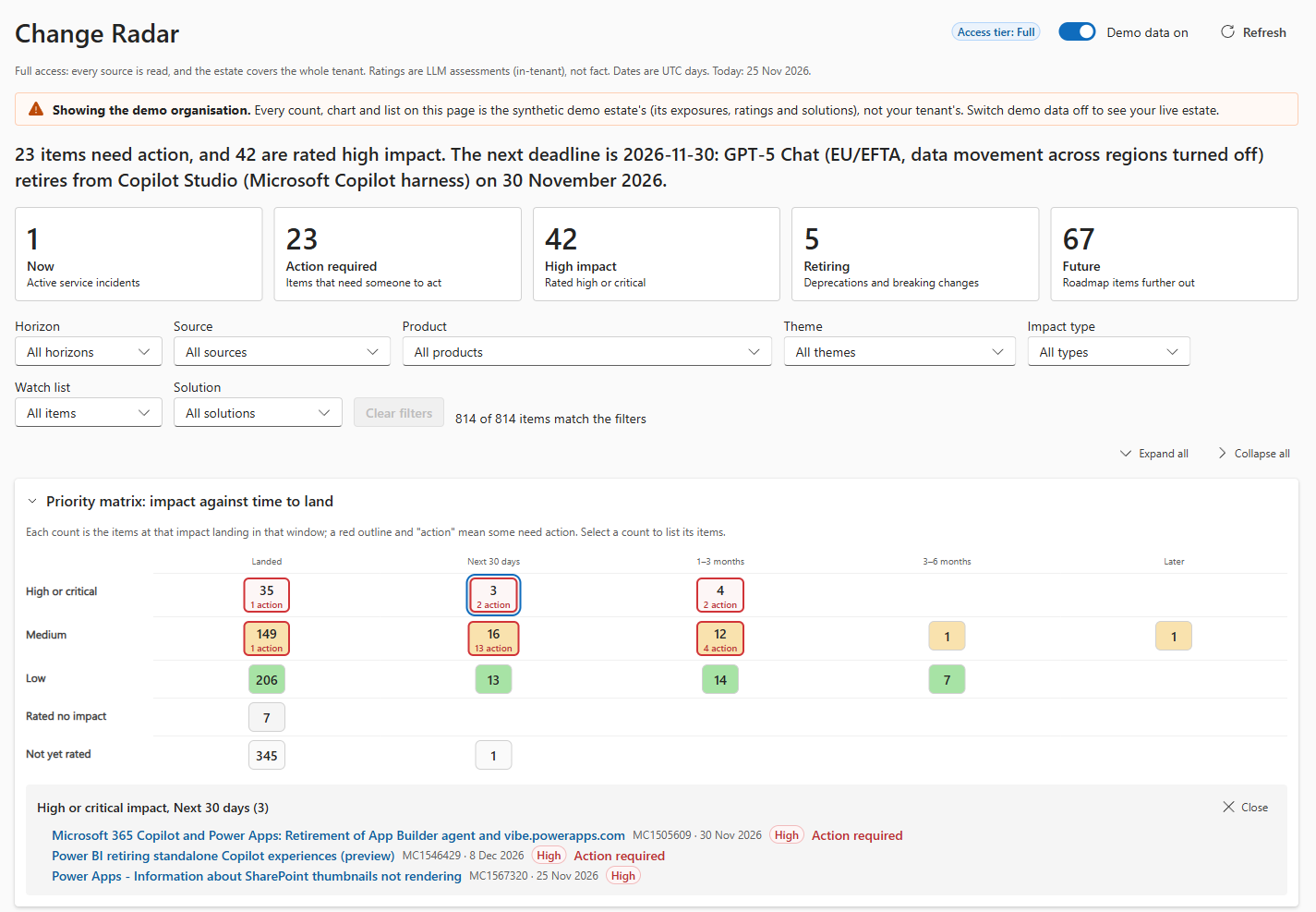
What’s changing, how much does it matter, and when does it land? (All demo data, from 25 November 2026.)
On the day that I took that screenshot there were 814 items on the radar. That’s a LOT of reading. Of those there were 23 that needed somebody to do something, and if you look at the ones that are rated high and landing in the next 30 days then there are just three. I can have a sensible conversation about three things, whereas with 814 I’m going to need a lot more coffee.
You can also flip it round and come at it from the other direction by starting with your solutions – “I look after Fleet bookings… what’s heading my way?”
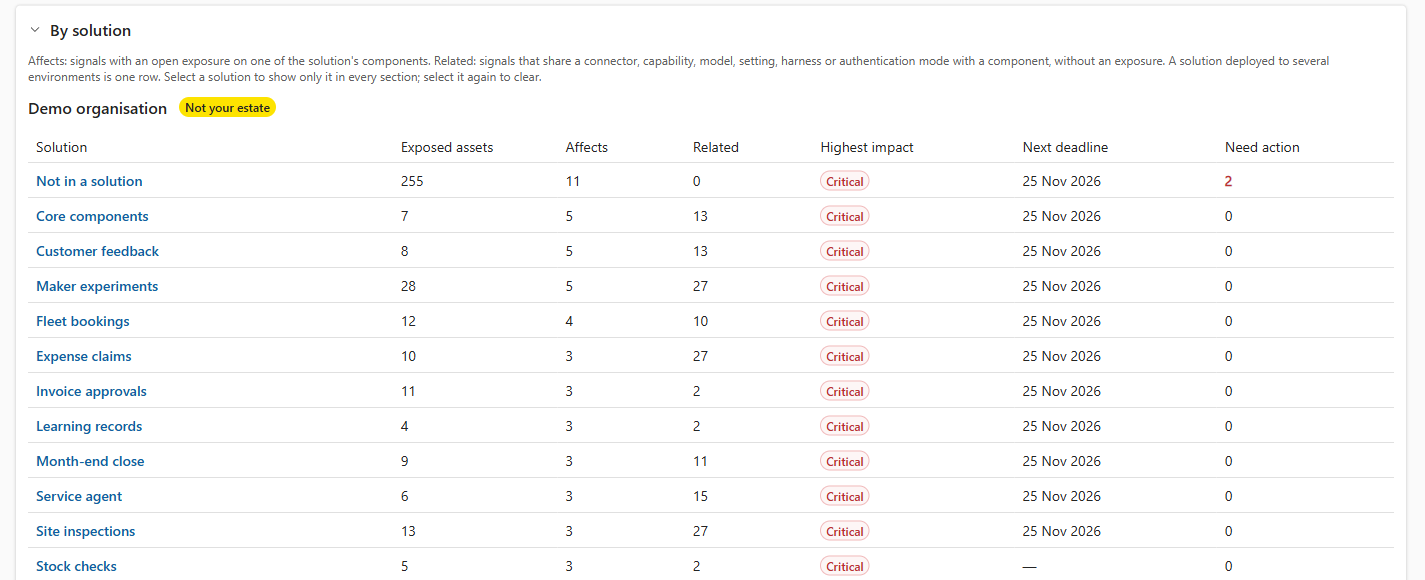
The same changes from the other direction: which of my solutions do I need to think about?
It does its collecting and matching overnight and checks service health every 15 minutes. If you want it to then you can also have it post the urgent stuff into Teams and send you a digest every Monday, and there’s an agent that you can ask questions too.
But is it safe to point it at my tenant?
That’s exactly what I’d be asking, and it’s what your security team is going to ask you, so I tried to start from what they’d need to hear for them to be comfortable saying yes.
It only reads your landscape, and the only place that it writes is into its own tables. When the AI is rating what a change means for you it gets counts rather than names, so it sees “3 cloud flows, 2 in production” but it doesn’t see which ones they are. Anything that sends or posts is switched off when you install it, so nothing goes anywhere until you decide that it should. There’s no telemetry coming back to me, and the processing stays within Microsoft’s cloud.
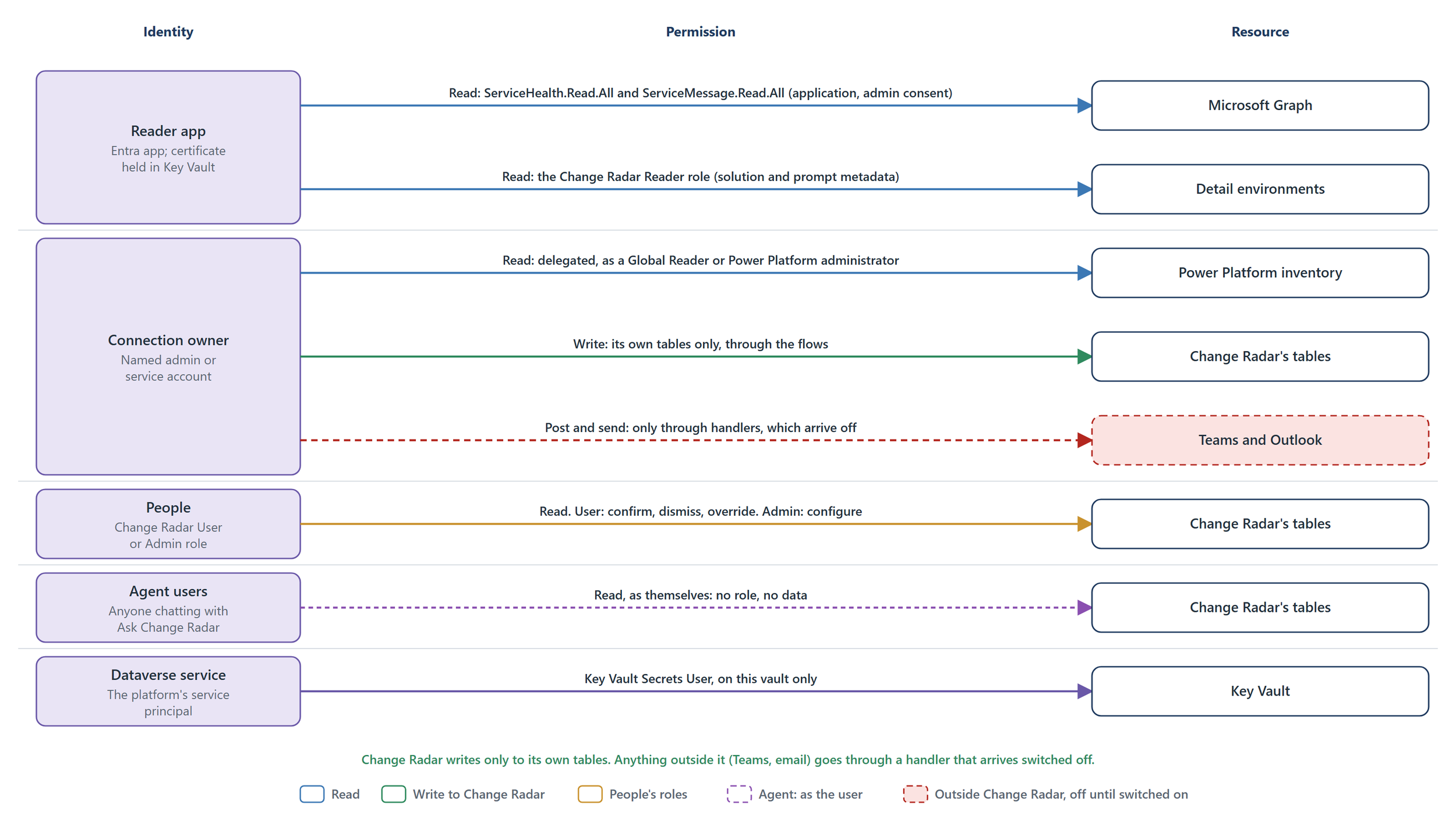
Who can reach what. The red dashed line is the part that arrives switched off.
And because even a “yes” normally needs to go through a process, I’ve included the paperwork to help you with that too – security, data protection, how it uses AI, a risk register, and an approval checklist.
What I don’t know yet
It’s release 0.3.0, it’s built by one person with a lot of help from AI, and there isn’t a support desk sat behind it. We’ve installed it from scratch twice in clean environments by following only the install guide, and the first time through turned up plenty of things that we hadn’t spotted whilst we were building it (which is why we did it). Both of those were in my own tenant, so I don’t know yet how it’s going to behave in yours.
It’s also going to get things wrong sometimes. Eight out of ten is pretty encouraging but ten is a tiny number, and those other two are exactly why I want people to stay part of the process. It’s free to use, but you’ll need some premium licences and AI credits to run it, so I’ve measured what it uses and put the figures in the docs to help you work out what that might look like for you.
Over to you
Change Radar is open source (Apache 2.0) and you can get hold of everything here, including the docs to help you understand it, challenge it, install it, and change it – github.com/SimonOwenDigital/change-radar
Have a play, have a poke around, and tell me what’s wrong with it! In some follow up posts I’m going to get into how it works, and how I used AI to build it, including the bits that went wrong along the way.
I’d also love to hear how you’re dealing with this today – When Microsoft changes something, how do you find out whether it’s going to rain on your barbecue? I’ve got a feeling that quite a few of the answers are going to start with “well… there’s this one person” 😁
Come and join the conversation on LinkedIn, or drop me a message.
Change Radar is an independent community project. It isn’t made, endorsed, or supported by Microsoft, and it isn’t affiliated with my employer.