


Some week ago, I received a strange request from auditors: can you track every file touched (read/write) by your AI coding agents? We should have a clear auditing log of every file a coding agent session touches.
How to do that? We cannot use skills or something similar, because these are triggered by the agent itself. But fortunately there’s something new in the horizon for achieve this…
Visual Studio Code has a feature (currently in preview) called Agent Hooks.
Hooks enable you to execute custom shell commands at key lifecycle points during agent sessions. You can use hooks to automate workflows, enforce security policies, validate operations, and integrate with external tools.
Hooks are designed to work across agent types, including local agents, background agents, and cloud agents. Each hook receives structured JSON input and can return JSON output to influence agent behavior.
Hooks enable reliable, script-based orchestration. While prompts and directives shape agent reasoning, hooks run your custom code at predefined execution stages with predictable results. Key scenarios for leveraging hooks include:
- Implement security guardrails: Prevent risky operations such as
rm -rforDROP TABLEfrom executing, irrespective of the agent’s original instructions. - Enhance code standards: Execute linters, testing frameworks, or formatters automatically in response to code modifications.
- Establish compliance records: Capture detailed logs of all tool calls, system commands, and data modifications to satisfy regulatory and troubleshooting requirements.
- Supply contextual data: Furnish agent decisions with environment variables, credentials, or domain-specific configuration to improve performance.
- Manage authorization workflows: Streamline approval by auto-permitting low-risk operations while flagging critical transactions for manual verification.
Visual Studio Code currently supports eight hook events that fire at specific points during an agent session:
| Hook Event | When It Fires | Common Use Cases |
|---|---|---|
SessionStart |
User submits the first prompt of a new session | Initialize resources, log session start, validate project state |
UserPromptSubmit |
User submits a prompt | Audit user requests, inject system context |
PreToolUse |
Before agent invokes any tool | Block dangerous operations, require approval, modify tool input |
PostToolUse |
After tool completes successfully | Run formatters, log results, trigger follow-up actions |
PreCompact |
Before conversation context is compacted | Export important context, save state before truncation |
SubagentStart |
Subagent is spawned | Track nested agent usage, initialize subagent resources |
SubagentStop |
Subagent completes | Aggregate results, cleanup subagent resources |
Stop |
Agent session ends | Generate reports, cleanup resources, send notifications |
Hooks rely on lifecycle events, which determine when they should run. These events act as trigger points during an agent session and choosing the right lifecycle event is critical, because it defines when your automation actually happens.
Hooks vs agent skills.
Hooks and agent skills are completely different things. They sit at opposite ends of the same “customize the agent” spectrum because skills add knowledge, hooks add control.
Skills extends what the model knows how to do, and they are invoked by the model itself:
- A folder with a
SKILL.md(instructions, optionally scripts/templates) that VS Code loads into context when the model decides it’s relevant to the task at hand. - It’s model-invoked and probabilistic: the agent reads the skill’s description, judges if “this applies,” and pulls the instructions into its own reasoning.
- The purpose is to teach the agent a specialized workflow, house style, or domain knowledge it can then follow — e.g. “folders of instructions, scripts, and resources that GitHub Copilot can load when relevant to perform specialized tasks”, portable across “multiple AI agents, including GitHub Copilot in VS Code, GitHub Copilot CLI, and GitHub Copilot cloud agent”.
- It never runs on its own, it’s just guidance the model chooses to read.
Hooks intercept the agent loop from the outside and runs deterministically every time:
- A shell command registered against a lifecycle event (
PreToolUse,PostToolUse,SessionStart,Stop, etc.) that VS Code fires automatically, no model judgment involved. - 100% deterministic: instead of relying on the agent to call a tool or use a skill, an agent hook sits in the middle of the agent loop and listens for specific events.
- The purpose is to enforce policy, block dangerous actions, auto-format after edits, or write an unconditional audit trail. It can even change or deny what the agent is about to do (
permissionDecision). - It never sees the model’s reasoning; it only sees structured JSON about the event (tool name, tool input, session id, etc.).
That’s exactly why an audit log belongs in a hook and not a skill: you want every tool call logged, not just the ones the model happens to think warrant loading a skill.
Visual Studio Code hook structure.
Technically speaking, a VS Code hook is just a JSON config file (usually in .github/hooks/*.json) that maps events to commands. Basic structure is the following:
{
  "hooks": {
    "EventName": [
      {
        "type": "command",
        "command": "your-script.sh"
      }
    ]
  }
}
A hook has three main parts:
- An event that determines when the hook runs.
- A command that VS Code runs when the event is triggered.
- Optional JSON input and output that lets the command read event details and influence the agent.
Hooks are configured in JSON files stored in your workspace or user directory.
What about the VS Code hook to auditing AI AL coding sessions?
You can find the hook in the following GitHub repo. Download the repo content and place it in the .github folder of your AL project.
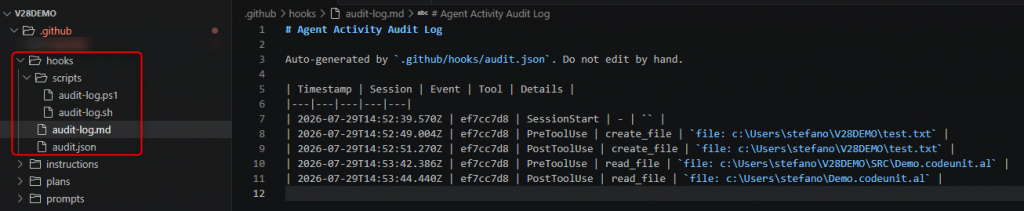
This hook (.github/hooks/audit.json) creates a lightweight audit trail of what an AI coding agent does in your repo.
It fires a script on SessionStart, PreToolUse, and PostToolUse, appending a Markdown table row to a audit-log.md file with the timestamp, session ID, event type, tool name, and a human-readable detail (file path, command, etc.).
An AUDIT_LOG_EVENTS env var (in audit.json file) lets you filter which lifecycle events actually get logged (for example only PostToolUse to record completed actions rather than every intent ) without touching the script itself.