
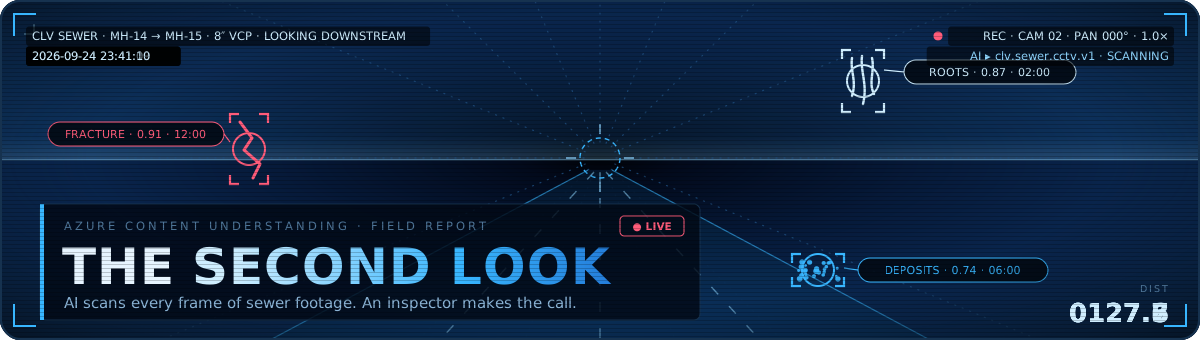
A city crew drives a camera through a sewer pipe and records everything. The footage lands in SharePoint, and then someone has to watch it, every minute of it, pausing to log each crack, root intrusion, and joint offset against the right footage counter. It is skilled, necessary work, and it is also exactly the kind of work that burns out good people.
As part of my work at MGP Inc., I built a proof of concept that keeps the skilled part and removes the burnout part.
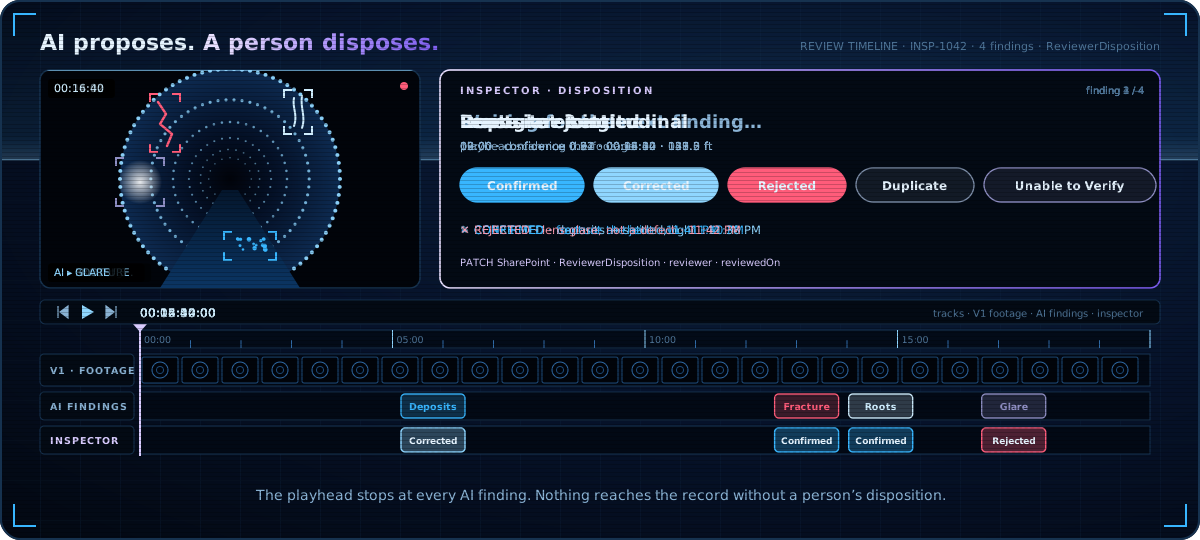
An AI model watches the video first and proposes findings. A human reviewer then confirms, corrects, or rejects each one, with the video cued up to the exact timestamp of the observation. The reviewer stops being a stenographer and goes back to being an inspector.
The whole thing is Azure Content Understanding in Microsoft Foundry, one Python Function App, a Power Automate flow, SharePoint, and a canvas app.
Nothing complicated, and that is the point. This post walks through how it is put together and the two design decisions that made it work.

The pipeline, end to end
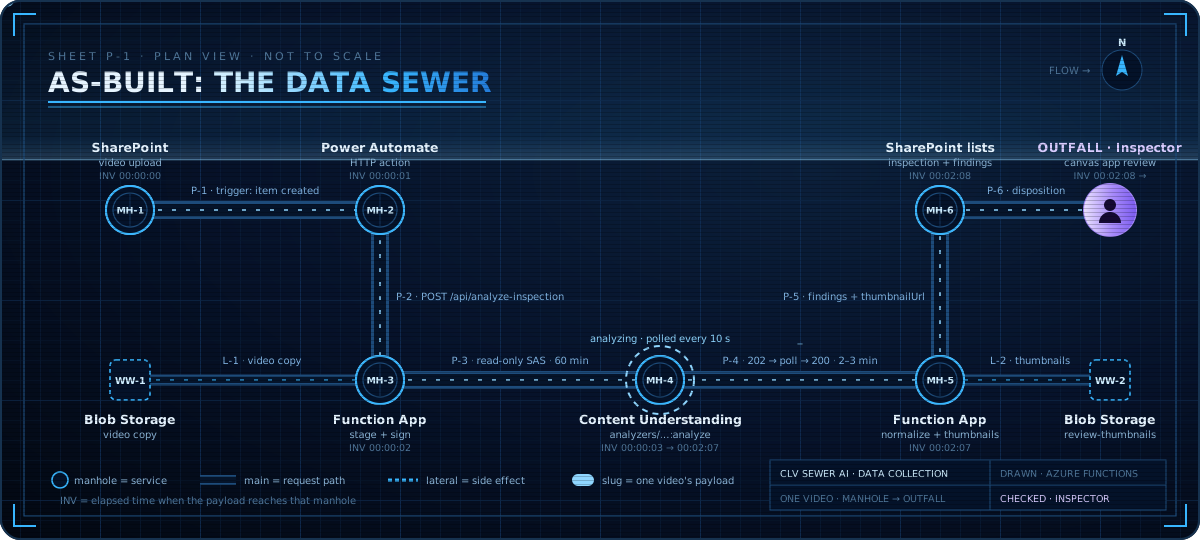
The system is a straight line with a loop at the end. A video is staged into Blob Storage, submitted to Content Understanding with a custom analyzer, normalized into findings, written to SharePoint, and then reviewed by a person in the canvas app.
The analyzer is a custom Content Understanding analyzer, clv.sewer.cctv.v1. It was configured to extract what a sewer inspector actually looks for: condition type, the pipe quadrant where the defect appears, the footage counter reading, start and end timestamps, and a confidence score. The output is not a chat response. It is a structured list of observations with timestamps in the video.
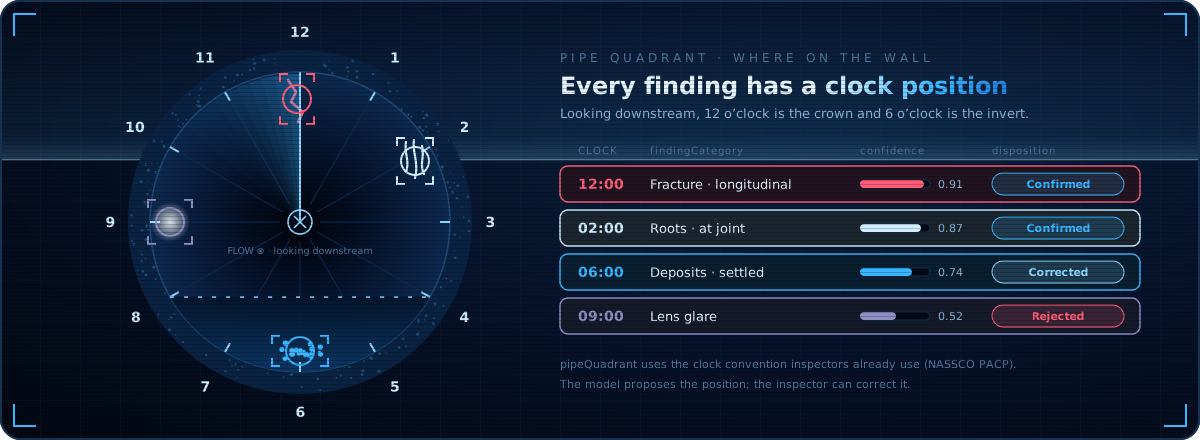
pipeQuadrant as a clock position, the same way inspectors already describe where a defect sits on the wall.Decision one: the analysis is asynchronous, and Power Automate already knows how to wait
Analyzing a full inspection video takes minutes, sometimes tens of minutes. A synchronous HTTP call will not survive that, and Power Automate’s HTTP action will not either.
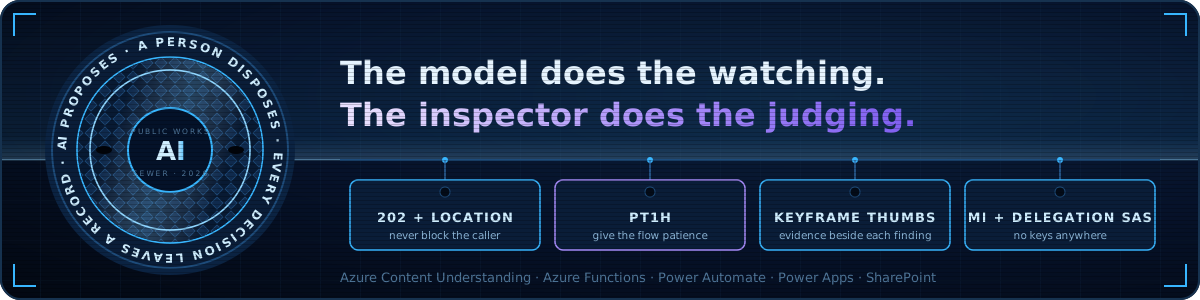
The function’s answer is the standard async HTTP pattern. When analysis will take a while, it returns 202 Accepted with a Location header pointing to its own status endpoint and a Retry-After of ten seconds. Here is the part that matters: the Power Automate HTTP action already understands this pattern. It follows the Location header, waits the requested interval, and polls again, with no loop to build and no state to manage.
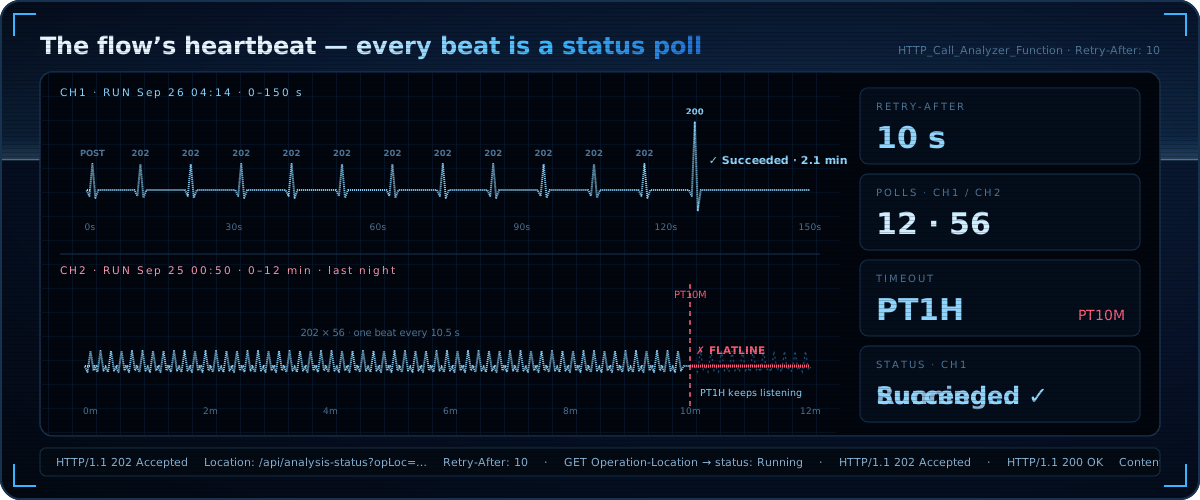
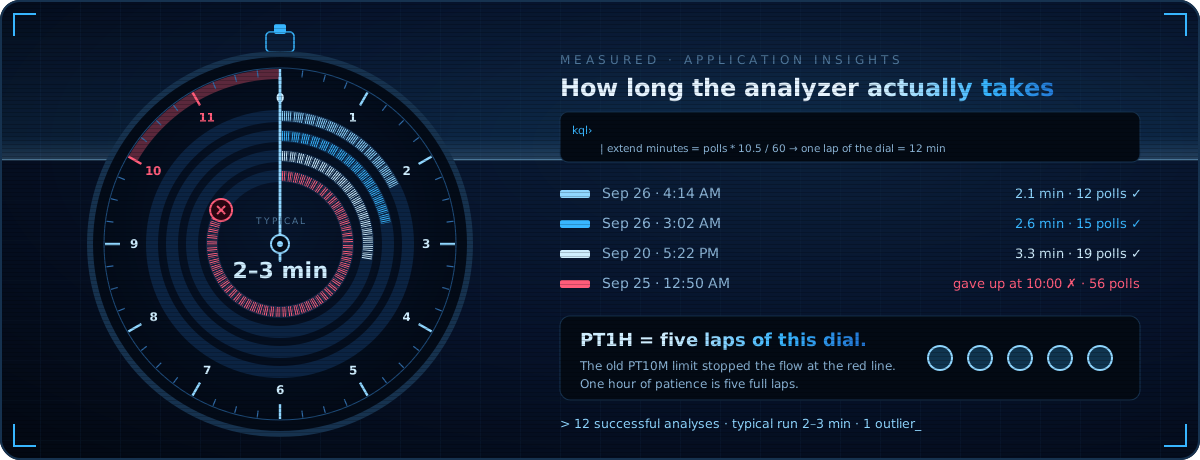
One honest lesson from running this in production: the polling pattern is free, but patience isn’t. The HTTP action has a timeout, and the first version of the flow gave up after ten minutes. A short two-minute clip finishes in two or three minutes, comfortably inside that window. Longer footage does not: one run was still processing when the flow gave up at exactly the ten-minute mark. The fix was a one-line change, raising the action timeout to an hour. If your footage regularly runs past that, move the polling into an explicit Do Until loop and remove the ceiling entirely.
Decision two: thumbnails make the review real
A finding that says “root intrusion at 00:12:34” is a claim. A reviewer cannot confirm a claim quickly; they can only go watch the video and check. That round trip is where review queues go to die.
Content Understanding samples keyframes from the video as part of analysis, and those keyframes are downloadable. So when the function normalizes the result, it also pulls the keyframe nearest each finding’s start timestamp and publishes it as a review thumbnail. The reviewer sees the actual frame the model was looking at, right next to the finding. Confirming or rejecting becomes a glance, and the video player is there for the cases that genuinely need motion.
Two implementation details worth stealing. First, thumbnails are uploaded to a public-read container, so the canvas app renders them with plain URLs and no token dance. Second, thumbnail generation is deliberately not on the critical path: if a frame download fails, the analysis still succeeds, and the finding simply shows no thumbnail. Enrichment should never be able to take down the pipeline.
The SAS question
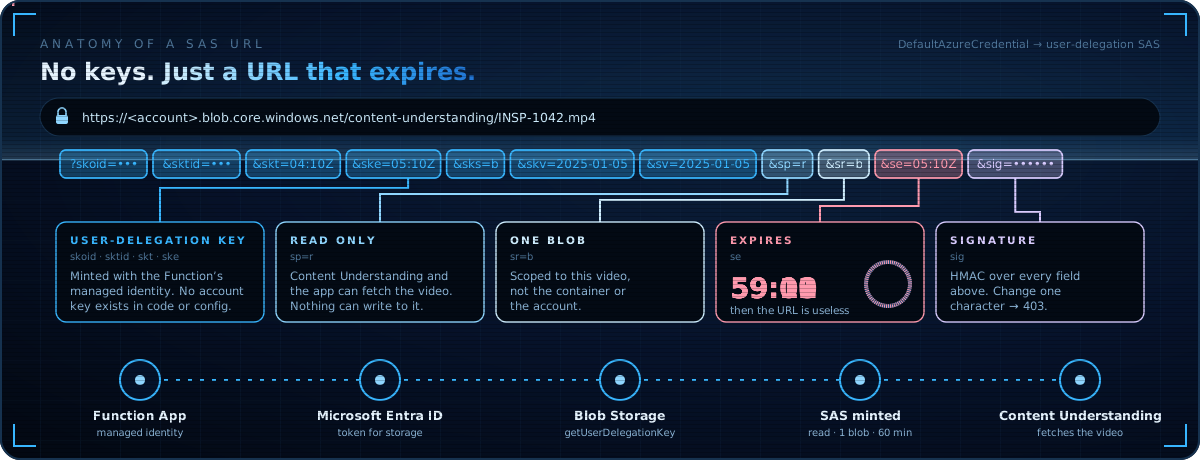
Two parts of the system need access to blobs: Content Understanding needs to fetch the video, and the canvas app needs to stream it during review. The easy answer is an account key. I did not want a storage account key living anywhere near a flow definition or app configuration.
The function runs with a managed identity and mints short-lived, read-only SAS URLs using a user delegation key, which it requests from Blob Storage as its own identity. No secret is stored, rotated, or pasted anywhere. The delegation key is scoped to an hour and read-only, so even a leaked URL has a short, boring life.
What the review app looks like
The canvas app has four screens that mirror how an inspector thinks. The Intake Queue shows every video with a processing status. Inspection Review shows the AI’s summary of the whole run, detected pipe material, diameter, visibility, and the list of proposed observations. Finding Review is where decisions happen: video on the left, the AI’s classification and the human’s disposition side by side. GIS Match is a read-only reference, showing the asset record the footage belongs to.
Every finding ends in one of five dispositions: Confirmed, Corrected, Rejected, Duplicate, or Unable to Verify. Those are not just labels. They are the feedback signal that tells you whether the analyzer is calibrated, and they are the audit trail a public works department needs when someone asks why a repair was prioritized.
What it costs
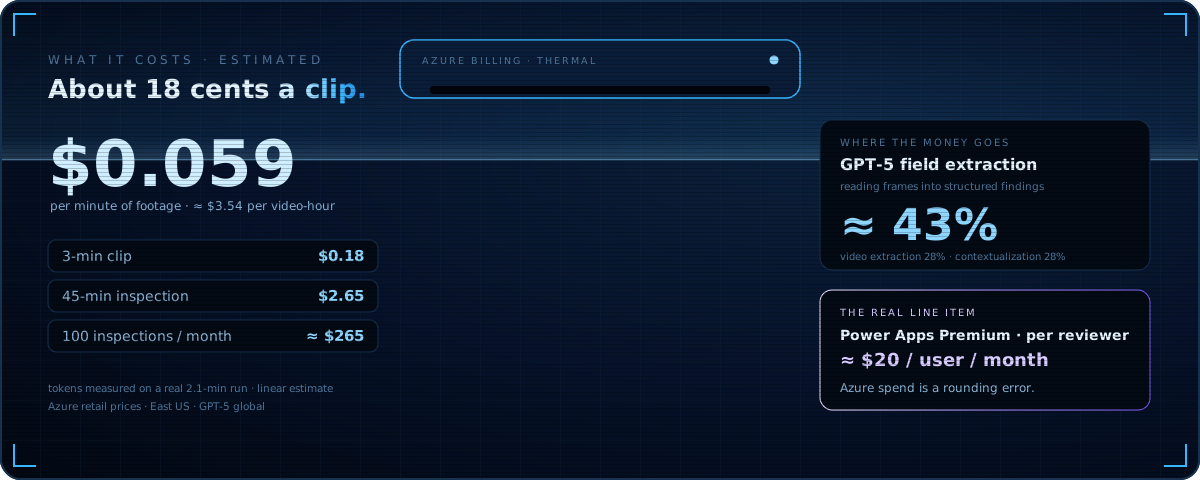
I priced it from a real run instead of a rate card. The sample inspection is 2.1 minutes of video, and the analyzer’s own usage report shows 35,000 contextualization tokens plus about 16,000 GPT-5 input tokens and 3,300 output tokens. At East US pay-as-you-go prices (video extraction at $1 per hour, contextualization at $1 per million tokens, and GPT-5 at $1.25 and $10 per million input and output tokens) that comes to about $0.059 per minute of footage, or roughly $3.54 per video-hour.
In practice: a three-minute clip is about 18 cents, a forty-five-minute inspection is about $2.65, and a hundred of those a month is about $265. At this volume, the Function App fits within the Consumption plan’s free grant, and storage and logging add less than a cent per clip. The surprise was the split. GPT-5 field extraction is the biggest line, about 43% of each clip, ahead of the video extraction itself. At scale, the schema is the lever: fewer fields means fewer output tokens.
Where this goes next
The POC answers the question it was built to answer: AI can do the first pass on sewer CCTV footage, and a human can review its work faster than they could ever watch the raw video. The next steps are the unglamorous ones that turn a demo into a system: batch intake, NASSCO PACP code validation, confidence thresholds that auto-confirm the boring findings, and feeding reviewer corrections back into the analyzer.
The pattern is the part worth taking home. AI proposes, a human disposes, and every decision leaves a record. That shape works for sewer inspections, permit reviews, damage assessments, and most of the other places where a municipality has more footage than people. The model does the watching. The inspector does the judging. That is the right division of labor.