
Exploring proactive voice and SMS engagement, Copilot Studio orchestration, and the architectural considerations behind outbound customer conversations.
Traditionally, contact centers have been reactive. A customer calls, sends an email, starts a chat, or reaches out through another supported channel and the contact center responds. But what if we already know that a customer is likely to need assistance? What if we could reach out before they contact us, provide relevant information and even resolve their needs without involving a customer service representative? This is where proactive engagement in D365 Contact Center comes into play.
Together with my colleague Pauline Kolde I’ve been experimenting with proactive engagement using both voice and SMS, combining D365 Contact Center, Customer Insights – Journeys, Copilot Studio, and Dataverse. The capabilities are interesting, particularly when introducing AI agents into the initial interaction. But there are also some important prerequisites, architectural decisions, and limitations worth understanding before implementing this in a production environment.
In this post, I’ll walk through how proactive engagement works, how I’ve configured our scenarios in Contact Center and Copilot Studio, and some of the lessons learned along the way. For a deeper dive into the Customer Insights journeys triggering the proactive deliveries, have a look at Pauline’s blog post here Don’t Wait for the Support Call: Proactive Engagement with Customer Insights – Journeys — Pauline Kolde
What is proactive engagement?
Proactive engagement essentially means that the business initiates the conversation rather than waiting for the customer to make contact. In D365 Contact Center, we can proactively reach customers through voice or SMS, with engagement initiated through a conversational journey in Customer Insights – Journeys, Power Automate, or an API.
Proactive engagement essentially turns Dynamics Contact Center from a platform that previously has handled incoming interactions, to instead also be able to initiate conversations based on different triggers and events in the business.
A proactive engagement configuration defines how that outbound interaction should happen: which outbound workstream to use, whether the interaction is voice or SMS, whether an AI agent or representative handles it, and how outcomes and retries should be handled.
Depending on the scenario, the conversation can be:
- AI-led: A Copilot Studio agent handles the interaction, provides information, asks questions, and potentially performs actions.
- Representative-led: The engagement is directed to a customer service representative.
- Hybrid: An AI agent initiates the conversation and transfers to a human representative when needed.
There are plenty of potential use cases: appointment reminders, upcoming event information, rescheduling, follow-ups, service notifications, and other situations where we already know there’s a reason to contact the customer. And this last part is important. We already have a business reason to initiate the interaction, so ideally we should also have the context required to make it relevant. As we’ll see later, carrying that context through the different components is one of the more interesting architectural challenges.
Proactive outreach through a voice channel can be done using three different dial modes:
- Progressive dialing places one call per CSR available in the queue, so that customers get minimal wait times.
- Predictive dialing uses a dynamic algorithm to initiate outbound calls before CSR become available, based on when they’re forecasted to be free. This approach maximizes CSR use while minimizing customer wait times.
- Preview dialing identifies a service representative from the specified queue, notifies them of the request to make the outbound call. The number of simultaneous calls made is dependent on the number of available representatives. If the representative accepts, they’re given time to review the details and place the outbound call to customer when ready.
The architecture: Bringing the components together
Customer Insights – Journeys adds another dimension to proactive engagement by allowing outbound interactions to become part of a larger, orchestrated customer journey.
The configuration starts in Contact Center, where we define the proactive engagement, including the channel, dialing mode, and whether the interaction should be handled by a Copilot Studio agent or a human representative. In Customer Insights – Journeys, we can then add a conversational voice or SMS step and connect it to the corresponding proactive engagement.
When a contact reaches that step, Customer Insights initiates the engagement and Contact Center takes over the interaction. Depending on the configuration, the customer might speak with an AI agent, a representative, or both if the conversation requires escalation.
What makes this particularly interesting is that the interaction doesn’t have to end there. Unlike a traditional outbound campaign, where the primary objective might be to deliver a message, conversational journeys allow the outcome of an interaction to influence what happens next.
Imagine a customer with an upcoming appointment. An AI agent calls to confirm their attendance, but the customer asks to reschedule. That outcome can be used to direct the customer into a different journey path, triggering the next step in the rescheduling process. Similarly, an unanswered call could lead to an SMS follow-up, while a successful interaction concludes the journey.
This turns voice and SMS from standalone communication channels into interactive steps within a broader customer journey, with support for branching, follow-ups, and retries based on the results of previous interactions.
Customer Insights – Journeys isn’t a prerequisite for proactive engagement, however. It’s one way to orchestrate it, and particularly useful when interactions are part of a longer customer lifecycle. For more operational scenarios, proactive engagements can also be initiated through other mechanisms. External business systems can use the Contact Center CCaaS API, predefined audiences can be uploaded through files, and AI agents can initiate outbound voice engagements using the Contact Center MCP capabilities.
For the scenarios detailed in this post, we’ve used the following components of the Microsoft business applications platform:
- Customer Insights – Journeys provides the journey orchestration and determines when an outbound engagement should be initiated.
- Dynamics 365 Contact Center manages the outbound workstream, engagement configuration, and conversation handling.
- Copilot Studio provides the AI agent that interacts with the customer.
- Dataverse holds the customer and business data that we can use to contextualize the interaction.
- And Power Automate and agent tools can be used to retrieve additional information or perform actions when required.
The key distinction is that Contact Center handles the outbound interaction, while Customer Insights – Journeys orchestrates when it happens and what should happen next.
If using conversational journeys, the important prerequisite is that Customer Insights – Journeys and Contact Center need to reside in the same Power Platform environment to be able to utilize the native integration. Another consideration is that proactive engagement is aimed at Dataverse Contact records, rather than Customer Insights customer profiles. This distinction matters when designing the customer data model and determining which audiences can be targeted through proactive engagement when using conversational journeys as the trigger.
The use case of our demo
For our use case, we designed a customer journey that combines proactive voice and SMS engagement to ensure customers are prepared for an upcoming event. In our demo environment, this is a training workshop.

The journey starts a few days before the scheduled event, when Contact Center initiates an outbound call handled by a Copilot Studio voice agent. The AI agent checks whether the participant has completed the necessary preparations and offers assistance if needed. If the customer doesn’t confirm that they’re prepared, the journey continues with a proactive SMS offering another opportunity to get in touch and request support. The details of these journeys are explained in Pauline’s post Don’t Wait for the Support Call: Proactive Engagement with Customer Insights – Journeys — Pauline Kolde
Rather than treating voice and SMS as separate scenarios, we’re using them as complementary touchpoints within the same customer journey. Customer Insights – Journeys orchestrates when and how we reach out, while Contact Center handles the actual interactions, whether through an AI agent or a human representative.
Step 1: Define the journey and customer context
In Customer Insights – Journeys, Pauline configured the journey that will initiate the proactive engagement. The journey determines which Contacts should be targeted and under what conditions, based on event registrations data. These attributes are added to the journey so they can be passed to Contact Center when the engagement is initiated.
For the voice scenario, we used the information related to the Contact and their associated business records, e.g. the event name, the XXXXXXXXX
This is an important design consideration because we don’t want an AI agent calling a customer without knowing who they’re contacting or why.
Step 2: Configure the outbound workstream
Before creating our proactive engagements, we first needed an outbound voice workstream with a voice channel configured for outbound calling. The outbound workstream determines how the proactive engagement is handled and which agent or representative should receive the interaction. The workstream needs to have a least one outbound voice channel added to it.
One important prerequisite here is that the outbound voice channel must have an approved Know Your Customer (KYC) process. Without the required KYC approval, outbound calling cannot be enabled, even if the workstream, telephony infrastructure, and proactive engagements have otherwise been configured correctly. This is an important dependency to account for early in an implementation, particularly when planning demos, pilots, or testing in non-production environments. Having a phone number connected to Contact Center does not automatically mean that it can be used for proactive outbound calling.

We also need to define context variables corresponding to the attributes being passed from the journey. These values can then be made available to the Copilot Studio agent.

The relationship between journey attributes, workstream context variables, and Copilot Studio variables is essential. If the variables are not configured and mapped correctly, the Copilot agent won’t receive the intended information.
Step 3: Configure proactive voice engagements
Proactive engagements are configured within the outbound voice workstream. Each engagement defines how outbound calls should be initiated, who or what handles the conversation, and how calls are prioritized and distributed. For our demo environment, we configured two proactive voice engagements to explore the differences between representative-led and AI-led outbound calling.
A. Representative-led outbound engagement
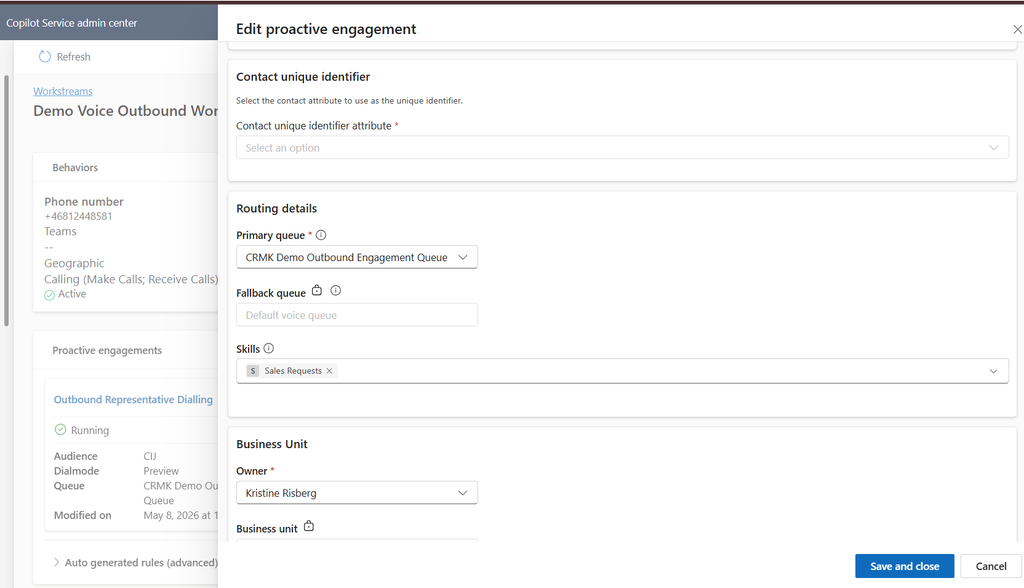
Our first configuration, Outbound Representative Dialling, uses the Preview dialing mode. In this mode, Contact Center first identifies an available representative and assigns the outbound interaction to them. The representative is connected before the customer is called, allowing them to review the engagement and any available customer context before the conversation begins.
We configured the engagement with:
- Channel and workstream: Voice, using our existing outbound voice workstream and Teams telephony number.
- Primary queue: CRMK Demo Outbound Engagement Queue, with the default voice queue as fallback.
- Skills: Sales Requests, allowing the engagement to use skill-based representative selection.
- Dialing mode: Preview, meaning the representative is connected before the customer.
- Automatic dialing: Enabled, with a delay of 1 minute and 10 seconds before the call starts.
- Priority and call order: Normal priority, processed using First In, First Out (FIFO).



The Preview mode is particularly useful for scenarios where representatives need time to prepare before speaking with a customer, such as reading up on the event prerequisites, or for other scenarios; reading up on an existing support case.
B. AI-led outbound engagement
Our second configuration, Outbound Agent Dialling, uses the Copilot dialing mode. Instead of assigning the interaction to a human representative, Contact Center initiates the outbound call using a Copilot Studio voice agent. The agent handles the initial conversation and can involve a human representative if the scenario requires it. This is the approach we use for our training workshop scenario, where customers receive an automated call ahead of their scheduled event.
The configuration includes:
- Channel and workstream: The same outbound voice workstream and Teams telephony infrastructure.
- Dialing mode: Copilot, allowing an AI agent to conduct the outbound conversation.
- Priority: Normal.
- Maximum concurrent calls: Five, limiting how many outbound AI conversations can run simultaneously.
- Call order: First In, First Out.
- Operating hours: Calls are restricted to the configured queue operating hours, as the option to call outside those hours is disabled.
- Failure handling: Continue making calls until the AI agent failure rate reaches the configured threshold of 5% over the preceding 24 hours.
- Additional rules: Not enabled in this configuration.


The concurrency setting is particularly important when scaling outbound AI engagements. Unlike representative-led calling, where the number of available representatives naturally limits call capacity, AI-led engagements can initiate parallel conversations. In this scoped demo scenario we’ve set the limit to 5 concurrent calls (mainly to keep costs down in terms of Copilot Credits) but this limit should be adapted to business needs and align with the forecasted contact volume for each outbound engagement.
We also have the option to configure how Contact Center should respond if the AI agent starts failing. Rather than allowing an outbound campaign to continue indefinitely, we can stop further calls immediately or configure a failure-rate threshold. For our demo, we’ve chosen the latter.
Choosing the right dialing mode
The distinction between the two configurations is not simply whether a human or an AI agent makes the call. It also affects how we design the engagement, manage capacity, and determine when human involvement is necessary.
Representative-led dialing is suitable when the interaction requires human judgment or preparation from the outset. AI-led dialing is more appropriate for high-volume, repeatable conversations where an agent can independently handle the initial interaction, gather information, and determine whether escalation is necessary.
In our workshop scenario, the AI agent contacts participants to check whether they’re prepared for the upcoming training. The outcome can then be used by Customer Insights – Journeys to determine whether the participant needs a follow-up SMS. This allows us to combine automated voice conversations with journey orchestration, without requiring a human representative to initiate every interaction.
Step 4: Configure the Copilot Studio agent
For the voice scenario following the first conversational journey, I’ve built a voice-based Copilot Studio agent using a combination of predefined topics and generative orchestration. The agent is built in the standard harness as the conversational harness was not yet available at the time of building this, and the Microsoft Copilot harness, previously known as the GitHub Copilot harness, does not support engagement channels.

The purpose of the call is relatively straightforward: the voice calls participants to confirm they have completed the necessary preparations. If needed, it retrieves workshop-specific prerequisites and guides participants through what’s missing. Once readiness is confirmed, the agent ends the call. If additional assistance is required, it can summarize the customer’s needs and transfer them to a human representative, with their consent.

Agent structure

The 01 Conversation Start topic is triggered when the customer answers based on the agent instructions. The agent introduces itself, explains the purpose of the call, and asks whether the participant has time to confirm their workshop preparations. The topic then ends, allowing the agent to continue the conversation based on its instructions.

If the customer confirms they’re ready for the workshop, the agent thanks them and ends the call via the End Call topic.


If the customer states they’re unsure, or if they want to hear the prerequisites again, the agent uses a two-step process to provide personalized workshop information.

It first retrieves the participant’s upcoming event and its associated prerequisites, then uses a second tool to extract a checklist that can be explained conversationally. This allows the agent to provide event-specific guidance rather than relying on generic responses.
This is done using an tool in form of an agent flow.
The agent tool
The Get participant upcoming event tool invokes an agent flow to retrieve the customer’s upcoming workshop and its associated prerequisites.
The tool takes the customer’s phone number as input, using a dynamic value from the Global.msdyn_CustomerPhone variable. This allows the flow to identify the participant and retrieve the relevant event information without asking the customer to provide their details.

The agent flow

The flow starts with the When an agent calls the flow trigger, allowing our Copilot Studio voice agent to execute the flow during an ongoing conversation.
The flow accepts one input parameter, TextCustomerPhone, which is passed automatically from the voice agent using the Global.msdyn_CustomerPhoneNumber system variable. We’ve also enabled Express mode (Preview) to optimize execution speed. This is particularly relevant for voice agents, where delays while retrieving information can interrupt the natural flow of a conversation.

Next, we initialize two string variables that will be used throughout the flow.
The first, var_ContactId, stores the Dataverse Contact ID once we’ve identified the customer. We’ll use this identifier to retrieve their event registrations.

The second, var_EventPrerequisite, will hold the workshop prerequisites retrieved from the related Event record. This is the information we ultimately want to return to our Copilot Studio agent. Both variables are initially empty and populated as the flow progresses.

The next action, List Contact based on CustomerPhone, queries the standard Dataverse Contacts table. We filter the records using the mobilephone column, comparing it against the phone number received from Copilot Studio. To avoid retrieving unnecessary data, we limit the returned columns to mobilephone, fullname, and contactid, and restrict the query to a maximum of one matching record. This allows us to identify the customer based on the number we’re calling, without asking them to provide their contact details.
One consideration for a production implementation is that phone numbers need to be stored consistently, including country codes and formatting, for this matching approach to work reliably.

Once we’ve identified the Contact, we use an Apply to each loop to process the returned Contact record. First, we store its contactid in our var_ContactId variable. We then query the custom Dataverse table msevtmgt_eventregistrations to retrieve registrations associated with that Contact. The query uses an OData filter to match the registrations against the Contact ID and returns up to ten records. This is where we connect the customer to their upcoming workshops. Rather than relying on information passed from the journey, we’re retrieving the relevant registration data directly from Dataverse during the conversation.


For each found event registration, the flow runs another Apply to each loop to retrieve the corresponding Event record from the msevtmgt_events table. Each registration references an Event record containing the details of the workshop. Inside the loop, we use the Get the related event action to retrieve that record from the msevtmgt_events Dataverse table.
We’re specifically retrieving the event’s start date (msevtmgt_eventstartdate) and expected outcome (msevtmgt_expectedoutcome), which we’re using to store workshop prerequisites in our demo environment.
By retrieving the associated Event record for each registration, we can subsequently evaluate when the workshop takes place and determine whether its prerequisites should be returned to the Copilot Studio agent.
Using the event reference stored on the registration, the Get the related event action retrieves two specific columns:
msevtmgt_eventstartdate– the scheduled start date of the workshop.msevtmgt_expectedoutcome– the field we’re using in our demo environment to store the workshop prerequisites.
This allows the flow to retrieve information about the actual workshop the customer is registered for, rather than returning generic preparation instructions.

Since a customer could have multiple workshop registrations, we need to identify which event is relevant to the current conversation. The Condition on Event Start Date action compares the event’s scheduled start date against a defined date range, using Power Automate expressions such as utcNow(), addDays(), and formatDateTime(). In our example, the condition checks whether the workshop falls within the configured upcoming window, including a comparison against five days from the current date.

If the condition evaluates to true, the flow proceeds to retrieve the prerequisites. If it evaluates to false, no further action is taken for that particular event registration.
This prevents the agent from retrieving preparation instructions for events outside the intended time window.

When an event meets the date condition, the Set var EventPrerequisite action assigns the value from the event’s msevtmgt_expectedoutcome field to our var_EventPrerequisite variable. In our demo environment, this field contains the workshop preparation instructions, such as required software, access permissions, or other prerequisites participants need to complete before attending. An important distinction is that we’re not generating these prerequisites with AI. We’re retrieving existing business data from Dataverse. Finally, the Respond to the agent action returns the value of var_EventPrerequisite to the calling Copilot Studio agent through the output parameter named EventPrerequisite. This completes the flow execution, but not the conversation.

Back in Copilot Studio, the agent receives the retrieved prerequisites and can use them to explain what the participant needs to prepare for their workshop.

If the customer confirms they’re prepared after hearing the prerequisites, the agent will invoke the 04 End Call topic.

If the customer states they need further support or have additional questions, the agent will invoke the 03 Transfer call topic. It transfers the conversation to a representative, including contextual information in the transfer message.

I’ve also configured a separate topic for answering-machine detection. The agent leaves a short message explaining the purpose of the call and that a follow-up SMS will be sent, then ends the conversation and sets the outcome variable according to the follow-up process.

In our scenario, I’ve chosen to use the same outcome value for answering machine as a busy line, because I want to follow up with an SMS rather than treating the engagement as successfully completed just because we’ve left a voicemail. This is a business decision rather than a technical requirement. Other organizations might choose to distinguish voicemail from busy lines and handle the outcomes differently.
I tend to always prefix my agent topics with numeric values. It’s a small detail, but it makes the conversation flow easier to follow when reviewing the agent configuration and troubleshooting unexpected behavior. (Remember not to add periods (.) in the name of topics, as you’re then unable to export the solution Export and import agents using solutions – Microsoft Copilot Studio.)
Proactive SMS engagement: A different conversation model
Voice is interesting because the outbound engagement can immediately become an active conversation when the customer answers. SMS behaves a bit differently.
For the SMS scenario, we wanted to follow up with workshop participants who hadn’t been reached by phone. Rather than simply sending a reminder, the idea was to give participants an opportunity to request assistance with their workshop preparations by replying to the SMS.
The message informed the customer that we had tried to reach them regarding their upcoming workshop, explained that they could reply if they needed help, and that a member of the team would get in touch.

Unlike voice, sending a proactive SMS does not immediately create an active Contact Center conversation. Instead, a proactive delivery record associated with the outbound message. The actual conversation is created when the customer responds, provided the response is received within the configured timeout window.

But before we get to that, let’s look at how the outbound SMS workstream is configured.
Configuring the outbound SMS workstream
Just as with outbound voice, we need an outbound workstream to handle our proactive SMS engagements. For this scenario, I created a workstream with the following configuration:
- Category: Outbound
- Type: Messaging
- Channel: SMS
- Work classification: Push
- Fallback queue: Demo SMS Outbound Queue
I then added an SMS channel to the workstream, using an active phone number that customers can respond to.

One important difference compared with an inbound SMS workstream is how routing is configured. Outbound SMS workstreams do not use manually configured routing rulesets in the same way as inbound workstreams. Instead, routing rules are automatically generated based on the configuration of the proactive engagement associated with the workstream. This means we configure the routing behavior through the proactive engagement rather than defining separate routing rules in the workstream itself.
In the advanced section of the workstream, we can inspect these automatically generated rules. In this example, a routing rule has been created that evaluates the ProactiveEngagementID and routes matching conversations to the Demo SMS Outbound Queue.

This is particularly useful when we have multiple proactive engagements associated with the same workstream, potentially targeting different queues. Let’s look at how the corresponding proactive engagement is configured.
Configuring the proactive engagement
The proactive engagement defines how the outbound interaction should be handled, including the routing destination and what happens when the customer responds. In the Details section, I configured the primary queue as Demo SMS Outbound Queue, which is where I want incoming responses to be routed. There is also an option to specify skills, allowing us to influence which representatives are eligible to handle the resulting conversations. The proactive engagement configuration is also where we define the contact identification settings, using a Contact attribute as the unique identifier.

The Preferences tab contains several settings that are particularly important for SMS engagements. The First response timeout determines how long Contact Center waits for the customer to respond to the proactive message. In my example, I configured the first response timeout to one day (24 hrs). If the customer responds within this period, Contact Center creates an open conversation associated with the proactive engagement. If the customer responds after the timeout has expired, the response is instead treated as a new anonymous inbound conversation, without the same proactive engagement context.
This makes the timeout an important design decision. We need to consider how quickly customers are expected to respond and how long we want the outbound engagement to remain relevant.
I configured the engagement with High priority and First In, First Out (FIFO) message ordering. These settings influence how the resulting work is prioritized and handled.

Another interesting setting determines what happens if we initiate a new proactive SMS engagement for a customer who already has an active conversation. We can choose between Close conversation to send and Do not send. In my example, I selected Close conversation to send, meaning that an existing active conversation can be closed to allow the new proactive engagement to proceed.
This is something worth considering carefully in a production scenario. Automatically closing an ongoing customer conversation to send another outbound message may not always be desirable, particularly if the customer is already receiving assistance.
Handling incoming responses: AI agent or representative?
There is another architectural decision to make: who should handle the customer’s response? An outbound SMS workstream can also be configured to use an AI agent to handle incoming responses. This could be useful when sending proactive messages to a large audience, where we expect many responses but don’t necessarily want every interaction to immediately reach a human representative.
For example, an AI agent could answer common questions about workshop preparations, retrieve information about the participant’s registration, or determine whether additional assistance is required before escalating the conversation. Kinda like what our voice agent does. However, for this SMS scenario, I chose a different approach. I want the customer’s response to be routed directly to a customer service representative, without an AI agent handling the initial interaction. The proactive message already gives the customer the option to request help. If they decide to respond, I want that request to reach a representative.
What happens when the customer replies?
In my test, the customer responded to the proactive SMS within the configured one-day timeout and asked for help with an upcoming workshop. This triggered the creation of a new open conversation in Contact Center. The conversation was routed to the Demo SMS Outbound Queue, based on the automatically generated routing rule associated with the proactive engagement.
An eligible customer service representative received the standard incoming conversation notification. When the representative accepted the interaction, the conversation transitioned from Open to Active.
This is an important distinction from the earlier behavior I encountered during testing, where SMS conversations were incorrectly being created as closed. This was confirmed by the product group to have been a defect, so if you’ve been testing SMS in proactive engagement before the end of October 2026, you might’ve come across this too. That issue has since been mitigated, and the expected conversation lifecycle now works in my scenario.
Once accepted, the representative could handle the interaction in Copilot Service workspace.

The communication panel displayed both the original proactive SMS and the customer’s subsequent responses, giving the representative visibility into how the conversation started. This is a significant improvement compared with traditional custom SMS integrations in D365 Contact Center. Previously, when implementing outbound SMS through custom integrations with third-party messaging providers, the outbound message could not be initiated through an outbound Contact Center workstream. As a result, no Contact Center conversation was created or associated with the outbound message. When the customer subsequently replied, Contact Center would create a new inbound conversation, but that conversation wouldn’t contain the original outbound SMS that prompted the response.
With proactive engagement, the original outbound message becomes part of the conversation context when the customer replies within the configured timeout window. The representative can see both sides of the interaction, even though the conversation itself wasn’t created until the customer responded. It’s a seemingly small improvement, but an important one for maintaining continuity between outbound communication and inbound customer service.
Understanding proactive delivery records
If you want to monitor your proactive deliveries and troubleshoot potential issues, it’s useful to understand what information is captured in the outbound engagement records.
In the screenshots below, we’re looking at proactive delivery records created for the SMS channel. Each record represents an outbound engagement initiated through Customer Insights – Journeys, with information about the delivery, its outcome, and any resulting Contact Center conversation.
There are a few interesting things worth highlighting here.
First, the Engagement Type is displayed as BotLed, and the Dial Mode Type as Copilot. This is somewhat confusing considering that our SMS engagements are triggered by CI-J and any resulting conversations are routed directly to human representatives, without involving a Copilot Studio agent. I haven’t established why these values are assigned to SMS engagements, but they don’t accurately describe how our scenario is configured.
The Result column is also interesting, as it provides information about what happened to the engagement. In my testing, I’ve observed three different values:

- Unknown: The engagement has been initiated, but no final outcome has been recorded. In my example, the customer has not yet responded.

- Error: The outbound message could not be sent. The two highlighted records illustrate failed delivery attempts.

- ConversationClosed: The customer responded within the configured timeout window, a Contact Center conversation was created, and that conversation has subsequently been handled and closed.
When the customer responds within the timeout window, the resulting Conversation ID is populated on the delivery record. This gives us a direct reference to the Contact Center conversation created from the customer’s response, which is particularly useful for troubleshooting and tracing interactions.

We can also see the Journey ID, allowing us to identify which Customer Insights – Journeys journey initiated the engagement. Together, these identifiers provide traceability between the originating journey, the outbound delivery, and the resulting customer conversation.

However, the Status column raises some questions.

In my example, we can see records with a status of Error and Complete, but these values don’t appear to represent a conventional engagement lifecycle.
For instance, one record has a Result of Unknown but a Status of Error, despite having an associated Conversation ID. This combination is difficult to interpret without further information about how Microsoft determines these values.
I would have expected a more intuitive lifecycle, with statuses such as Pending when the engagement is prepared but not yet sent, In Progress while the engagement is awaiting a response or has an active conversation, and Complete once the interaction has concluded. An Error status would then indicate an actual failure. Instead, the current values make it difficult to distinguish between a delivery failure, an engagement awaiting a customer response, and an interaction that is still ongoing.
My takeaway is that proactive delivery records provide useful traceability, but their Result and Status fields shouldn’t be interpreted as a straightforward representation of the customer conversation lifecycle. For reporting purposes, I would therefore look at the delivery records together with their associated Contact Center conversations, rather than relying solely on the delivery status to determine whether an engagement was successful.
A completed delivery does not necessarily mean the customer’s service request has been resolved. The conversation may still be active or require further action. This distinction becomes relevant when designing reporting and interpreting engagement outcomes.
Before you implement: Prerequisites, lessons learned, and architectural considerations
Having experimented with both voice and SMS proactive engagement, I think there’s considerable potential in bringing outbound communication into D365 Contact Center. But there are also some important prerequisites, design decisions, and limitations that become apparent once you move beyond the initial configuration.
AI agents introduce new competency and capacity requirements
Proactive engagement changes how we think about contact center demand. Traditionally, we’ve designed our contact centers around customers initiating interactions. With proactive engagement, we’re actively generating those interactions ourselves.
And if we’re planning to contact hundreds or thousands of customers, we probably don’t want every interaction to immediately reach a human representative. This is where Copilot Studio becomes particularly valuable.
An AI agent can handle the initial conversation, answer straightforward questions, retrieve information, and potentially resolve the customer’s request without involving a representative. But introducing AI also means the organization needs the competence to design, build, test, monitor, and maintain these agents.
Copilot Studio licensing and credit consumption become part of the contact center’s operating model, rather than something we only consider during development.
For voice engagements, the choice of model and harness is particularly important. For relatively straightforward scenarios, such as delivering a notification or recording a simple confirmation, the standard voice model in the standard Copilot Studio harness may be sufficient. But when we expect a genuine conversation, with follow-up questions, deviations from the expected conversation flow, or actions such as rescheduling an appointment, I recommend considering gpt-realtime. This model is available in both the standard, and the conversational harness. It provides a more natural conversational experience, but at a higher cost. Updated rates and cost estimator can be found here Copilot Credit Estimator
For a handful of calls, the cost difference might not matter much. For thousands of outbound conversations, it certainly does. The choice of model should therefore be driven by what the conversation needs to accomplish, not simply by which model offers the most advanced capabilities.
Environment architecture and customer data matter
For organizations using Customer Insights – Journeys to orchestrate proactive engagement, there’s an important architectural prerequisite: Customer Insights – Journeys and Dynamics 365 Contact Center must reside in the same Power Platform environment to use the native conversational journey integration. This is worth establishing early, particularly in organizations where marketing and customer service applications have historically been implemented in separate environments.
Customer data is another consideration. Proactive engagement through conversational journeys targets Dataverse Contact records, rather than Customer Insights unified customer profiles. Organizations relying on unified profiles need to consider how those profiles relate to Contacts and whether the necessary information is available for the outbound engagement.
Customer identification also becomes important when an AI agent retrieves additional business data during a conversation. In my voice scenario, I’m using the customer’s phone number to identify their Contact record and retrieve upcoming workshop registrations. This works for our demo, but phone numbers aren’t necessarily unique, and they aren’t always stored consistently.
A production implementation needs to account for missing records, duplicate matches, and situations where the customer cannot be reliably identified.
Outbound voice: KYC verification and approval
One important prerequisite for outbound voice engagement is having an approved Know Your Customer (KYC) process for the outbound voice channel. In this context, KYC refers to the verification process Microsoft requires before enabling proactive outbound calling. Its purpose is to establish that the organization is a legitimate business, has an authorized use case for outbound calling, and meets the requirements intended to prevent misuse of the telephony platform.
This is particularly important for proactive engagement, where the organization initiates calls to customers rather than responding to incoming calls. Without appropriate verification and controls, automated outbound calling could potentially be misused for spam, fraudulent calls, or other unwanted communications.
Configuring the outbound workstream, connecting a phone number, and setting up the telephony infrastructure does not automatically authorize the organization to initiate proactive outbound calls. The required KYC process must also be completed and approved.
It’s therefore worth addressing this prerequisite early in the implementation, particularly when planning demonstrations, testing, or production rollout. Otherwise, you may find yourself with a fully configured outbound voice solution that isn’t yet authorized to make calls.
Microsoft references: Best practices for proactive engagement campaigns and Set up outbound calling.
Context propagation remains one of the biggest challenges
One of my biggest observations is how little context from Customer Insights – Journeys automatically follows into the Contact Center conversation. We know which journey initiated the engagement, but beyond the journey identifier, relatively little business context is automatically available to the representative. And this is particularly noticeable when a human becomes involved.
Imagine receiving an outbound call assignment without knowing why we’re calling the customer. Perhaps they’re registered for an upcoming workshop, have an outstanding preparation requirement, or need to confirm an appointment. The business already knows why the interaction was initiated, but that doesn’t necessarily mean the representative does.
For AI-led conversations, we can mitigate this by passing journey attributes into workstream context variables and mapping them to Copilot Studio global variables. We can also use tools to retrieve additional information from Dataverse, as demonstrated in my workshop scenario. For representative-led engagements, we need to think equally carefully about how relevant information is presented before or during the call.
Knowing who the customer is isn’t enough. We also need to know why we’re contacting them.
SMS routing is still less flexible than I’d like
Another limitation worth highlighting is how outbound SMS workstreams handle routing. An SMS number can only be associated with one workstream, and when using proactive engagement, responses (inbound messages) are handled through the outbound workstream associated with that number.
Unlike inbound SMS workstreams, we don’t have the same flexibility to define our own work classification and routing rulesets. Instead, routing rules are automatically generated based on the proactive engagement configuration.
This works well enough when each proactive engagement has a clearly defined destination queue. But consider an organization using the same SMS number for appointment reminders, sales follow-ups, service notifications, and other types of customer communication. Ideally, we’d want to classify incoming responses based on their content and context, and route them accordingly. While different proactive engagements can target different queues, we don’t have the same flexibility to dynamically evaluate and route the incoming conversation using the standard inbound workstream configuration.
This is an important limitation to consider when designing SMS communication across multiple departments or business processes.
Proactive engagement also means proactively managing demand
There’s another consequence of initiating conversations ourselves: we’re also responsible for the demand we generate. If we initiate 5,000 outbound interactions, we need to consider how many customers might respond, how many conversations an AI agent can resolve, and how many will eventually require human assistance.
A successful proactive campaign could actually increase the number of conversations requiring representative attention. This means journey scheduling, AI containment, concurrency limits, queue capacity, and representative availability need to be considered together.
Proactive engagement shouldn’t be designed independently from contact center operations. And not every proactive interaction needs to involve a human. In many scenarios, the AI agent should be able to complete the interaction independently, involving a representative only when the customer needs additional support. But that requires a well-designed agent with access to the right business context, clear instructions, appropriate tools, and a reliable escalation process.
Engagement outcomes need to tell us what actually happened
Finally, we need to think about what a successful proactive engagement actually means.
Did the customer answer the call? Did the AI agent deliver the intended message? Did the customer confirm their preparations? Did the SMS reach its destination? Did the customer respond? Was a representative involved? And most importantly, was the underlying business need resolved? These are very different outcomes.
In my voice scenario, I’ve configured outcome variables to distinguish between answered calls, declined calls, busy lines, unanswered calls, and voicemail. Those outcomes can then influence what happens next in Customer Insights – Journeys.
For SMS, the proactive delivery records provide useful traceability between the journey, the outbound engagement, and any resulting conversation. However, as we’ve seen, the Result and Status values aren’t always particularly intuitive. This makes it important to distinguish between successful message delivery, customer engagement, conversation handling, and actual resolution. Otherwise, we risk measuring the success of our communication rather than the success of the service we’re trying to provide.
Final thoughts
What I find most interesting about proactive engagement isn’t necessarily the ability to make outbound calls or send SMS messages. We could already do those things using other solutions. It’s the opportunity to bring those interactions into the same platform where we manage our customer conversations, business data, routing, and AI agents.
By combining Contact Center with Customer Insights – Journeys, Copilot Studio, and Dataverse, we can initiate conversations based on business events, provide contextual assistance, and let the outcome determine what happens next.
But as my experiments have shown, there are still gaps to consider, particularly around context propagation, SMS routing flexibility, and interpreting engagement outcomes. And there’s a fair amount of architecture and operational planning behind what might initially appear to be a straightforward outbound call or SMS.
Still, I think this is an important direction for D365 Contact Center: We’re moving from a contact center that primarily responds to customers reaching out, toward one that can anticipate when assistance might be needed and initiate the interaction itself.
Finally I want to send a big thank you to Pauline Kolde for supporting me in this collaboration. I could never have done the CI-J part without you! <3