

So, often times if you are working on Project Contracts, you must have encountered this button which creates a separate Price List for the Quote itself – Project Contract Price List Defaulting Behavior in Project Operations
But here’s how to track and find what happens to these Price Lists and what Price Override levels are –
Creating Price Overrides
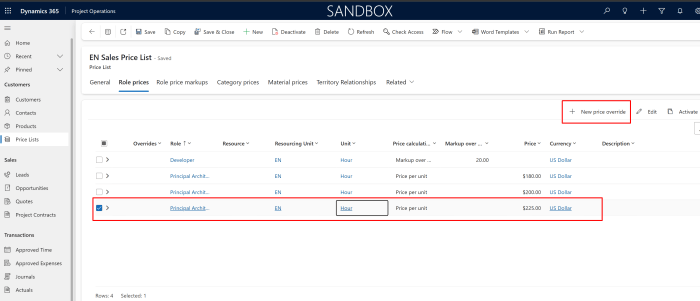
- Here’ where you can find the Prices to be overridden on a Price List level –

- Now, when a new Quick Create form is created, you can fill in the details for either the new Price or the % and the Scope.

- Now, when you add the Price Per Unit, also notice that there’s a Scope field as well. Notice the types of records for the Scope defines at what level should this take effect.

- Let’s select an Account and save.

- Now when I save the record, notice that the Price is added differently.

So, let me demystify this Part 2 of this post here: Price Override in Project Operations | Part 2 [Understanding Change Amount effect]
Hope this was helpful!
Here are some Power Automate posts you want to check out –
- Select the item based on a key value using Filter Array in Power Automate
- Select values from an array using Select action in a Power Automate Flow
- Blocking Attachment Extensions in Dynamics 365 CRM
- Upgrade Dataverse for Teams Environment to Dataverse Environment
- Showing Sandbox or Non Production Apps in Power App mobile app
- Create a Power Apps Per User Plan Trial | Dataverse environment
- Install On-Premise Gateway from Power Automate or Power Apps | Power Platform
- Co-presence in Power Automate | Multiple users working on a Flow
- Search Rows (preview) Action in Dataverse connector in a Flow | Power Automate
- Suppress Workflow Header Information while sending back HTTP Response in a Flow | Power Automate
- Call a Flow from Canvas Power App and get back response | Power Platform
- FetchXML Aggregation in a Flow using CDS (Current Environment) connector | Power Automate
- Parsing Outputs of a List Rows action using Parse JSON in a Flow | Common Data Service (CE) connector
- Asynchronous HTTP Response from a Flow | Power Automate
- Validate JSON Schema for HTTP Request trigger in a Flow and send Response | Power Automate
- Converting JSON to XML and XML to JSON in a Flow | Power Automate
Thank you!