


If you have spent any real time modeling security in Dataverse, you have had this conversation. A customer wants “this group of people should only see the rows for their region”, and you reach for the tools you have: business units, teams, hierarchy security, sharing, maybe an owning team per region and a great deal of patient explaining about why the org chart and the data model now have to agree with each other forever. It works. It has worked for the better part of two decades. But you have also had the other half of that conversation, the one where the customer says “but the region is just a column on the record”, and you have to explain why a column cannot grant access, and why the answer involves restructuring their business units.
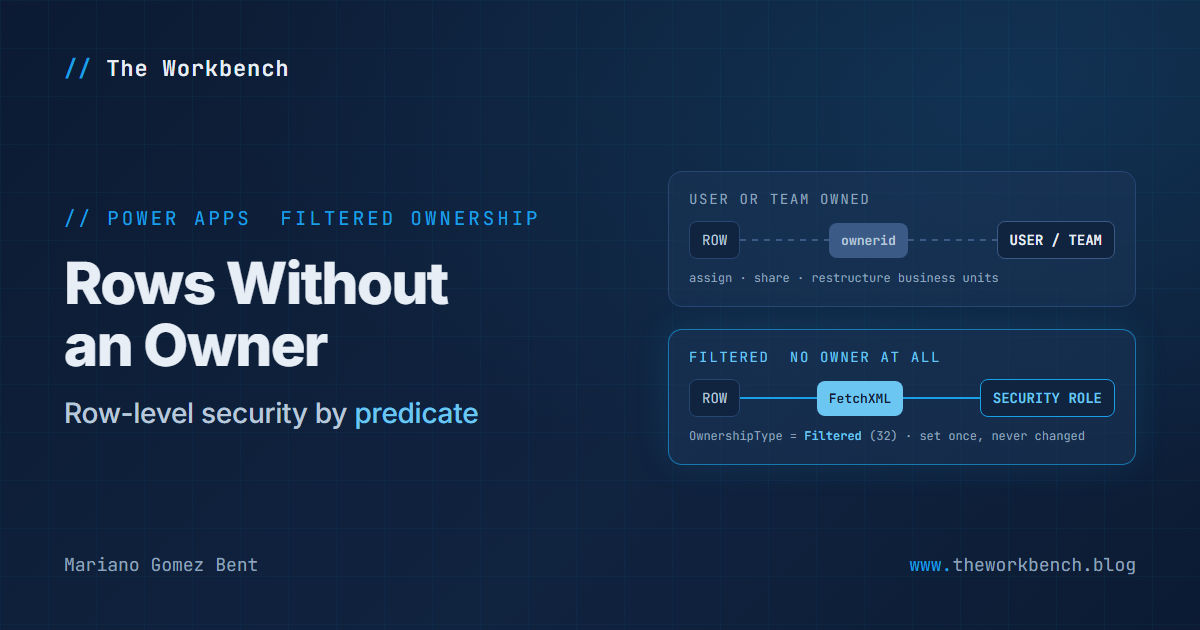
Well, in late September a new article appeared in the Power Apps developer documentation, dated September 23, 2026, and it describes a genuinely new answer to that conversation. It is called filtered record ownership, and the short version is this: a table whose rows have no owner at all, where access is decided by a FetchXML predicate evaluated against the row’s own column values.
That is a new ownership type in Dataverse. Those do not come along very often.
Background
The new page is Filtered record ownership by using code (preview), roughly 400 lines covering the SDK for .NET and the Web API. It is the developer half of a pair. The maker half, Filtered record ownership, covers the same ground through the Power Apps portal, and the developer article is careful to point you there first. Its opening is refreshingly blunt about it: you do not need to write code to use this feature.
NOTE: everything below is preview. The record ownership dropdown in the maker portal literally reads Filtered (preview), and the developer article carries the preview banner.
The model, in three objects
The design is clean once you see the pieces, and it is worth laying out before any code.
First, the table. You create it with its OwnershipType set to a new member, Filtered, which has the value 32. Rows in such a table have no owner. They cannot be assigned and they cannot be shared. And you cannot change the ownership type after the table is created, so this is a decision you make once, at design time, and live with.
Second, the record filter, stored in a new recordfilter table. It holds a display name, a unique name, and a FetchXML query that defines which rows it selects. The FetchXML root entity must match the table you eventually associate it with.
Third, the entity record filter, stored in a new entityrecordfilter table, which associates a record filter with a Dataverse table. A table can have several, so “City equals Redmond” and “City in Kirkland or Sammamish” can coexist as separate, independently activated predicates against the same table.
A security role then grants a filter for one or more of the Create, Read, Write, Delete, Append and Append to privileges, and you assign the role to users or teams. So, the whole chain in one sentence: a FetchXML predicate becomes a named filter, the filter is attached to a table, and a security role hands that filter to people for specific operations.
Access is cumulative. The documentation puts it precisely: access is the union of the filters granted through all security roles assigned to the user or their teams. Grant somebody the Redmond filter through one role and the Kirkland filter through another, and they see both cities. Nobody is subtracting anything, so when a user sees more than you expected, the answer is almost always a second role you forgot about.
Creating the table in code
Here is the table creation, the piece that makes it a filtered table at all:
var createTableRequest = new CreateEntityRequest
{
    SolutionUniqueName = "<Solution Unique Name>",
    Entity = new EntityMetadata
    {
        SchemaName = "new_Store",
        DisplayName = new Label("Store", 1033),
        DisplayCollectionName = new Label("Stores", 1033),
        Description = new Label("Stores organized by city.", 1033),
        OwnershipType = OwnershipTypes.Filtered,
        IsActivity = false
    },
    PrimaryAttribute = new StringAttributeMetadata
    {
        SchemaName = "new_Name",
        DisplayName = new Label("Name", 1033),
        RequiredLevel = new AttributeRequiredLevelManagedProperty(
            AttributeRequiredLevel.None),
        MaxLength = 100,
        FormatName = StringFormatName.Text
    }
};

service.Execute(createTableRequest);
A few things to note. The one line that matters is OwnershipType = OwnershipTypes.Filtered. Everything else is an ordinary custom table. The SolutionUniqueName is the optional parameter that associates the new component with an unmanaged solution as it is created, which you want, because every object in this feature is a solution component and you would rather not go hunting for them later. If you prefer the Web API, the same thing is a POST to EntityDefinitions with "OwnershipType": "Filtered" in the body and the solution carried in an MSCRM.SolutionUniqueName header.
Creating the filter
Next, the predicate itself, as a row in the new recordfilter table:
string fetchXml = """
    <fetch>
      <entity name="new_store">
        <filter type="and">
          <condition attribute="new_city" operator="eq" value="Redmond" />
        </filter>
      </entity>
    </fetch>
    """;

Entity recordFilter = new("recordfilter")
{
    ["displayname"] = "Stores in Redmond",
    ["uniquename"] = "new_storesinredmond",
    ["fetchxml"] = fetchXml
};

CreateRequest createRecordFilterRequest = new() { Target = recordFilter };
createRecordFilterRequest["SolutionUniqueName"] = "<Solution Unique Name>";

CreateResponse createRecordFilterResponse =
    (CreateResponse)service.Execute(createRecordFilterRequest);
Guid recordFilterId = createRecordFilterResponse.id;
Two things in there are deliberate. The FetchXML is stored as plain text on the row, and its root <entity> name must match the table this filter will be associated with. Notice also that this uses CreateRequest rather than the more convenient service.Create(entity), and that is deliberate: CreateRequest is what lets you set the SolutionUniqueName optional parameter. Give the filter a unique name with your publisher prefix, the same as any other component.
Then you associate the filter with the table:
Entity entityRecordFilter = new("entityrecordfilter")
{
    ["name"] = "Stores in Redmond",
    ["objecttypecode"] = "new_store",
    ["recordfilterid"] = new EntityReference("recordfilter", recordFilterId)
};

CreateRequest createEntityRecordFilterRequest = new() { Target = entityRecordFilter };
createEntityRecordFilterRequest["SolutionUniqueName"] = "<Solution Unique Name>";

service.Execute(createEntityRecordFilterRequest);
objecttypecode takes the table’s logical name as a string, and recordfilterid is a lookup back to the filter you just created. In the Web API the same association is made with the RecordFilterId@odata.bind navigation property. This row is what activates the predicate for that table, which is why the maker documentation describes creating one as the step that turns a filter on.
Why it matters, for makers
The headline for a maker is that row-level security is now expressible as a condition on a column, in a dialog you already know how to use, and it never touches your business unit structure.
Better still, the maker path has a genuinely nice touch: you do not have to hand-write FetchXML. You open a model-driven app, open the table, use the Filters pane to build the condition visually, and then select Download FetchXML to get exactly the XML you need to paste into the record filter. Building the predicate with the same filter builder your users already use, then shipping it as a security rule, is a good piece of design and whoever thought of it deserves the credit.
The thing to be careful about is the one the documentation flags twice, and I will flag it a third time: test with a nonadministrator account. The system administrator role carries a system-provided All records filter, so an administrator sees everything and will never experience the restriction. Demo this as an admin and you will demo nothing at all.
Why it matters, for professional developers
Three things I would want on the table before recommending this to anyone.
The first is that the ownership type is immutable. Filtered is chosen at CreateEntityRequest time and cannot be changed afterward, which means this is not something you retrofit onto an existing table. It is a modeling decision, made up front, and the migration path from a user-owned or organization-owned table to a filtered one is “create a new table and move the data”. Plan accordingly.
The second is that a surprising amount of the platform assumes an owner exists. Anything in your codebase or your process that reaches for ownerid, or calls AssignRequest, or grants access with GrantAccessRequest, simply has no counterpart here. That is the point of the design rather than a criticism, but it turns up during testing rather than during design if nobody says it out loud early.
The third is that this is now application lifecycle management surface area. Record filters and entity record filters are solution components, and the security roles that grant them are solution components too. Which means the predicate that decides who sees what is a versioned, deployable artifact that moves between environments with your solution. That is the part I find genuinely exciting, and I would even venture to say it is the more important half of this feature: your row-level security rules stop being environment configuration that somebody clicked together in production and start being something you can review in a pull request.
One operational note for your runbook: deleting a record filter also deletes its associated entity record filters. Review every role that grants a filter before you change or remove it, because pulling a predicate out from under a role is not a change you want to hear about from a user who suddenly cannot see anything.
The demo I would build
The demo writes itself, and it is the two-screenshot kind that makes a point in about four seconds.
Build a Store table with a City column and populate it with a dozen rows across Redmond, Kirkland and Sammamish. Create two record filters, one per city, and two security roles, each granting Read on one filter. Then sign in as two nonadministrator users with one role each, open the same view of the same table, and put the two screens side by side. Same app, same table, same view definition, two different sets of rows, no business unit involved anywhere.
Then, for the finale, assign the second role to the first user as well and refresh. The rows union together in front of the audience. That is the cumulative-access rule made visible, and it is the single behavior most likely to confuse somebody later, so it is worth burning into people’s memory while you have their attention.
The companion repo
Which is no longer a sketch: it is at github.com/dgpblogster/filtered-ownership-lab, MIT, clone it or download the zip. The Web API calls are the part to trust first, since there is nothing between the request and the service. Laying it out:
filtered-ownership-lab/
  README.md                    what preview means here, and the admin-blindness warning
  solution/
    src/                       unpacked unmanaged solution: table, filters, roles
  src/
    FilteredOwnership.Setup/
      Program.cs               verbs: create-table | create-filter | associate | teardown
      TableBuilder.cs          CreateEntityRequest with OwnershipTypes.Filtered
      FilterBuilder.cs         recordfilter + entityrecordfilter, both via CreateRequest
  http/
    01-create-table.http       Web API equivalents, one file per step
    02-create-recordfilter.http
    03-associate.http
    04-inspect-filters.http    the $expand query that shows the live configuration
  data/
    stores.csv                 sample rows across three cities
  docs/
    cumulative-access.md       the union rule, with the two-role walkthrough
The http/ folder is there because seeing the raw request makes this model click in a way an SDK wrapper hides: "OwnershipType": "Filtered" in a JSON body is more memorable than an enum. 04-inspect-filters.http is the one people will reuse, because it answers “what filters are live on this table right now”:
GET [Organization URI]/api/data/v9.2/entityrecordfilters?$select=name,objecttypecode,statecode&$filter=objecttypecode eq 'new_store' and statecode eq 0&$expand=RecordFilterId($select=displayname,uniquename,fetchxml) HTTP/1.1
Accept: application/json
OData-MaxVersion: 4.0
OData-Version: 4.0
The statecode eq 0 condition restricts the result to active associations, and the $expand on RecordFilterId pulls the actual FetchXML of each filter into the same response, so one call gives you the complete picture of what predicates are in force on a table. That is your first stop when a user reports seeing the wrong rows.
Steps to recreate
The maker path is the one to start with, and the maker article has the full click path. These are the steps that carry a decision:
1) Create the table inside a solution, and set Record ownership to Filtered (preview). This is the one you cannot take back later.
2) Build the predicate without writing XML. Open your model-driven app for editing, open the table, use the Filters pane to add a condition such as City equals Redmond, then select Download FetchXML.
3) Create a Record Filter in the solution and paste that FetchXML into it, with a unique name carrying your prefix.
4) Create an EntityRecordFilter pointing at that filter, with the table’s logical name as the related entity. This is the row that turns the predicate on.
5) Grant the filter on a security role, Read being the one to start with, and assign the role to a user or team.
6) Sign in as a real nonadministrator account. Not your own: the system administrator role carries an All records filter, so you will see everything and prove nothing.
You need the system administrator role yourself to configure any of it.
Final Notes
What I keep coming back to with this one is how much it changes the shape of a conversation I have had dozens of times. For years, “who can see this row” in Dataverse has been a question about structure: which business unit, which team, which position in the hierarchy, who owns it. Filtered record ownership makes it a question about the data. The row’s own values decide, and the rule that reads them is a versioned artifact that ships in a solution.
It does not replace the ownership model we have. Nothing here helps you with a table where the answer really is “the person who owns it and their manager”, and for that, user and team ownership remains exactly the right tool. But for the very large category of requirements that were always secretly about a column, this is a much more direct road, and it means you stop having to reorganize a company’s business units to express a rule about a city name.
It is preview, so build a lab, not a production rollout. But build the lab. This one is worth your Saturday.
Until next post!
MG.-
Mariano Gomez Bent
Former Microsoft BizApps MVP