



Recently, while working with the Projects table from a Finance & Operations (F&O) environment, we ran into an error while using the Get a record action in Power Automate. (BTW this was the first we were using the Fin & Ops connector)
The flow kept failing with the following message:
Only 1 of 2 keys provided for lookup, provide keys for dataAreaId, ProjectID.
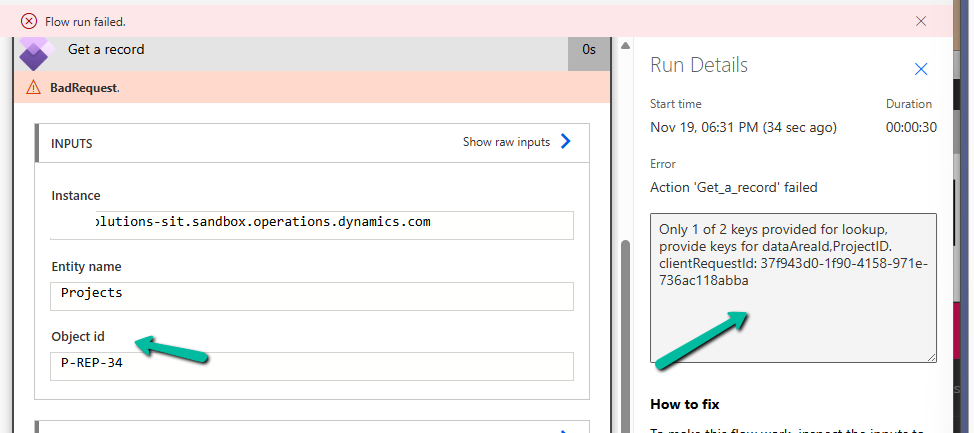
This error appears when we try to fetch a record from an F&O using only the ProjectID. But unlike normal Dataverse tables, F&O tables often come with composite keys.
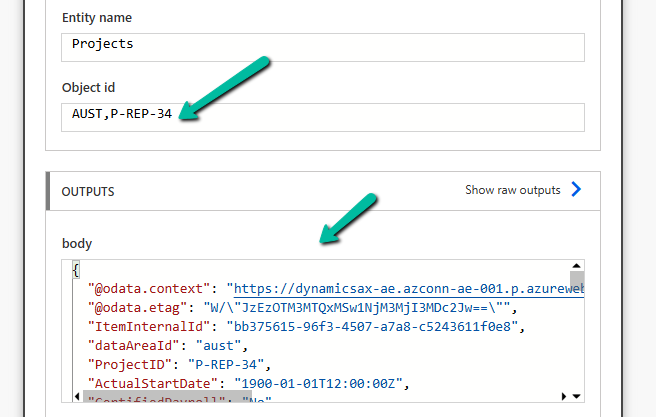
Instead of passing just the ProjectID, we must pass the full composite key in the format:
dataAreaId,ProjectID
In our case, the correct value was:
AUST P-REP-34
Below, we can see it working properly
At one point, even after passing the correct composite key, we started getting a NotFound error:
Action ‘Get_a_record’ failed – NotFound
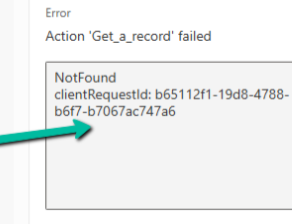
Nothing had changed in the inputs — it was just not working. The fix was surprisingly simple..
We deleted the Get a record step, re-added it, provided the same inputs again, and the error disappeared. It could be related to the connection reference not being updated properly in the background.
Hope it helps..
Discover more from Nishant Rana’s Weblog
Subscribe to get the latest posts sent to your email.
Share It –

