

A query object in AL object type built for one job: reading data. You describe a result set by declaring one or more tables as data items, nesting them to express joins, and choosing the columns you want back. On top of that you can filter rows, group them, aggregate values with methods such as Sum or Count, and limit the number of rows returned.
Because the whole definition is handed to the database as a single request, a query is often a better fit than looping over records in code, especially when you need to join data from several related tables at once. A query can also be exposed as an OData endpoint by setting its type to API.
Unless you specify otherwise, a query runs with ReadUncommitted transaction isolation level. In plain terms, the query does not care whether the rows it touches belong to a finished transaction. The upside is speed. The query takes no locks, so it never waits for anyone and nobody waits for it. The downside is that the values it returns might disappear. If the other transaction fails and rolls back, your result described a state of the database that was never made permanent.
Starting from Dynamics 365 Business Central 2026 Wave 2 release (version 29, runtime 18) you can now specify a transaction isolation level also for an AL query object by using the new ReadState property.
Possible values for these property are summarized in the following table:
| Value | What it reads | Locking behavior | SQL equivalent |
|---|---|---|---|
ReadUncommitted (default) |
Everything, including uncommitted changes | None | Read Uncommitted |
ReadCommitted |
Only committed data | Nothing keeps the rows stable for the rest of the transaction | Read Committed |
ReadShared |
Only committed data | Shared locks held until the transaction ends | Repeatable Read |
ReadExclusive |
Only committed data | Update locks that stop others from changing or deleting the rows | UPDLOCK |
ReadUncommitted is the permissive default described above. Other sessions remain free to read, change or delete the same rows while your query runs. It is the cheapest option in terms of waiting, and the least reliable in terms of what you get back.
ReadCommitted is the new middle ground. The query sees only data that has been saved by a finished transaction, so it can no longer be misled by work in progress. What it does not promise is stability: if you read the same rows again later in the same transaction, another session may have changed them in the meantime.
ReadShared keeps the committed-only rule and adds shared locks, which last until the surrounding transaction ends. Other sessions can still read those rows, but they cannot alter or remove them while the locks are held.
ReadExclusive also limits the query to committed data, but the locks it places are update locks. They prevent other transactions from changing or deleting what you read. Whether other sessions can still read those rows depends on their own transaction types.
For both locking modes, the transaction type of the code running the query is left untouched. The property only affects how the query reads.
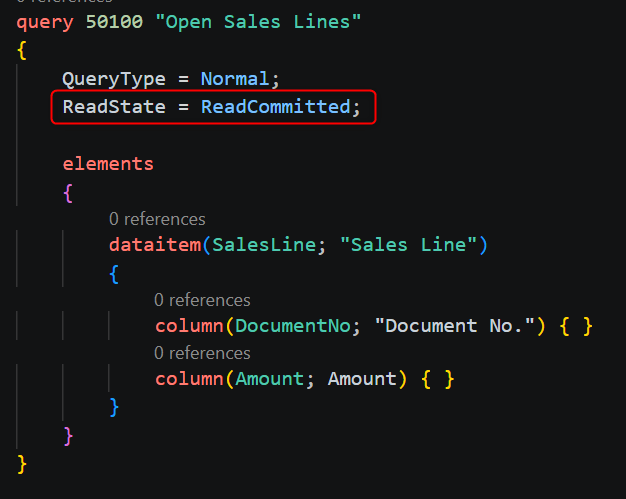
You can set this property in the AL query definition as in the following example:
There are some important aspects to remember:
- Queries in AL ignore
CurrentTransactionType. If you have been steering isolation for record reads with that call, do not assume it reaches your queries. TheReadStateproperty takes precedence, so it is the only lever that matters for them. - Every query decides for itself. Each execution honors its own
ReadState, regardless of which queries ran earlier in the same transaction. You can therefore read uncommitted and committed data from the very same tables within one transaction, if you want to. - The strictest lock wins and stays. When several reads touch the same row with different settings, the strongest lock placed on it remains until the transaction is committed. A single conservative query early in a long routine can therefore keep rows protected, and other sessions waiting, for the rest of that routine.
A useful way to decide the right transaction isolation level for your AL query objects is to ask what the query’s result will be used for:
- Display and analysis: if the output is shown to a person and a momentary inaccuracy is harmless,
ReadUncommittedis a defensible choice. - Decisions that trigger writes: if the result determines whether something is inserted, changed or skipped, reading data that may be rolled back is a real risk.
ReadCommittedis the minimum, and it is often enough. - Results that must stay stable.: if you need the rows to remain unchanged until the transaction ends, step up to
ReadShared. - Read, then modify: if you read rows and then update those same rows, you want to stop other sessions from changing them in between. This is what
ReadExclusiveexists for, at the price of more waiting for everyone else.
Remember that stricter reads are safer, but they are never free. Locks that live until the end of a transaction can turn a short query into a long-lived obstacle, especially inside routines that run for a while, such as posting or batch jobs.
Queries are easy to write and easy to forget about. But the ReadState property decides whether they can see data that another user has not yet committed, and whether they hold locks while they run.
For queries that only display data, a permissive setting is often fine. For queries whose results drive a decision or a write, it is worth choosing a stricter one on purpose. ReadCommitted is a good starting point, and ReadShared or ReadExclusive are there when you need more protection.
Take a few minutes to review your queries and decide, for each one, how careful it needs to be.