

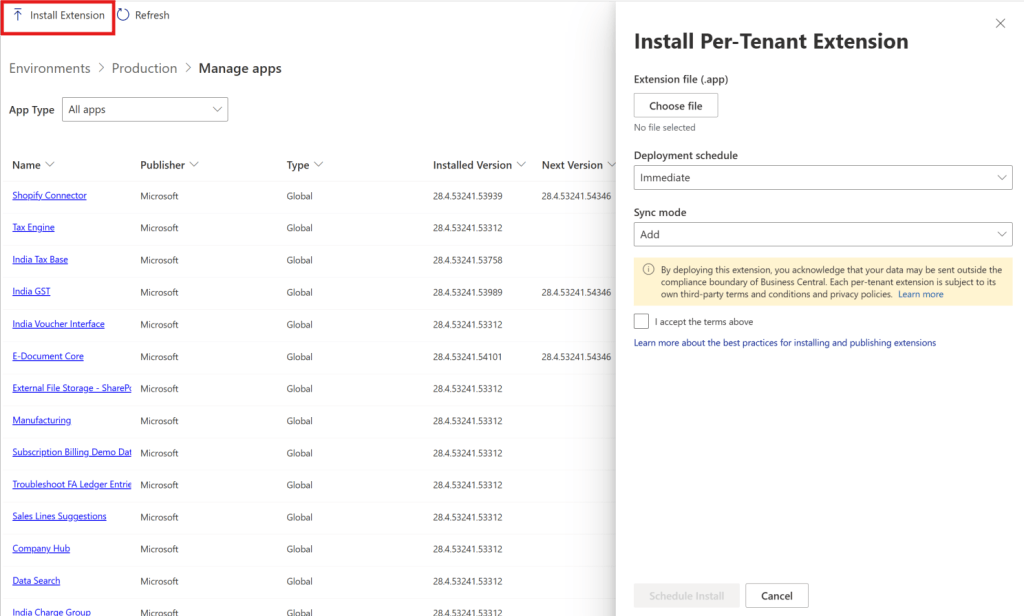

For as long as most Business Central partners have been shipping per-tenant extensions, the workflow has looked the same: log into the customer’s tenant, open Extension Management, choose Upload Extension, select the .app file, pick a schema sync mode, accept a disclaimer, deploy. It’s a familiar ritual, repeated across every customer, every update, for years.
That workflow now has an expiration date.
The Admin Center Is No Longer the Alternative Path. It’s the Only Path.
Microsoft has made the Business Central admin center and its API the recommended way to upload, install, schedule, and manage per-tenant extensions. That alone wouldn’t be worth a newsletter recommended paths shift constantly, and partners are used to evaluating whether to adopt them on their own timeline.
What makes this different is the second half of the announcement: the in-product Extension Management upload flow, and the old Automation API’s extensionUpload endpoint, are both deprecated and planned for removal in Business Central version 30, arriving with 2027 release wave 1. This isn’t a quiet preference shift. It’s the same pattern I described with SOAP web services a few weeks ago — a fixed removal date attached to a workflow a lot of partners still depend on without thinking about it.
There’s a transition detail worth planning around now rather than discovering later: the Admin Center and Extension Management aren’t fully interoperable during this period. A PTE installation or update scheduled through one experience is only visible in that same experience until it completes schedule something in the Admin Center, and it won’t show up in Extension Management’s view until the install actually finishes. Microsoft’s own guidance is to avoid mixing both tools on the same environment during the transition, specifically to prevent that inconsistent picture of what’s actually scheduled. Extension Management itself isn’t disappearing entirely at removal current plans keep it available for viewing installed extensions, with the upload and install capability removed. Whether the page is retired completely at some later point hasn’t been decided.
What Actually Changes in the New Flow
The admin center now offers full lifecycle control over PTEs directly upload, immediate or scheduled installation, and visibility into upcoming extension versions, all from one place instead of requiring a login to each individual customer tenant through Extension Management. The API accepts extension package uploads directly, removing the more complex configuration the old Automation API required.
The deployment screen itself reflects this consolidation: choose the extension file, set a deployment schedule immediate, next update window, or next minor or major update and select a sync mode before deployment proceeds. The compliance disclosure now sits directly in that same flow, making explicit at the point of deployment that a per-tenant extension may send data outside Business Central’s compliance boundary, subject to that extension’s own third-party terms. It’s not new information, but making a partner or administrator actively acknowledge it as a required step, rather than as documentation they may never have read, is a meaningful change in how that risk gets surfaced.
The Part That Changes How This Work Gets Done
Every new admin center endpoint for PTE management is also exposed as a tool through the admin center API’s MCP server. That means uploading, installing, and scheduling extensions is no longer only something a person does by clicking through a UI. It’s something an AI agent can do directly, through VS Code or another AI-assisted workflow, using the same endpoints a human would use manually.
This connects directly to the pattern running through the rest of this release. Agents are increasingly capable of operational tasks that used to require a developer or administrator sitting at a keyboard — debugging sessions, profiling performance, and now, extension deployment itself. A build pipeline that used to end with a person logging into Extension Management can now end with an agent calling the same admin center API directly, without a human in the loop for that step at all.
What Partners Actually Need to Do Before 2027
This isn’t an urgent problem today. It becomes one on a fixed schedule. Any partner still using the in-product Extension Management upload flow, or scripts built against the old Automation API extensionUpload endpoint, has a deprecation deadline now attached to that dependency version 30, 2027 release wave 1 even if it feels distant. In the meantime, the safer path for any environment already testing the Admin Center flow is to pick one tool and stay with it rather than alternating, given the visibility gap between the two during this transition period.
The practical work is straightforward but easy to defer: inventory which deployment scripts, CI/CD pipelines, and manual processes still route through the old flow, and migrate them to the admin center API before the removal date arrives rather than after. The organizations that treat this as routine platform maintenance now will experience it as a non-event in 2027. The ones that don’t will be doing this migration under deadline pressure instead of on their own schedule.
Finally
A deployment workflow this familiar is easy to keep using without noticing it has a shelf life now. The admin center consolidation is a real improvement centralized management, direct API upload, and now AI-assisted deployment through MCP tools. But the improvement comes bundled with a deadline, the same way the platform’s other architectural changes this year have.
The lesson isn’t really about per-tenant extensions specifically. It’s that the safest assumption for any BC partner right now is that a workflow that has worked unchanged for years is exactly the kind of thing worth checking against the current deprecation list, before it checks itself against your deployment pipeline on its own schedule.