



We might get the below error while using LINQ to query Dataverse – “System.NotSupportedException: ‘Invalid ‘where’ condition. An entity member is invoking an invalid property or method.’” Here we got the below error because we used the HasValue property.
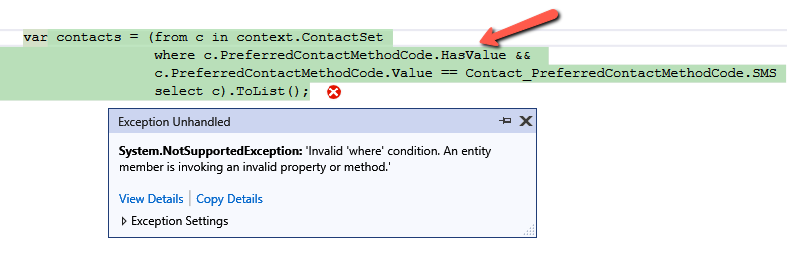
Here the issue with HasValue arises because FetchXML doesn’t have a direct equivalent for nullable checks like HasValue in LINQ. In FetchXML, null checks are handled explicitly through conditions like neq (not equal) or eq (equal) with the null value. Therefore, instead of using HasValue, we need to manually check for null using != null or GetValueOrDefault().
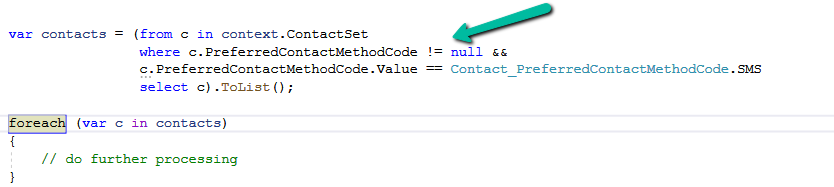
We will also get the same error on below query.

Here we get this error because OriginatingLeadId is a LookUp referencing Lead table, and we are trying to access the Name property of it in the where clause, which cannot be directly translated into FetchXML. To fix it we can perform a join between the Contact and Lead table.
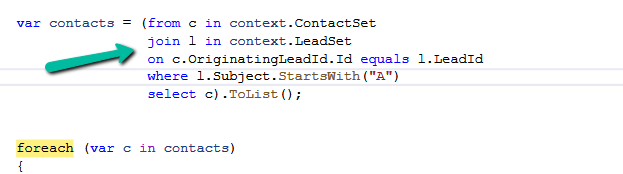
Let us see one more example.
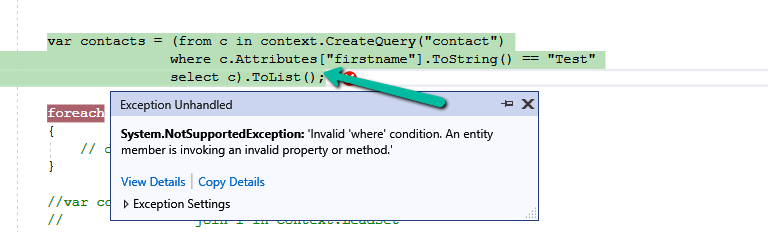
The query, c.Attributes[“firstname”].ToString() is trying to access the firstname attribute and convert it to a string. However, the LINQ provider doesn’t know how to translate.ToString() into a valid FetchXML query.
To fix it we can use GetAttributeValue method.

Or doing the casting

However, we will get the same not supported error if we try to use Attributes Collection.
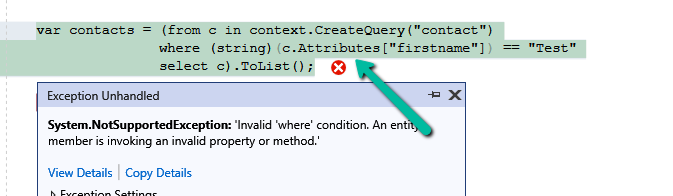
The error occurs because of the syntax c.Attributes[“firstname”] directly accesses the internal Attributes dictionary of the Entity object. The LINQ provider in Dataverse (Dynamics 365) cannot translate this access pattern into a FetchXML
Check more about the LINQ limitations
Hope it helps..
Discover more from Nishant Rana’s Weblog
Subscribe to get the latest posts sent to your email.
Share It –

