

Now Reading: Logic apps – Handling AND OR conditions
-
01
Logic apps – Handling AND OR conditions


When building workflows in Azure Logic Apps, one of the most common challenges developers face is correctly handling AND and OR logic inside the Condition action. The designer interface makes simple comparisons easy, but as soon as you need multiple conditions—especially a mix of AND/OR—the logic can become confusing.
I had an instance where I need to validate an Item Number. In my business scenario, an item number may be optional, or it may follow specific naming rules.
Imagine my Logic App that receives an item record from a system. Before processing it further, I need to validate the item number and need to stop if the following rules are met
* If the item number is missing
* If the item number ends with “W”
* If the item number ends with “WN”
If none of these conditions are met, the workflow should take a different path.
This means any of the conditions being true should allow the workflow to continue. That’s classic OR logic.
How to proceed? The given steps are followed as per my business scenario and this can be tweaked as per the readers use case.
- A variable to capture the Item Id from the request
2. I am reading the value from the request which is in array
triggerBody()[0]?['data']?['ProductDetails'][0]?['ITEMNO']
3. Add the condition which should meet the following condition if the Item is empty or if the item ends with ‘W’ or Item ends with ‘WN’.
I started with the check if the Item is empty . By default the condition will be AND.

Then added the next set of condition for Item ending with W or WN
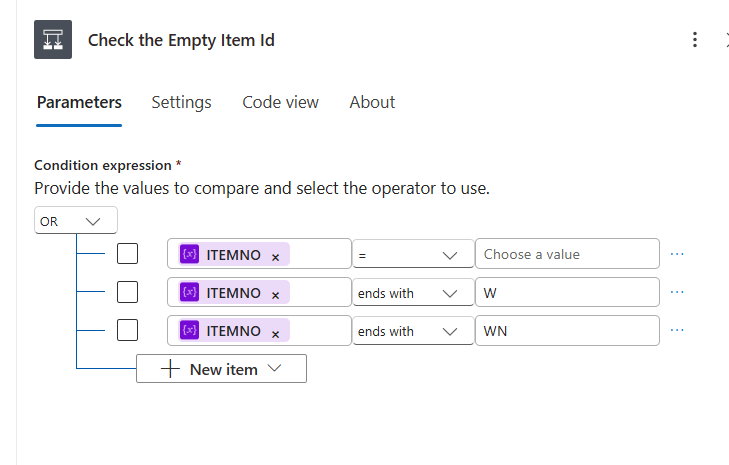
I included both W and WN because other item codes ending with W* also need to be processed. This ensures that if a request contains an item like ‘XXXXWJ’, the flow will still run.
When these conditions are met, the flow is aborted. Add the terminate condition.
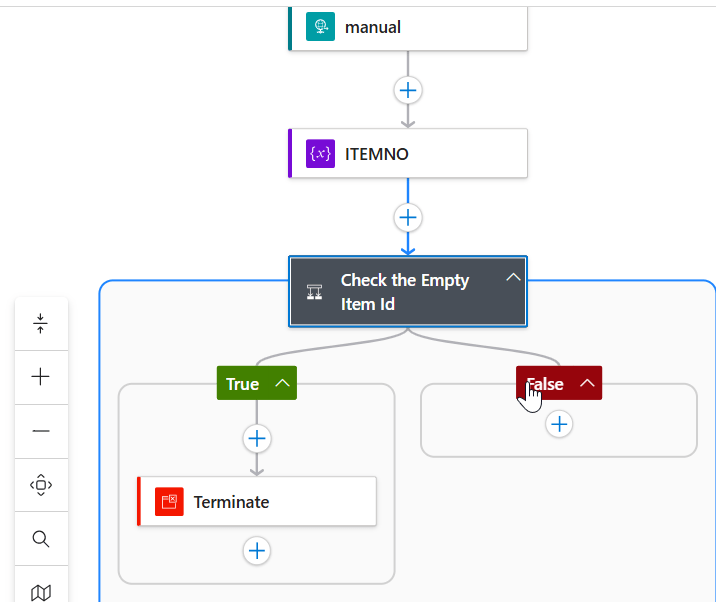
The key takeaway is this: whenever your workflow requires multiple comparisons—especially when combining AND and OR—use expressions to explicitly control the logic. This ensures your conditions behave exactly as intended and keeps your Logic App easier to maintain and troubleshoot.
With this approach, you can confidently build more complex validations and decision paths in your workflows.
Original Post https://anithasantosh.wordpress.com/2026/04/21/logic-apps-handling-and-or-conditions/


