



This blog is part of the series: What is <this tech> and what is it used for?
Copilot answer
Copilot Studio is Microsoft’s graphical low-code platform for building, training, and managing custom AI agents that combine language models, knowledge sources, connectors, and automation.
Teams use it to create conversational copilots that answer questions, automate workflows, run agent flows, and integrate securely with Microsoft 365, Azure services, and external systems.
It’s used to deploy assistants across web, Teams, mobile, and other channels to improve customer support, employee productivity, and domain-specific automation.
Explain it to me like I’m 10 years old
Copilot Studio is like a workshop where you can build a smart helper that talks and answers questions.
You pick what it should know, teach it with examples, and connect it to apps so it can do things for you.
Once it’s ready, the helper can chat with people, find information, and even start tasks like sending emails or opening files.
Specialist answer
Katerina Chernevskaya, Power Platform Architech, KPMG Bulgaria.
Copilot Studio is Microsoft’s platform for building AI agents.
It lets you design conversational experiences, connect them to your business data and systems, and control how they behave.
For me personally important part is governance – with Copilot Studio and Copilot Studio Kit you specify what the agent can do, how it is monitored and how it keeps improving in a secure way.
Daniel Laskewitz, Principal Cloud Advokate at Microsoft
Copilot Studio is Microsoft’s low-code platform for building custom AI agents that can chat with users and actually get things done.
You can create agents that understand your company’s specific needs, connect to your data sources, and plug into apps through the Power Platform – and the good part is: no computer science degree is required.
Your agents can live wherever your users are, whether that’s Teams, your website, or standalone apps.
And for more complex scenarios, you can even combine Copilot Studio with Microsoft Foundry to build advanced AI agents with custom models, orchestration, and more
Explain it like it’s my first day on the job
Think of a chatbot. No, not the bad kind that can’t help you with anything.
Think about the best experience you’ve ever had with a chatbot. Now think about that paired with AI and grounded in your companies data, and you’re starting to understand what Copilot Studio can build for you!
Instead of calling it bots, Microsoft are now calling it Agents. Probably because it has more of a brain and can help way more than the traditional bots ever could.
Starting at https://copilotstudio.preview.microsoft.com/ or https://copilotstudio.microsoft.com/ you can ofcourse use AI to start creating your agent, or you can create workflows to get your agent to do things.
As you can see from the screenshot, I’ve started with the prompt: “Check what should be put in my ERP system for the previous week from my calendar and my emails. Make a list with hours I should bill for.” This was the explanation on the agent I want to create.
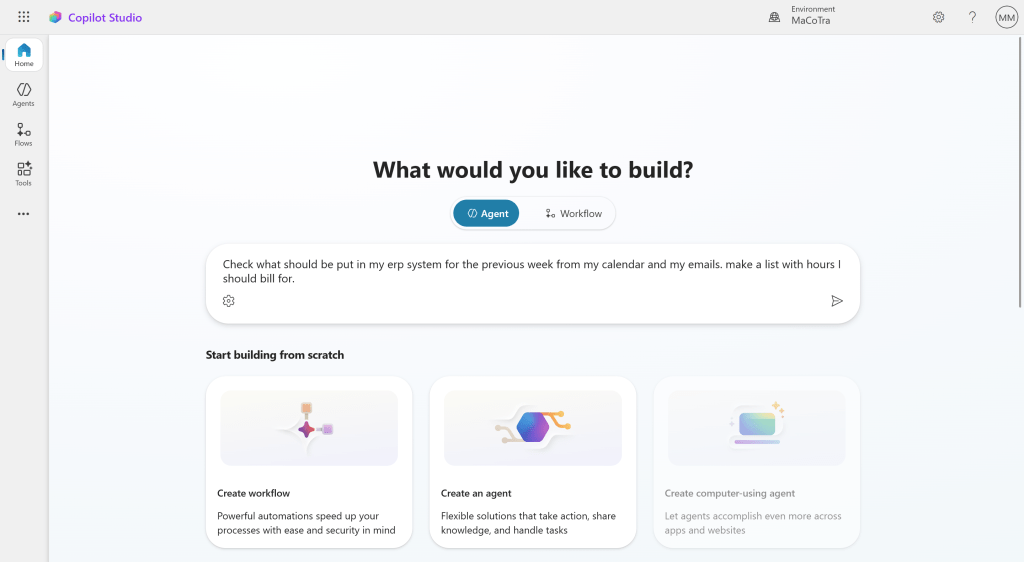
If I just try to get an answer from the new agent straight away, it wont have access to check what I want it to check. So the first step I need to do, is give it access to Tools and Knowledge sources. It’s the same as if you gave a human the same prompt. They would know what to do, but they wouldn’t have access to what they needed to do the job.

One of the things I can give the agent access to is something called MCP (Model Context Protocol) Servers, which can act like the brain of your agent. It can be filled with amazing things giving your agent an insane amount of knowledge. You can listen to CRM Rock podcast where we talk with Daniel about what MCP servers are.

Once I’ve added my MCP server and/or other knowledge bases and tools, I can ask the agent the same question again, and now it has access to my calendar and can give me a good overview of what I’ve put in my calendar and in my emails that should be billable work. I’ve not said how I should trigger it or which words it should reach to or anything else. There’s still a lot I can do to make the agent smarter and better, but this is a huge step as to how you needed to create your bots back in the day – a year ago….

It’s very easy to create agents, it’s simple to give them a brain, and they will actually help internal people or external people.
Use cases with large customers
On big customer I was working with wanted to use agents, but were worried because a lot of them had been burned by the old school bots. They were using Dynamics 365 Customer Service and had a good knowledge base filled with relevant information. We created an agent connected to Dataverse and their knowledgebase. We first tested the agents internally for the support team, and then pushed it to the public through their website. The support team loved it as they didn’t have to look through multiple articles and got the answers they were looking for a lot faster. The public got answers faster and didn’t have to log support tickets, so everyone was happy.
I know the sales people at Microsoft are using agents to get relevant information about new or potential customers before they are meeting with them. Imagine how much information Microsoft has about customers in their internal systems, think of how long it would take someone to find all that relevant information. The agent can now do it for them in a matter of minutes!
Imagine donating money to those less fortunate than you is one of the pillars of your religion. Now imagine an organisation doing their best to give out that money, to those in need, but get over 10 000 applications for aid every single month. Who do you give that money to, who are in the most urgent need of that donation? Well that is the everyday life for the National Zakat Foundation in the UK. With the help of Copilot Studio (and other technologies from Microsoft) the application wait time has been reduced by 80% from four/five months, and they are hoping to get it even further down. Now that’s a great way technology can be used to help people in need. Read the full story here: https://www.microsoft.com/en/customers/story/23068-national-zakat-foundation-microsoft-copilot-studio
Use cases with small customers
Again I’m the smallest customer I know of who is using Copilot Studio, but if I have several uses for it with my one person company, then I’m sure you can see that there are use cases for companies in every size.
I have a way of getting lost in my own head, and forget what I was doing or what I should’ve done. One of the Microsoft pre-built agents that I use is the Researcher agent (you can find this in Microsoft 365 Copilot). Here I often use the prompt “Status tracker” as you can see in the screenshot below

This now gives me some feedback and asks a couple of questions on what I would like and how it should structure it.

After I clarify and answer the questions, the agent goes through my communication and gives me a list over tasks I need to do, and the priority of each task. I now have a list and can start work from this.

It also gives me a summary and what should be done this week, and if there are any other tasks that should be done by others or I need to pay attention to.

In addition to this, there’s also an analyst agent who helps me do research on new or potential customers and I have the Sales agent who can help me with the data I have in Dynamics 365 Sales (or Salesforce) and guide me on what’s in my own CRM system.
Training material
Copilot Studio learn: https://learn.microsoft.com/en-gb/microsoft-copilot-studio/fundamentals-what-is-copilot-studio
Learning path: https://learn.microsoft.com/en-gb/training/paths/create-extend-custom-copilots-microsoft-copilot-studio/
Global Black belt Carsten Groth has some great posts: https://carstengroth.wordpress.com/tag/copilot-studio/
Matthew Devaney has lots of good content, also about Copilot Studio: https://www.matthewdevaney.com/category/copilot-studio/
20 great blogs from the Copilot Studio Power CAT team: https://microsoft.github.io/mcscatblog/categories/copilot-studio/
Have questions about the licensing of it: https://www.untethered365.com/post/comprehensive-copilot-studio-licensing-guide
Learn how to create MCP servers: https://github.com/microsoft/mcsmcp
Summary
The days of the stupid bots are over – the agents are taking over the world. Well, partially at least. The agents have the possibility of a much larger brain than the bots ever had, and that way have a much bigger chance of helping us in our job or with tasks we don’t want. I highly recommend to try building these agents or use the ones that Microsoft have built for you, it’s like magic!

Since march 2018 I have worked with Microsoft’s new HR system, Dynamics 365 for Talent, and gained unique insight in the system and various HR processes.
In august 2018 I was the second in the world to pass the MB6-898 Dynamics 365 for Talent certification.
View all posts by Malin Martnes