

The topic of Artificial Intelligence is hard to avoid right now, and for good reason. It has and will continue to shape our personal and professional lives. One area that I think is prime for utilizing AI is helping us analyze D365FSC data to help from an administration and management perspective.
Let’s take a look at how we could do that!
What is Artificial Intelligence (AI)?
Let’s start at the beginning and take a step back on what AI actually is.
Artificial intelligence (AI) is the ability of machines to perform tasks that typically require human intelligence, such as learning, problem-solving, and decision-making. It works by using data to train computer systems to recognize patterns, analyze information, and make predictions, enabling them to simulate human-like reasoning and behavior.
Things like Siri, Alexa, and Google Assistant were the ‘first generation’ of AI and were the precursors of the AI models today.
Today the AI options are numerous from OpenAI’s ChatGPT, Anthropic’s Claud, Google’s Gemini, Microsoft Copilot and many that offer AI around specific tasks (eg: Cursor for coding).
Does AI Have Actual ‘Intelligence’?
One big misconception is that these solutions contain actual ‘intelligence’ in a human sense, that is not the case.
At its core, all AI models are extremely sophisticated ‘prediction models’ in that based on your input / prompt to the model it determines what is the most likely answer fits your input. Now newer AI models are extremely good at doing this and can appear as if they have actual ‘intelligence’ but that is not the case.
The reason I bring this up is because we have to keep this in mind when conversing with AI clients and helps to keep its responses in the right context.
I asked ChatGPT if it had actual intelligence and I think it defined it very well:
AI today is not intelligent in the human sense — it is a probabilistic pattern-completion engine that predicts what sequence of tokens is most likely given the input.
What isn’t AI?
The term Artificial Intelligence is sometimes used for a wide range of different business intelligence actions. A common misconception is that anything that automates actions within the source system is ‘AI’.
An easy way to differentiate between something like an automation / workflow and true AI is asking the question ‘Is this process following a static, rule-based process that will always have exactly 1 output for every 1 input?’
If the answer is yes, then you are not probably using AI but instead are using a workflow or automation. Now to be clear, you can use AI to help build these workflows / automations but that does not mean that AI is being used during the execution.
If the answer is no, then you are probably using some sort of AI.
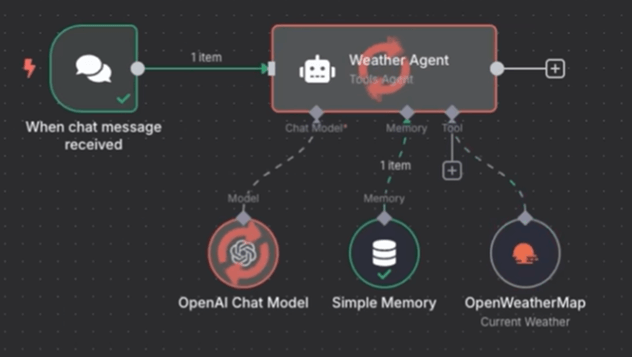
An example to demonstrate this would be to look at the two weather examples below:
1) If every day on a schedule you are sent an overview of the day’s weather to your email – this is probably not using AI as the same process is performed every day regardless of any user input.

2) If on the other hand if you either prompt or ask an agent ‘Should I bring an umbrella to work today?’ – then this requires reasoning and planning because the solution has to be smart enough to know to go out to get the weather data and then interpret the data to determine if there is rain in the forecast.
Is AI the Right Tool For The Job?
This somewhat goes back to the previous point, but I am always under the impression that we should not try to over-engineer solutions. With that in mind, don’t try and shoehorn AI into a problem that doesn’t require it.
If you can solve the issue by creating a workflow, automation, Excel formula, PowerShell script absolutely go that route. It will be much easier to ensure consistent results and the management of that process will be much more straightforward. You can absolutely use AI to help create the process or develop the more technical parts of the process but if you don’t need AI to reason over the data or process to come up with a result then don’t use AI for that process.
Long and short, don’t let every problem ‘look like a nail’ when you have the AI ‘hammer’.
Why Has AI Not Had a Bigger Impact in Business Applications?
This may be a controversial statement but I think if you ask any major player in the space they will tell you that the adoption of AI has been slower than they expected and I think it comes down to a couple key points.
1) What is the one thing you see across every AI model you utilize even before you submit a prompt? A statement saying something to the effect of ‘AI responses can be incorrect, please validate results.’ Now ask any finance person if they want ‘potentially incorrect actions / results’ to go anywhere near their GL?!? And I think you have found the one main issue.
Anthropic Claude:

OpenAI ChatGPT:

Google Gemini:
Microsoft Copilot:
2) Another issue is data security / governance, for example Microsoft Copilot uses the current user security when forming its responses. This means that companies need to have strong internal data governance policies (eg: least privilege) before implementing any AI at a corporate level otherwise this could lead to data exposure.
An example of what this might look like is if I ask something like ‘What were the bonuses of all employees last year?’, if this data was inadvertently shared with an end user even if they didn’t know they had access to it the AI model would return the data to the end user.
I think a of companies are unsure if their data is properly secured and are therefore (rightfully) apprehensive to enable AI within their environment.
3) The final main issue I see is that a lot of companies have adopted an ‘AI-first’ mindset without determining what problem(s) AI is meant to solve, this means that AI is forced on end users without businesses describing how it should be used, what processes it can help with, and potential issues to look out for.
Anyone who has went through a business transformation (eg: implementing / upgrading an ERP) where the benefits are not accurately described to all end users can attest to the push back that can occur within an organization to this change. This is heightened with AI adoption as one of the main drivers of deploying AI has initially been ‘workforce reduction’. The narrative of this is slowly changing to ‘workforce amplification’ but the overall stigma is still there.
It doesn’t help with news stories like this being posted on a daily basis:
- https://www.businessinsider.com/list-companies-replacing-human-employees-with-ai-layoffs-workforce-reductions
- https://www.theregister.com/2025/11/27/ai_employee_overcapacity_report/
- https://fortune.com/2025/09/02/salesforce-ceo-billionaire-marc-benioff-ai-agents-jobs-layoffs-customer-service-sales/
- https://www.cnbc.com/2025/11/14/ai-to-impact-89percent-of-jobs-next-year-cnbc-survey-finds.html
D365FSC AI Data Analysis Example
Let’s switch gears and look at how AI models can actually help us with our business applications. My focus in this case is to use AI to help analyze data to look for areas of optimization surrounding administration and management.
I wanted to give an example of this from an external AI chat client as I think it is important that no company get ‘locked in’ to any AI client in particular (eg: just because you use Dynamics 365 doesn’t mean you have to use Microsoft Copilot to analyze the data).
I first wanted to analyze a list of users, security roles, and user role assignments and let AI help determine if there were optimization options. To do this I first have to generate this data, the easiest way to do this is to use the Data Management Framework and export this data via data entities and then upload the data to the respective AI chat client.
1) Identify the problem / issue you would like AI to help with
In this case my problem statement I wanted to solve was two-fold:
- I wanted to validate if AI could help analyze D365FSC data
- I wanted to see if it could generate a prompt to find optimization scenarios to help administration and management processes
2) Export the source data
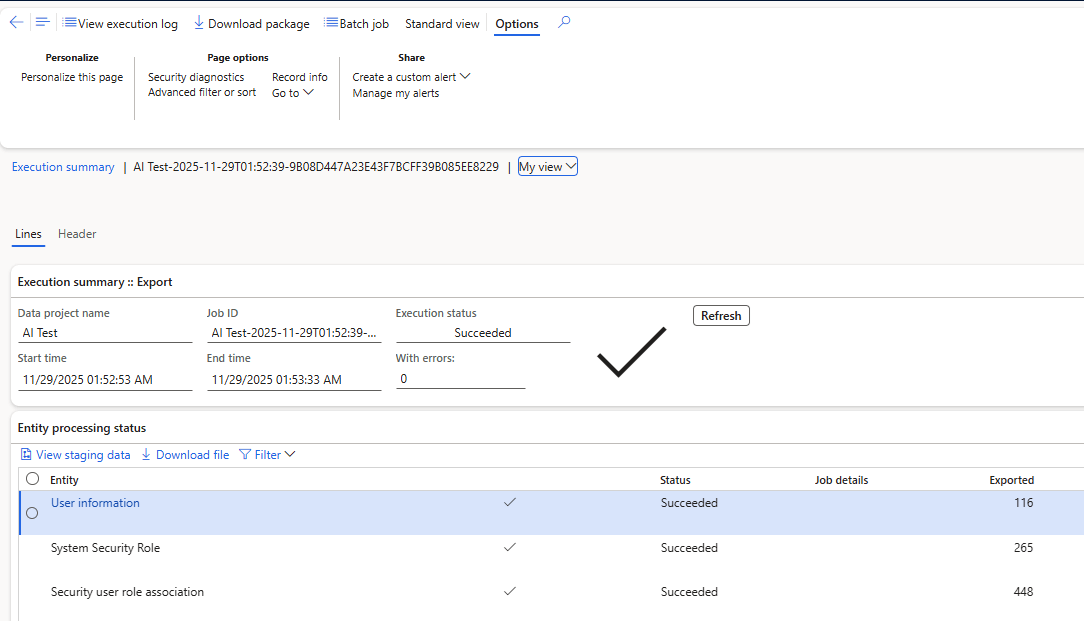
To do this I set up a Data Management Framework Export project and selected the following data entities to include:
- User Information
- System Security Role
- Security User Role Association
I chose these because I knew based on my initial problem statement I would need a complete list of users and security roles in the system, as well as the association between user -> role assignments:

Once the export is complete, you can download the package which will be a .ZIP file but inside will be the actual data files from the data entities:
3) Generate the prompt
This took a little bit of time to formalize the input instructions I was giving the AI model, I initially found some articles on best practices:
I then actually fed the AI model my drafts of input prompts and asked it how I could improve the prompt and also gave it the links to the initial resources I had found to use as best practices. This proved to be helpful.
Here is the prompt I finally came up: User and Role Management Prompt
4) Analyze & validate the results
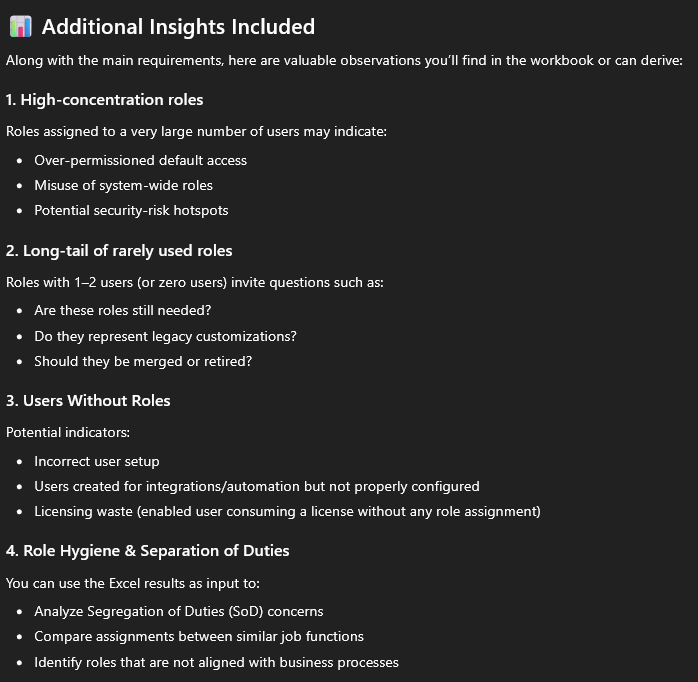
The results were actually fairly impressive in my opinion, the output below was generated via ChatGPT 5.1:
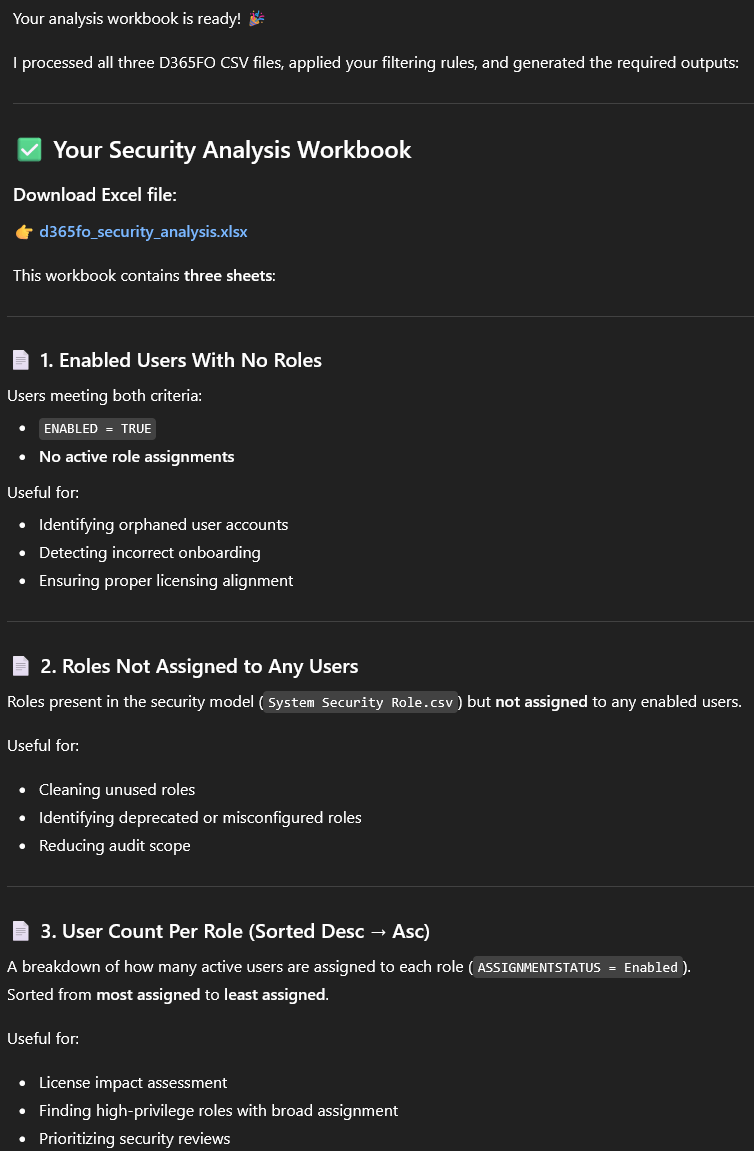
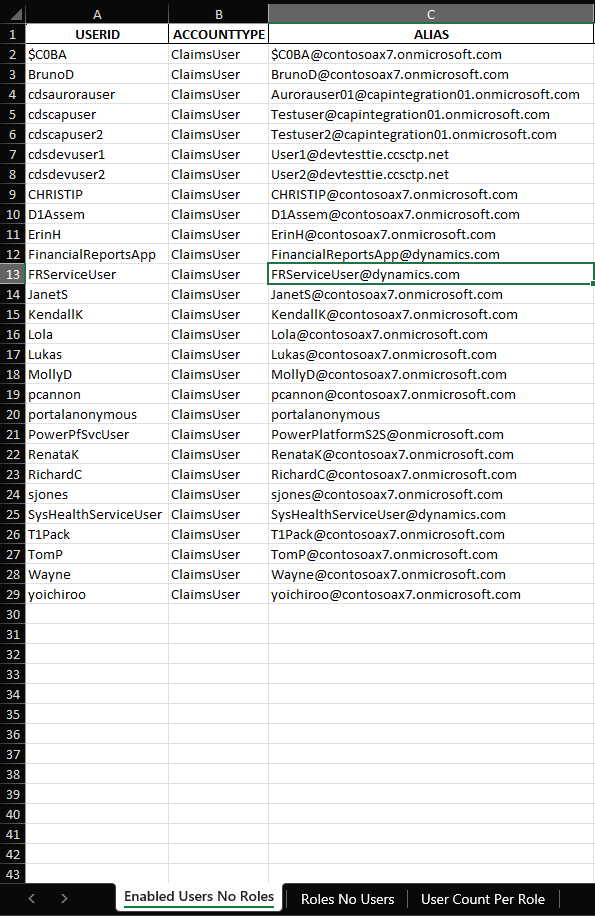
The generated Excel file includes 3 tabs, the first shows users that are not assigned any roles in my test environment:
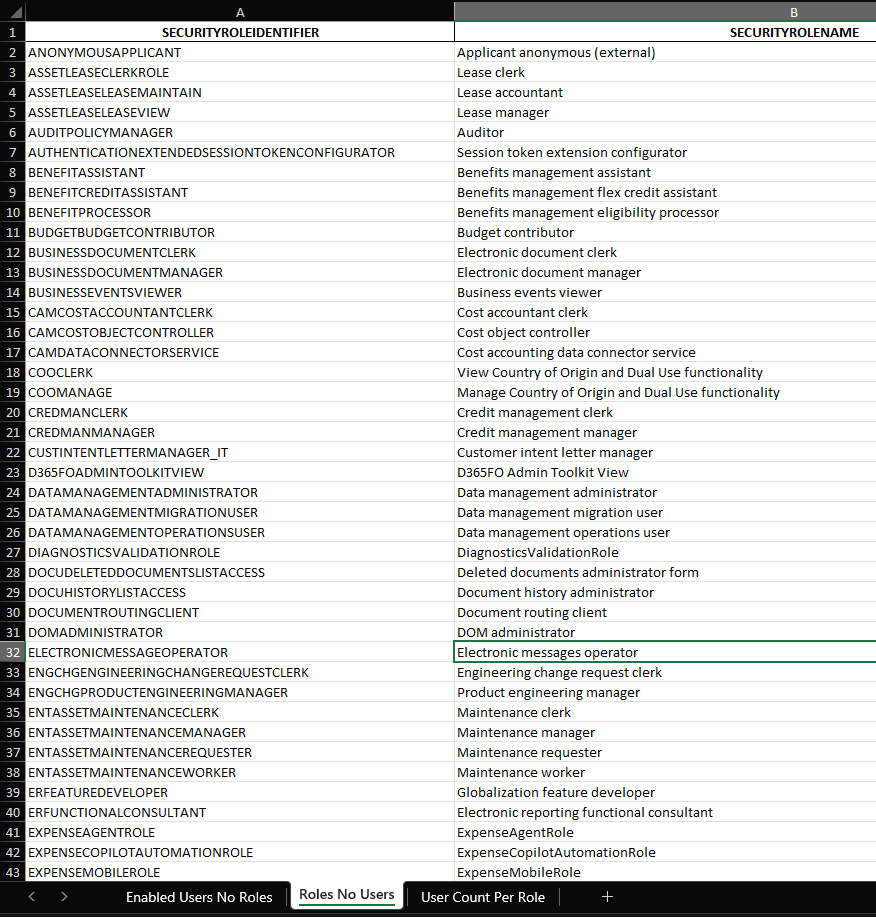
The second tab includes roles not assigned to any users:
And the third includes a break down of the security roles and how many each user is assigned to:
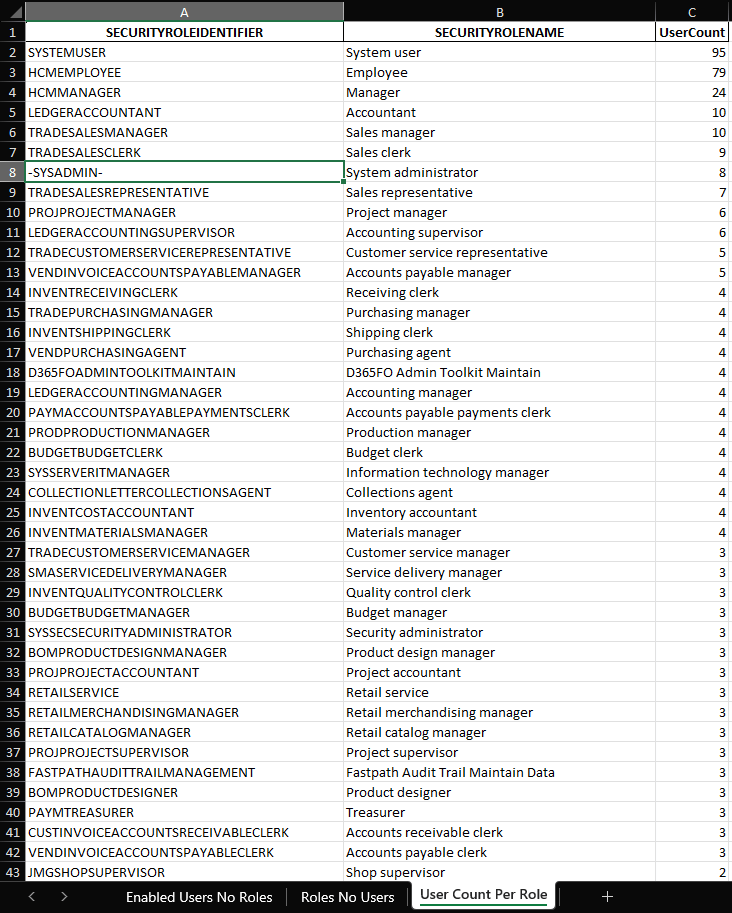
I did spot check these results to ensure they were valid by manually comparing results to what I was seeing within D365FSC.
Conclusion
This is just the tip of the iceberg when it comes to AI and its abilities to help ingest and analyze large amounts of data and I plan to continue this ‘series’ with additional prompts and scenarios as I find them.
How are others using AI within D365FSC? Leave a comment below!
The post Using AI to Analyze D365FSC Data appeared first on Alex Meyer.