

Fixing DevOps Chaos: Turning “Out‑of‑the‑Box” Azure DevOps into a Real Delivery Engine
Walk into almost any customer site today and you’ll hear a familiar story:
“Yes, we use Azure DevOps… but no, we don’t really have a process.”
Teams have the tool, but not the way of working.
What we typically find:
-
Azure DevOps set up with the default process
-
Work items added ad‑hoc
-
No clear lifecycle for a User Story
-
Developers interpreting vague requirements
-
Testers getting stories far too late
-
The business having no clear view of what’s really “done”
Azure DevOps is an end‑to‑end platform that can support everything from planning to release – Boards, Repos, Pipelines, Test Plans, Artifacts – but on its own, it doesn’t give you discipline.
That’s where we come in.
What We Actually Do When We “Implement DevOps”
When we arrive onsite, we’re not there just to show you where the Boards menu is.
We start by reshaping Azure DevOps so it matches how your business needs to work, using:
-
A customised work item workflow
-
Additional statuses that reflect real stages of work
-
Specific task types for design, build, and testing
-
Custom fields to support prioritisation and tracking
-
Queries and dashboards for visibility
Azure DevOps is designed so its process can be tailored – you can define how Epics, Features, Stories and Tasks are tracked, and how they move from new to closed.
We simply make that real.
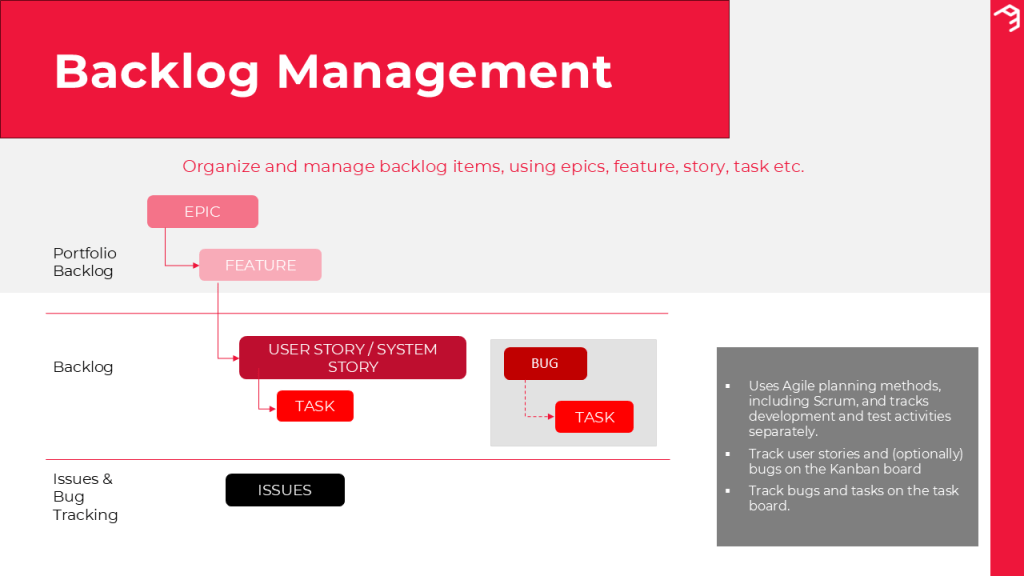
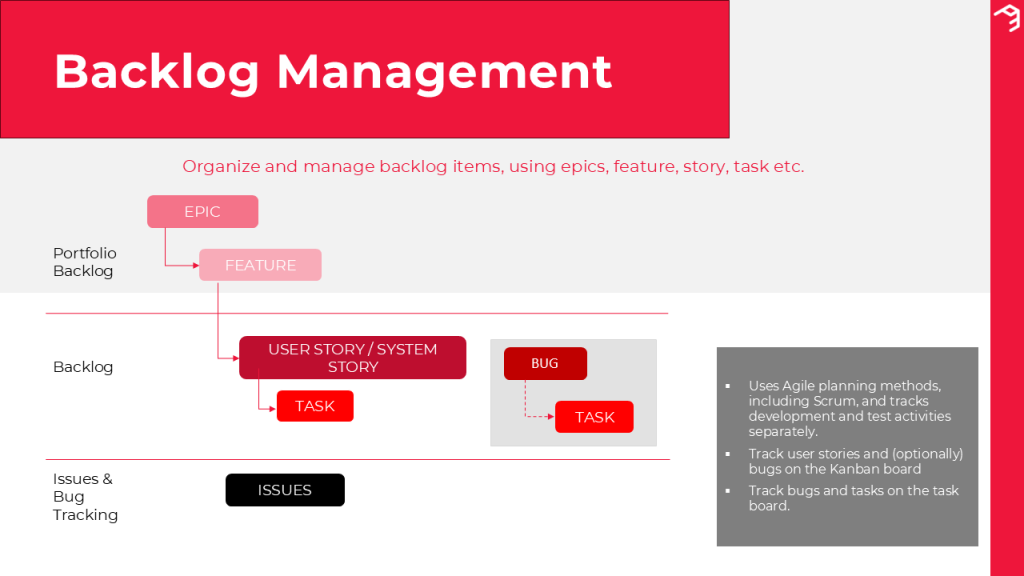
The Backbone: Epics, Features, User Stories, Tasks
At a high level, we keep the structure that Azure DevOps already supports:
-
Epics – big business outcomes (e.g. modernising fan engagement)
-
Features – major functional slices that roll up into Epics (e.g. online ticketing, membership management)
-
User Stories – small, user‑centric pieces of work that deliver value
-
Tasks – the units of work team members actually execute
Boards, backlogs and portfolio views let you see this hierarchy clearly and track work through epics, features, stories and tasks.
But Epics and Features are not where delivery usually falls down. The problems happen at the User Story and Task level – so that’s where we go deep.
The Workflow We Add on Top
The default workflows are too simplistic for most organisations. So we implement a clear, staged lifecycle for User Stories:
-
New – A requirement has been captured, but not analysed yet.
-
Active – A Business Analyst is working on the story and acceptance criteria with stakeholders.
-
Ready for Design – The story is written, understood, and ready for a Functional Consultant to design the solution.
-
Ready for Build – Design is complete and the story is ready for the developer/consultant to do the physical build.
-
Test Ready – Build is complete and ready for internal QA by the BA/Functional Consultant, supported by test management.
-
Ready for UAT – Internal QA passed; now ready for UAT/test team execution.
-
Resolved / Closed – UAT passed, all criteria met, and the story has moved to completion.
Every stage has a clear owner, purpose, and definition of “good”.
The Task Types We Introduce
Out of the box, a Task is just a Task. We split this into meaningful types aligned with real roles:
-
Design Task – owned by the Functional Consultant; responsible for translating requirements into a functional/solution design.
-
Build Task – owned by the Developer/Technical Consultant; linked to Repos and Pipelines so that code, branches and builds are traceable back to the User Story.
-
Test Task – owned by the BA or Functional Consultant; executed using test management capabilities so tests and bugs are tied back to the original story.
This gives you a full chain from requirement → design → build → test → release, with each step visible in Azure DevOps.
What “Good” Looks Like – Using the Perth Panthers Example
To make this concrete, let’s walk through the flow using a fictional example: the Perth Panthers Ice Hockey Team improving their fan experience.
1 New → Active: Capturing the Requirement
A stakeholder raises an idea:
“We want Panthers supporters to be able to buy official jerseys online.”
At New, it’s just a captured need.
In Active, the BA turns it into a proper User Story with clear intent, following user‑centred story practices:
“As a Panthers supporter, I want to buy official jerseys online so I can support the team on game nights.”
The BA also works with the business to define acceptance criteria – so everyone knows how “done” will be measured.
For example:
-
Fans can browse available jerseys
-
Fans can select size and quantity
-
Fans can add items to a basket
-
Fans can complete payment successfully
At this stage, the story is also prioritised and estimated so it can be planned into a sprint or release.
Good looks like: A clearly written story, with unambiguous acceptance criteria, owned by the BA and understood by the business.
2 Ready for Design: Turning Requirements Into a Solution
Once the story is Ready for Design, the Functional Consultant picks it up.
For the Panthers example, they might design:
-
The “Merchandise” concept in the system
-
How jersey products and sizes are stored and maintained
-
How pricing, discounts and stock are handled
-
How the checkout and payment flow should behave
-
Any dependencies on existing membership data or game‑day systems
This aligns to the way Azure Boards supports defining user stories, managing requirements and assigning work across the team.
Good looks like: A design that can be built without guesswork – documented against the story, with clear decisions and identified dependencies.
3 Ready for Build: Making It Real
When the story is Ready for Build, the Developer owns it.
They’ll typically:
-
Configure or extend the application based on the design
-
Use Azure Repos for branching, committing and pull requests
-
Trigger builds and deployments through pipelines so changes are validated and traceable
All of this can be linked back to the User Story so you know exactly which story a change belongs to.
Good looks like: The functionality built exactly as designed, with commits and builds clearly associated to the story.
4 Test Ready: Internal QA
In Test Ready, the BA or Functional Consultant validates the story before it ever reaches UAT.
Using test management features, they can:
-
Run manual test cases based on the acceptance criteria
-
Record results and raise bugs directly against the story if required
For the Panthers example:
-
Can a fan add a jersey to the basket?
-
Does size selection work correctly?
-
Does the checkout behave as expected?
Good looks like: All acceptance criteria passing in internal test, with any defects already resolved before the test team or end users see it.
5 Ready for UAT → Resolved / Closed
When the story is Ready for UAT, the test team or business users validate the full end‑to‑end experience:
-
A fan buying multiple jerseys before a big game
-
A member receiving a discount
-
Payments and confirmations working reliably
Once UAT passes and there are no outstanding critical issues, the story moves to Resolved and finally Closed, completing the lifecycle that Azure Boards is built to support.
Good looks like: No ambiguity. The story is fully tested, signed off, and demonstrably ready for release.
The Outcome: From “We Have DevOps” to “We Deliver Reliably”
Most organisations we meet already have Azure DevOps. What they don’t have is:
-
A clear, custom workflow
-
Well‑defined statuses
-
Structured task types
-
A consistent way of writing and progressing User Stories
-
Traceability from requirement to release
By tailoring Azure DevOps to match how the business actually works – and by agreeing what “good” looks like at each stage – we turn it from a tracking tool into a delivery engine.
If this sounds like your organisation – plenty of DevOps tooling, not enough DevOps process – it’s fixable. And it starts with putting a proper way of working in place, one User Story at a time.