

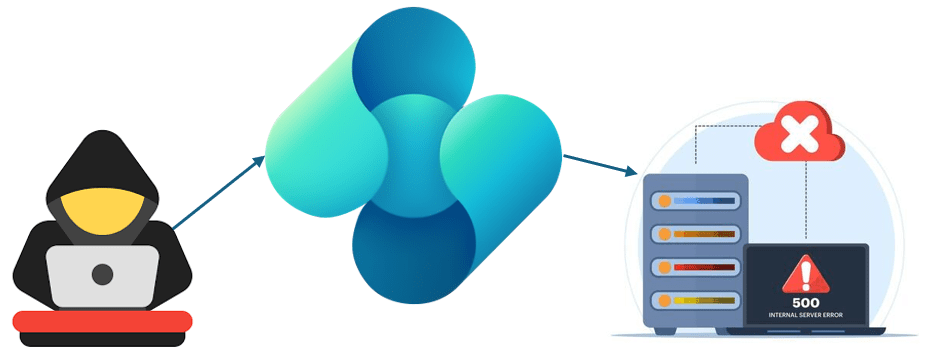
Dynamics 365 Business Central 2026 Wave 1 release (version 28) is available starting from April 1, 2026 (and it’s true despite the April Fool’s Day😜).
This new major version of the product brings with it several new features in every area (yesterday I’ve done a webcast with more than 400 people describing quite all the upcoming news), but there are also some small hidden new features that are worth pointing out.
One of the important changes coming with this wave is a change on how Business Central makes URI validation with AL HttpClient.
Microsoft has announced an important security enhancement in Business Central v28 that affects how developers handle outgoing HTTP requests. This change introduces stricter validation of URIs (web addresses) in the AL HttpClient, with the goal of preventing Server-Side Request Forgery (SSRF) attacks and protecting internal network infrastructure. While this is a positive security move, it’s essential for developers and administrators to understand the implications and how to handle it in their environments.
What is the change?
Starting with Business Central v28, outgoing HTTP calls made through the AL HttpClient are subject to hardened URI validation. This means that the system will now actively block HTTP requests to non-routable (internal) network addresses by default. Non-routable addresses include for example the following:
- Localhost addresses (127.0.0.1, ::1)
- Private IP ranges (10.0.0.0/8, 172.16.0.0/12, 192.168.0.0/16)
- Link-local addresses (169.254.0.0/16)
- Any other addresses not accessible from the public internet
Why this matters?
This change addresses a significant security vulnerability known as Server-Side Request Forgery (SSRF). In an SSRF attack, an attacker tricks a server-side application into making HTTP requests to internal systems that should not be accessible from the outside world.
Imagine a malicious actor crafts a request that tricks your Business Central extension into making an HTTP call to an internal database server or administrative service running on the company’s private network. Without this protection, the attacker could potentially access sensitive data or compromise internal systems.
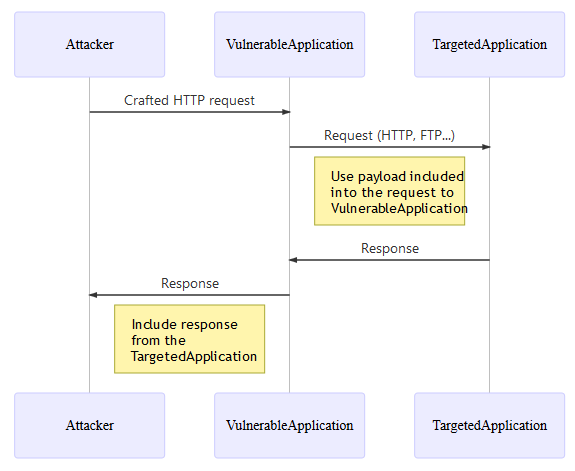
By blocking internal network requests by default, Microsoft is ensuring that extensions (whether developed in-house or sourced from AppSource) cannot be exploited to attack your internal infrastructure.
What is the impact of this change in Business Central environments?
The security enhancement applies differently depending on whether you’re running Business Central in the cloud or on-premises.
For organizations using Business Central online, there is no way to bypass this security restriction. This is intentional and non-negotiable:
- All HTTP requests to internal/non-routable addresses will be blocked.
- No configuration options to disable or circumvent the restriction.
- This ensures Microsoft can maintain the security posture of their shared cloud infrastructure.
What this means for you: if your extension needs to communicate with an external API or service, it must be accessible from the public internet. Internal integrations that worked with older versions of the product may need to be refactored to use different integration features (like Logic Apps for example) or moved to public-facing endpoints.
Organizations running Business Central on their own servers have more flexibility, though the default behavior is still restrictive:
Two new configuration settings are available for Business Central on-premise:
- NavHttpClientAntiSSRFEnabled:
- Controls whether the SSRF protection feature is active.
- Default: Enabled (true).
- Set to
falseto disable the protection entirely (not recommended for security-conscious organizations).
- NavHttpClientAntiSSRFAllowedAddresses:
- Allows you to create a whitelist of internal addresses that are permitted for HTTP calls.
- Use this to explicitly allow communication with trusted internal services.
- Example: You could whitelist an internal API server at
https://internal-api.company.local/
Important note: Even though on-premises environments offer this flexibility, Microsoft recommends keeping the protection enabled and only whitelisting specific, trusted addresses when absolutely necessary.
Backward Compatibility: Versions 26.x and 27.x
This security enhancement has been backported to Business Central versions 26.x and 27.x, meaning the protection applies even if you’re not immediately upgrading to v28. This ensures consistent security across supported versions and prevents attackers from exploiting vulnerabilities in older deployments.
Migration and Troubleshooting
If you’re upgrading to v28 and have extensions that make HTTP calls, here’s what to do:
Step 1: Audit Your Extensions
- Review all AL code that uses the HttpClient.
- Document all internal addresses your extensions communicate with.
- Identify which calls are essential for business processes.
Step 2: Determine Your Environment Type
- Are you using SaaS (cloud) or on-premises? This determines your available options
Step 3: Refactor or Configure
For cloud/SaaS environments:
- Refactor extensions to use publicly accessible endpoints.
- Consider using Azure Services or managed APIs instead of internal servers.
- Use Logic Apps as a bridge for internal integrations (if really needed).
- Implement VPN or API Gateway solutions if direct internal access is critical.
For on-premises environments:
- Use
NavHttpClientAntiSSRFAllowedAddressesto whitelist necessary internal addresses. - Keep the whitelist as restrictive as possible.
- Document why each address is whitelisted for audit and compliance purposes.
- Consider the security implications before whitelisting.
Step 4: Test thoroughly
- Run your extensions in a test environment with the new restrictions in place.
- Verify that all critical integrations still work.
- Monitor for any unexpected HTTP errors in your business processes.
Best practices going forward
- Adopt the principle of Least Privilege: only whitelist internal addresses that are absolutely necessary.
- Use public APIs: whenever possible, design integrations to use public, internet-accessible endpoints.
- Separate integration layers: consider hosting integration endpoints in DMZs or on public-facing services.
- Regular audits: periodically review your extensions and their network requirements.
- Security-First design: when developing new extensions, assume SSRF protection is in place and design accordingly.
Conclusion
The hardened URI validation in Business Central 2026 Wave 1 release (v28) represents a significant step forward in security. While it may require some adjustments to existing integrations, the protection it provides against SSRF attacks is well worth the effort. Organizations using cloud-hosted Business Central should plan their integrations around the restriction, while on-premises customers should use the configuration options judiciously and maintain a security-first mindset.
By understanding this change and planning accordingly, you can ensure your Business Central environment remains both secure and functional for your business needs.